---
title: "Build a Verified Recent Sales Notification with Polar and Astro"
description: "Show real purchase activity on your marketing site by listing recent Polar orders server-side, caching responses on the edge, and rendering a lightweight verified notification in the browser - no fake popups."
source: "https://www.launchfa.st/blog/polar-verified-latest-sale-badge-astro"
author: "Rishi Raj Jain"
created_at: 2026-04-05T12:00:00.000Z
keywords: "astro, polar, polar.sh, verified notification, social proof, payments, api routes, vercel, serverless, typescript"
---
> **Site index for agents**
> Fetch https://www.launchfa.st/llms.txt to discover every page on this site.
> Every page is also available as Markdown by appending `.md` to its URL.
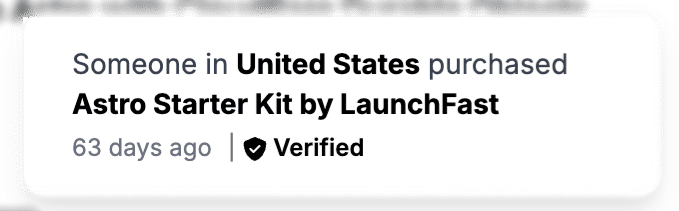
 “Someone in **Germany** just purchased **Pro** 2 hours ago.” That line is everywhere on SaaS landing pages and often it is entirely fabricated. A better approach is to surface **real** orders from your payment provider. If you sell with **[Polar](https://polar.sh/)**, you can read recent orders through the official API, expose a small JSON endpoint from your Astro application, and let the client render a tasteful toast with a **Verified** label so visitors know the signal comes from your checkout, not a random number generator.
In this guide, you will wire [Polar SDK](https://github.com/polarsource/polar-js) into an Astro server route, deploy it on Vercel, and add a floating notification component that cycles through recent sales. The pattern matches what we use on this site: server-only secrets, edge-friendly caching headers, and a minimal client script.
## Table Of Contents
- [How the pieces fit together](#how-the-pieces-fit-together)
- [Create a Polar access token](#create-a-polar-access-token)
- [Scaffold Astro with the Vercel adapter](#scaffold-astro-with-the-vercel-adapter)
- [Implement the API route](#implement-the-api-route)
- [Environment variables locally and on Vercel](#environment-variables-locally-and-on-vercel)
- [Add the floating recent-sale notification](#add-the-floating-recent-sale-notification)
## Prerequisites
You will need:
- [Node.js 20](https://nodejs.org/en/blog/announcements/v20-release-announce) or later
- A [Polar](https://polar.sh/) account with at least one product and (for meaningful demos) a few test or real orders
- A [Vercel](https://vercel.com/) account if you want to deploy there
## How the pieces fit together
```
1. Browser
→ GET /api/sale (your Astro route)
→ Receives JSON: product name, ISO timestamp, optional billing country label
2. Astro API route (Node / Vercel Function)
→ Uses POLAR_ACCESS_TOKEN with Polar SDK
→ Lists orders (newest first), maps to a small public shape
→ Sets Cache-Control for CDN caching
3. Polar API
→ Authoritative list of orders and line items
```
The **Verified** badge in the UI communicates that the payload was **fetched from Polar on the server** at request time (or from a cached response that was produced that way). Keep the access token out of client bundles and environment prefixes.
## Create a Polar access token
1. Open the [Polar dashboard](https://polar.sh/) and sign in.
2. Go to your organization **Settings** and find **Developers** (wording may vary slightly).
3. Create a token with permission to **orders:read**.
4. Copy the token once and store it securely - you will add it to Vercel and local `.env` as `POLAR_ACCESS_TOKEN`. (Never commit this value to git!)
## Scaffold Astro with the Vercel adapter
Create a new project (or use an existing one with `output: 'server'`):
```bash
npm create astro@latest polar-sale-badge
cd polar-sale-badge
```
Add the Vercel adapter so API routes run as serverless functions on deploy:
```bash
npx astro add vercel --yes
```
Ensure `astro.config.mjs` uses **server** output. A minimal config looks like:
```mjs
import { defineConfig } from 'astro/config'
import vercel from '@astrojs/vercel'
export default defineConfig({
output: 'server',
adapter: vercel(),
})
```
Install the Polar SDK:
```bash
npm install @polar-sh/sdk
```
## Implement the API route
Add `src/pages/api/sale.ts`. The important details:
1. **`export const prerender = false`** so Astro does not try to statically bake this URL at build time.
2. Instantiate **`Polar`** with `import.meta.env.POLAR_ACCESS_TOKEN`.
3. Call **`polar.orders.list`** with sorting **newest first** and a small **limit**, then map each item to only what the UI needs (product name, createdAt, optional billing country).
4. Return **`Cache-Control`** so Vercel’s CDN can cache the JSON for a day while allowing revalidation (`max-age=0, s-maxage=86400` is a reasonable starting point).
```ts title="src/pages/api/sale.ts" collapse={0,7-248}
export const prerender = false
import { Polar } from '@polar-sh/sdk'
const countryCodeToName: { [key: string]: string } = {
AF: 'Afghanistan',
AL: 'Albania',
DZ: 'Algeria',
AS: 'American Samoa',
AD: 'Andorra',
AO: 'Angola',
AI: 'Anguilla',
AQ: 'Antarctica',
AG: 'Antigua and Barbuda',
AR: 'Argentina',
AM: 'Armenia',
AW: 'Aruba',
AU: 'Australia',
AT: 'Austria',
AZ: 'Azerbaijan',
BS: 'Bahamas',
BH: 'Bahrain',
BD: 'Bangladesh',
BB: 'Barbados',
BY: 'Belarus',
BE: 'Belgium',
BZ: 'Belize',
BJ: 'Benin',
BM: 'Bermuda',
BT: 'Bhutan',
BO: 'Bolivia',
BA: 'Bosnia and Herzegovina',
BW: 'Botswana',
BV: 'Bouvet Island',
BR: 'Brazil',
IO: 'British Indian Ocean Territory',
BN: 'Brunei Darussalam',
BG: 'Bulgaria',
BF: 'Burkina Faso',
BI: 'Burundi',
KH: 'Cambodia',
CM: 'Cameroon',
CA: 'Canada',
CV: 'Cape Verde',
KY: 'Cayman Islands',
CF: 'Central African Republic',
TD: 'Chad',
CL: 'Chile',
CN: 'China',
CX: 'Christmas Island',
CC: 'Cocos (Keeling) Islands',
CO: 'Colombia',
KM: 'Comoros',
CG: 'Congo',
CD: 'Congo, Democratic Republic of the',
CK: 'Cook Islands',
CR: 'Costa Rica',
CI: "Côte d'Ivoire",
HR: 'Croatia',
CU: 'Cuba',
CY: 'Cyprus',
CZ: 'Czech Republic',
DK: 'Denmark',
DJ: 'Djibouti',
DM: 'Dominica',
DO: 'Dominican Republic',
EC: 'Ecuador',
EG: 'Egypt',
SV: 'El Salvador',
GQ: 'Equatorial Guinea',
ER: 'Eritrea',
EE: 'Estonia',
ET: 'Ethiopia',
FK: 'Falkland Islands (Malvinas)',
FO: 'Faroe Islands',
FJ: 'Fiji',
FI: 'Finland',
FR: 'France',
GF: 'French Guiana',
PF: 'French Polynesia',
TF: 'French Southern Territories',
GA: 'Gabon',
GM: 'Gambia',
GE: 'Georgia',
DE: 'Germany',
GH: 'Ghana',
GI: 'Gibraltar',
GR: 'Greece',
GL: 'Greenland',
GD: 'Grenada',
GP: 'Guadeloupe',
GU: 'Guam',
GT: 'Guatemala',
GG: 'Guernsey',
GN: 'Guinea',
GW: 'Guinea-Bissau',
GY: 'Guyana',
HT: 'Haiti',
HM: 'Heard Island and McDonald Islands',
VA: 'Holy See (Vatican City State)',
HN: 'Honduras',
HK: 'Hong Kong',
HU: 'Hungary',
IS: 'Iceland',
IN: 'India',
ID: 'Indonesia',
IR: 'Iran, Islamic Republic of',
IQ: 'Iraq',
IE: 'Ireland',
IM: 'Isle of Man',
IL: 'Israel',
IT: 'Italy',
JM: 'Jamaica',
JP: 'Japan',
JE: 'Jersey',
JO: 'Jordan',
KZ: 'Kazakhstan',
KE: 'Kenya',
KI: 'Kiribati',
KP: "Korea, Democratic People's Republic of",
KR: 'Korea, Republic of',
KW: 'Kuwait',
KG: 'Kyrgyzstan',
LA: "Lao People's Democratic Republic",
LV: 'Latvia',
LB: 'Lebanon',
LS: 'Lesotho',
LR: 'Liberia',
LY: 'Libyan Arab Jamahiriya',
LI: 'Liechtenstein',
LT: 'Lithuania',
LU: 'Luxembourg',
MO: 'Macao',
MK: 'Macedonia, The Former Yugoslav Republic of',
MG: 'Madagascar',
MW: 'Malawi',
MY: 'Malaysia',
MV: 'Maldives',
ML: 'Mali',
MT: 'Malta',
MH: 'Marshall Islands',
MQ: 'Martinique',
MR: 'Mauritania',
MU: 'Mauritius',
YT: 'Mayotte',
MX: 'Mexico',
FM: 'Micronesia, Federated States of',
MD: 'Moldova, Republic of',
MC: 'Monaco',
MN: 'Mongolia',
ME: 'Montenegro',
MS: 'Montserrat',
MA: 'Morocco',
MZ: 'Mozambique',
MM: 'Myanmar',
NA: 'Namibia',
NR: 'Nauru',
NP: 'Nepal',
NL: 'Netherlands',
NC: 'New Caledonia',
NZ: 'New Zealand',
NI: 'Nicaragua',
NE: 'Niger',
NG: 'Nigeria',
NU: 'Niue',
NF: 'Norfolk Island',
MP: 'Northern Mariana Islands',
NO: 'Norway',
OM: 'Oman',
PK: 'Pakistan',
PW: 'Palau',
PS: 'Palestinian Territory, Occupied',
PA: 'Panama',
PG: 'Papua New Guinea',
PY: 'Paraguay',
PE: 'Peru',
PH: 'Philippines',
PN: 'Pitcairn',
PL: 'Poland',
PT: 'Portugal',
PR: 'Puerto Rico',
QA: 'Qatar',
RE: 'Réunion',
RO: 'Romania',
RU: 'Russian Federation',
RW: 'Rwanda',
BL: 'Saint Barthélemy',
SH: 'Saint Helena',
KN: 'Saint Kitts and Nevis',
LC: 'Saint Lucia',
MF: 'Saint Martin (French part)',
PM: 'Saint Pierre and Miquelon',
VC: 'Saint Vincent and the Grenadines',
WS: 'Samoa',
SM: 'San Marino',
ST: 'Sao Tome and Principe',
SA: 'Saudi Arabia',
SN: 'Senegal',
RS: 'Serbia',
SC: 'Seychelles',
SL: 'Sierra Leone',
SG: 'Singapore',
SK: 'Slovakia',
SI: 'Slovenia',
SB: 'Solomon Islands',
SO: 'Somalia',
ZA: 'South Africa',
GS: 'South Georgia and the South Sandwich Islands',
ES: 'Spain',
LK: 'Sri Lanka',
SD: 'Sudan',
SR: 'Suriname',
SJ: 'Svalbard and Jan Mayen',
SZ: 'Swaziland',
SE: 'Sweden',
CH: 'Switzerland',
SY: 'Syrian Arab Republic',
TW: 'Taiwan, Province of China',
TJ: 'Tajikistan',
TZ: 'Tanzania, United Republic of',
TH: 'Thailand',
TL: 'Timor-Leste',
TG: 'Togo',
TK: 'Tokelau',
TO: 'Tonga',
TT: 'Trinidad and Tobago',
TN: 'Tunisia',
TR: 'Turkey',
TM: 'Turkmenistan',
TC: 'Turks and Caicos Islands',
TV: 'Tuvalu',
UG: 'Uganda',
UA: 'Ukraine',
AE: 'United Arab Emirates',
GB: 'United Kingdom',
US: 'United States',
UM: 'United States Minor Outlying Islands',
UY: 'Uruguay',
UZ: 'Uzbekistan',
VU: 'Vanuatu',
VE: 'Venezuela',
VN: 'Viet Nam',
VG: 'Virgin Islands, British',
VI: 'Virgin Islands, U.S.',
WF: 'Wallis and Futuna',
EH: 'Western Sahara',
YE: 'Yemen',
ZM: 'Zambia',
ZW: 'Zimbabwe',
}
export async function GET() {
const polar = new Polar({
accessToken: import.meta.env.POLAR_ACCESS_TOKEN,
})
let orders: { date: string; billingCountry: string | undefined; name: string }[] = []
const result = await polar.orders.list({
sorting: ['-created_at'],
limit: 10,
})
for await (const page of result) {
orders = page.result.items
.map((item) => ({
name: item.product.name,
date: item.createdAt.toISOString(),
billingCountry: item.billingAddress?.country ? countryCodeToName[item.billingAddress.country] || item.billingAddress.country : undefined,
}))
.filter((order) => order.name.includes('LaunchFast'))
.slice(0, 5)
break
}
return new Response(JSON.stringify(orders), {
headers: {
'Content-Type': 'application/json',
'Cache-Control': 'max-age=0, s-maxage=86400',
},
})
}
```
**Filtering by product:** In production you may only want certain SKUs (for example names containing your product family). After mapping, `.filter((order) => order.name.includes('YourBrand'))` keeps the toast relevant.
**Country names:** Polar returns a country code (like `DE`, `US`, etc.) in the `billingAddress.country` field, not the full country name. To display the proper country name, map this code to a country name using a lookup table, as shown in the example API route above.
## Environment variables locally and on Vercel
Create `.env` (and add `.env` to `.gitignore` if it is not already):
```bash
POLAR_ACCESS_TOKEN="polar_oat_…"
```
For Vercel:
1. Project → Settings → Environment Variables
2. Add `POLAR_ACCESS_TOKEN` for **Production** (and **Preview** if you test PR deployments)
3. Redeploy so the new value is available
Run locally:
```bash
npm run dev
```
Visit `http://localhost:4321/api/sale` and confirm you get a JSON array.
## Add the floating recent-sale notification
Create a component such as `src/components/SalesPopup.astro` with the following code:
```astro title="src/components/SalesPopup.astro"
---
---
```
The code above does the following:
- `fetch('/api/sale')` after page load.
- Stores the array in memory and **rotates** entries on an interval (for example every 10 seconds).
- Renders a small fixed card (bottom-right is common) with:
- Country (or “Unknown” if you prefer not to show coarse location)
- Product name
- **Relative time** (“3 minutes ago”) from the ISO `date`
- A **Verified** row with a shield-style icon to reinforce that data is backed by Polar
Keep the script lean: plain DOM APIs or a tiny helper for `timeAgo` are enough. Link the card to your pricing section so the nudge has a clear call to action.
If you want to match stricter privacy expectations, only show region or omit geography entirely and display product + time only.
## Output
“Someone in **Germany** just purchased **Pro** 2 hours ago.” That line is everywhere on SaaS landing pages and often it is entirely fabricated. A better approach is to surface **real** orders from your payment provider. If you sell with **[Polar](https://polar.sh/)**, you can read recent orders through the official API, expose a small JSON endpoint from your Astro application, and let the client render a tasteful toast with a **Verified** label so visitors know the signal comes from your checkout, not a random number generator.
In this guide, you will wire [Polar SDK](https://github.com/polarsource/polar-js) into an Astro server route, deploy it on Vercel, and add a floating notification component that cycles through recent sales. The pattern matches what we use on this site: server-only secrets, edge-friendly caching headers, and a minimal client script.
## Table Of Contents
- [How the pieces fit together](#how-the-pieces-fit-together)
- [Create a Polar access token](#create-a-polar-access-token)
- [Scaffold Astro with the Vercel adapter](#scaffold-astro-with-the-vercel-adapter)
- [Implement the API route](#implement-the-api-route)
- [Environment variables locally and on Vercel](#environment-variables-locally-and-on-vercel)
- [Add the floating recent-sale notification](#add-the-floating-recent-sale-notification)
## Prerequisites
You will need:
- [Node.js 20](https://nodejs.org/en/blog/announcements/v20-release-announce) or later
- A [Polar](https://polar.sh/) account with at least one product and (for meaningful demos) a few test or real orders
- A [Vercel](https://vercel.com/) account if you want to deploy there
## How the pieces fit together
```
1. Browser
→ GET /api/sale (your Astro route)
→ Receives JSON: product name, ISO timestamp, optional billing country label
2. Astro API route (Node / Vercel Function)
→ Uses POLAR_ACCESS_TOKEN with Polar SDK
→ Lists orders (newest first), maps to a small public shape
→ Sets Cache-Control for CDN caching
3. Polar API
→ Authoritative list of orders and line items
```
The **Verified** badge in the UI communicates that the payload was **fetched from Polar on the server** at request time (or from a cached response that was produced that way). Keep the access token out of client bundles and environment prefixes.
## Create a Polar access token
1. Open the [Polar dashboard](https://polar.sh/) and sign in.
2. Go to your organization **Settings** and find **Developers** (wording may vary slightly).
3. Create a token with permission to **orders:read**.
4. Copy the token once and store it securely - you will add it to Vercel and local `.env` as `POLAR_ACCESS_TOKEN`. (Never commit this value to git!)
## Scaffold Astro with the Vercel adapter
Create a new project (or use an existing one with `output: 'server'`):
```bash
npm create astro@latest polar-sale-badge
cd polar-sale-badge
```
Add the Vercel adapter so API routes run as serverless functions on deploy:
```bash
npx astro add vercel --yes
```
Ensure `astro.config.mjs` uses **server** output. A minimal config looks like:
```mjs
import { defineConfig } from 'astro/config'
import vercel from '@astrojs/vercel'
export default defineConfig({
output: 'server',
adapter: vercel(),
})
```
Install the Polar SDK:
```bash
npm install @polar-sh/sdk
```
## Implement the API route
Add `src/pages/api/sale.ts`. The important details:
1. **`export const prerender = false`** so Astro does not try to statically bake this URL at build time.
2. Instantiate **`Polar`** with `import.meta.env.POLAR_ACCESS_TOKEN`.
3. Call **`polar.orders.list`** with sorting **newest first** and a small **limit**, then map each item to only what the UI needs (product name, createdAt, optional billing country).
4. Return **`Cache-Control`** so Vercel’s CDN can cache the JSON for a day while allowing revalidation (`max-age=0, s-maxage=86400` is a reasonable starting point).
```ts title="src/pages/api/sale.ts" collapse={0,7-248}
export const prerender = false
import { Polar } from '@polar-sh/sdk'
const countryCodeToName: { [key: string]: string } = {
AF: 'Afghanistan',
AL: 'Albania',
DZ: 'Algeria',
AS: 'American Samoa',
AD: 'Andorra',
AO: 'Angola',
AI: 'Anguilla',
AQ: 'Antarctica',
AG: 'Antigua and Barbuda',
AR: 'Argentina',
AM: 'Armenia',
AW: 'Aruba',
AU: 'Australia',
AT: 'Austria',
AZ: 'Azerbaijan',
BS: 'Bahamas',
BH: 'Bahrain',
BD: 'Bangladesh',
BB: 'Barbados',
BY: 'Belarus',
BE: 'Belgium',
BZ: 'Belize',
BJ: 'Benin',
BM: 'Bermuda',
BT: 'Bhutan',
BO: 'Bolivia',
BA: 'Bosnia and Herzegovina',
BW: 'Botswana',
BV: 'Bouvet Island',
BR: 'Brazil',
IO: 'British Indian Ocean Territory',
BN: 'Brunei Darussalam',
BG: 'Bulgaria',
BF: 'Burkina Faso',
BI: 'Burundi',
KH: 'Cambodia',
CM: 'Cameroon',
CA: 'Canada',
CV: 'Cape Verde',
KY: 'Cayman Islands',
CF: 'Central African Republic',
TD: 'Chad',
CL: 'Chile',
CN: 'China',
CX: 'Christmas Island',
CC: 'Cocos (Keeling) Islands',
CO: 'Colombia',
KM: 'Comoros',
CG: 'Congo',
CD: 'Congo, Democratic Republic of the',
CK: 'Cook Islands',
CR: 'Costa Rica',
CI: "Côte d'Ivoire",
HR: 'Croatia',
CU: 'Cuba',
CY: 'Cyprus',
CZ: 'Czech Republic',
DK: 'Denmark',
DJ: 'Djibouti',
DM: 'Dominica',
DO: 'Dominican Republic',
EC: 'Ecuador',
EG: 'Egypt',
SV: 'El Salvador',
GQ: 'Equatorial Guinea',
ER: 'Eritrea',
EE: 'Estonia',
ET: 'Ethiopia',
FK: 'Falkland Islands (Malvinas)',
FO: 'Faroe Islands',
FJ: 'Fiji',
FI: 'Finland',
FR: 'France',
GF: 'French Guiana',
PF: 'French Polynesia',
TF: 'French Southern Territories',
GA: 'Gabon',
GM: 'Gambia',
GE: 'Georgia',
DE: 'Germany',
GH: 'Ghana',
GI: 'Gibraltar',
GR: 'Greece',
GL: 'Greenland',
GD: 'Grenada',
GP: 'Guadeloupe',
GU: 'Guam',
GT: 'Guatemala',
GG: 'Guernsey',
GN: 'Guinea',
GW: 'Guinea-Bissau',
GY: 'Guyana',
HT: 'Haiti',
HM: 'Heard Island and McDonald Islands',
VA: 'Holy See (Vatican City State)',
HN: 'Honduras',
HK: 'Hong Kong',
HU: 'Hungary',
IS: 'Iceland',
IN: 'India',
ID: 'Indonesia',
IR: 'Iran, Islamic Republic of',
IQ: 'Iraq',
IE: 'Ireland',
IM: 'Isle of Man',
IL: 'Israel',
IT: 'Italy',
JM: 'Jamaica',
JP: 'Japan',
JE: 'Jersey',
JO: 'Jordan',
KZ: 'Kazakhstan',
KE: 'Kenya',
KI: 'Kiribati',
KP: "Korea, Democratic People's Republic of",
KR: 'Korea, Republic of',
KW: 'Kuwait',
KG: 'Kyrgyzstan',
LA: "Lao People's Democratic Republic",
LV: 'Latvia',
LB: 'Lebanon',
LS: 'Lesotho',
LR: 'Liberia',
LY: 'Libyan Arab Jamahiriya',
LI: 'Liechtenstein',
LT: 'Lithuania',
LU: 'Luxembourg',
MO: 'Macao',
MK: 'Macedonia, The Former Yugoslav Republic of',
MG: 'Madagascar',
MW: 'Malawi',
MY: 'Malaysia',
MV: 'Maldives',
ML: 'Mali',
MT: 'Malta',
MH: 'Marshall Islands',
MQ: 'Martinique',
MR: 'Mauritania',
MU: 'Mauritius',
YT: 'Mayotte',
MX: 'Mexico',
FM: 'Micronesia, Federated States of',
MD: 'Moldova, Republic of',
MC: 'Monaco',
MN: 'Mongolia',
ME: 'Montenegro',
MS: 'Montserrat',
MA: 'Morocco',
MZ: 'Mozambique',
MM: 'Myanmar',
NA: 'Namibia',
NR: 'Nauru',
NP: 'Nepal',
NL: 'Netherlands',
NC: 'New Caledonia',
NZ: 'New Zealand',
NI: 'Nicaragua',
NE: 'Niger',
NG: 'Nigeria',
NU: 'Niue',
NF: 'Norfolk Island',
MP: 'Northern Mariana Islands',
NO: 'Norway',
OM: 'Oman',
PK: 'Pakistan',
PW: 'Palau',
PS: 'Palestinian Territory, Occupied',
PA: 'Panama',
PG: 'Papua New Guinea',
PY: 'Paraguay',
PE: 'Peru',
PH: 'Philippines',
PN: 'Pitcairn',
PL: 'Poland',
PT: 'Portugal',
PR: 'Puerto Rico',
QA: 'Qatar',
RE: 'Réunion',
RO: 'Romania',
RU: 'Russian Federation',
RW: 'Rwanda',
BL: 'Saint Barthélemy',
SH: 'Saint Helena',
KN: 'Saint Kitts and Nevis',
LC: 'Saint Lucia',
MF: 'Saint Martin (French part)',
PM: 'Saint Pierre and Miquelon',
VC: 'Saint Vincent and the Grenadines',
WS: 'Samoa',
SM: 'San Marino',
ST: 'Sao Tome and Principe',
SA: 'Saudi Arabia',
SN: 'Senegal',
RS: 'Serbia',
SC: 'Seychelles',
SL: 'Sierra Leone',
SG: 'Singapore',
SK: 'Slovakia',
SI: 'Slovenia',
SB: 'Solomon Islands',
SO: 'Somalia',
ZA: 'South Africa',
GS: 'South Georgia and the South Sandwich Islands',
ES: 'Spain',
LK: 'Sri Lanka',
SD: 'Sudan',
SR: 'Suriname',
SJ: 'Svalbard and Jan Mayen',
SZ: 'Swaziland',
SE: 'Sweden',
CH: 'Switzerland',
SY: 'Syrian Arab Republic',
TW: 'Taiwan, Province of China',
TJ: 'Tajikistan',
TZ: 'Tanzania, United Republic of',
TH: 'Thailand',
TL: 'Timor-Leste',
TG: 'Togo',
TK: 'Tokelau',
TO: 'Tonga',
TT: 'Trinidad and Tobago',
TN: 'Tunisia',
TR: 'Turkey',
TM: 'Turkmenistan',
TC: 'Turks and Caicos Islands',
TV: 'Tuvalu',
UG: 'Uganda',
UA: 'Ukraine',
AE: 'United Arab Emirates',
GB: 'United Kingdom',
US: 'United States',
UM: 'United States Minor Outlying Islands',
UY: 'Uruguay',
UZ: 'Uzbekistan',
VU: 'Vanuatu',
VE: 'Venezuela',
VN: 'Viet Nam',
VG: 'Virgin Islands, British',
VI: 'Virgin Islands, U.S.',
WF: 'Wallis and Futuna',
EH: 'Western Sahara',
YE: 'Yemen',
ZM: 'Zambia',
ZW: 'Zimbabwe',
}
export async function GET() {
const polar = new Polar({
accessToken: import.meta.env.POLAR_ACCESS_TOKEN,
})
let orders: { date: string; billingCountry: string | undefined; name: string }[] = []
const result = await polar.orders.list({
sorting: ['-created_at'],
limit: 10,
})
for await (const page of result) {
orders = page.result.items
.map((item) => ({
name: item.product.name,
date: item.createdAt.toISOString(),
billingCountry: item.billingAddress?.country ? countryCodeToName[item.billingAddress.country] || item.billingAddress.country : undefined,
}))
.filter((order) => order.name.includes('LaunchFast'))
.slice(0, 5)
break
}
return new Response(JSON.stringify(orders), {
headers: {
'Content-Type': 'application/json',
'Cache-Control': 'max-age=0, s-maxage=86400',
},
})
}
```
**Filtering by product:** In production you may only want certain SKUs (for example names containing your product family). After mapping, `.filter((order) => order.name.includes('YourBrand'))` keeps the toast relevant.
**Country names:** Polar returns a country code (like `DE`, `US`, etc.) in the `billingAddress.country` field, not the full country name. To display the proper country name, map this code to a country name using a lookup table, as shown in the example API route above.
## Environment variables locally and on Vercel
Create `.env` (and add `.env` to `.gitignore` if it is not already):
```bash
POLAR_ACCESS_TOKEN="polar_oat_…"
```
For Vercel:
1. Project → Settings → Environment Variables
2. Add `POLAR_ACCESS_TOKEN` for **Production** (and **Preview** if you test PR deployments)
3. Redeploy so the new value is available
Run locally:
```bash
npm run dev
```
Visit `http://localhost:4321/api/sale` and confirm you get a JSON array.
## Add the floating recent-sale notification
Create a component such as `src/components/SalesPopup.astro` with the following code:
```astro title="src/components/SalesPopup.astro"
---
---
```
The code above does the following:
- `fetch('/api/sale')` after page load.
- Stores the array in memory and **rotates** entries on an interval (for example every 10 seconds).
- Renders a small fixed card (bottom-right is common) with:
- Country (or “Unknown” if you prefer not to show coarse location)
- Product name
- **Relative time** (“3 minutes ago”) from the ISO `date`
- A **Verified** row with a shield-style icon to reinforce that data is backed by Polar
Keep the script lean: plain DOM APIs or a tiny helper for `timeAgo` are enough. Link the card to your pricing section so the nudge has a clear call to action.
If you want to match stricter privacy expectations, only show region or omit geography entirely and display product + time only.
## Output
 ## Conclusion
You now have a **Polar**-backed sales feed: the Astro API route owns the secret, Vercel serves it as a serverless function with CDN caching, and the browser only sees anonymized fields you choose to expose. Swap the styling to match your brand, tune intervals and filters, and you get credible social proof without maintaining a separate analytics pipeline for “fake” notifications.
## Conclusion
You now have a **Polar**-backed sales feed: the Astro API route owns the secret, Vercel serves it as a serverless function with CDN caching, and the browser only sees anonymized fields you choose to expose. Swap the styling to match your brand, tune intervals and filters, and you get credible social proof without maintaining a separate analytics pipeline for “fake” notifications.