---
title: "Implement Rate Limiting in Astro with Cloudflare Workers"
description: "Learn how to implement rate limiting in Astro using Cloudflare Workers Rate Limiting API. Protect your API endpoints and pages from abuse using middleware and endpoint-level rate limiting."
source: "https://www.launchfa.st/blog/rate-limiting-astro-cloudflare-workers"
author: "Rishi Raj Jain"
created_at: 2025-12-06T12:00:00.000Z
keywords: "astro, rate limiting, cloudflare workers, api protection, middleware, security, cloudflare"
---
> **Site index for agents**
> Fetch https://www.launchfa.st/llms.txt to discover every page on this site.
> Every page is also available as Markdown by appending `.md` to its URL.
 Rate limiting is essential for protecting your APIs and pages from abuse, brute force attacks, and excessive usage. Cloudflare Workers provides a built-in Rate Limiting binding that makes it easy to implement rate limiting at the edge.
In this guide, you'll learn how to implement rate limiting in Astro using Cloudflare's Rate Limiting API, both globally via middleware and at the endpoint level.
- [View Example GitHub Project](https://github.com/rishi-raj-jain/my-ratelimit-astro-app)
## Prerequisites
- [Node.js 20](https://nodejs.org/en) or later
- A [Cloudflare](https://cloudflare.com) account
## Create a new Astro application
Let's get started by creating a new Astro project. Execute the following command:
```bash
npm create astro@latest my-ratelimit-astro-app
```
When prompted, choose:
- `Use minimal (empty) template` when prompted on how to start the new project.
- `Yes` when prompted to install dependencies.
- `Yes` when prompted to initialize a git repository.
Once that's done, move into the project directory:
```bash
cd my-ratelimit-astro-app
npm install wrangler
npm run dev
```
The app should be running on [localhost:4321](http://localhost:4321/).
## Integrate Cloudflare adapter in your Astro project
To deploy your Astro project to Cloudflare Workers and use Cloudflare KV, you need to install the Cloudflare adapter. Execute the command below:
```bash
npx astro add cloudflare --yes
```
Update `astro.config.mjs` to have **output** as **server**:
```javascript
// File: astro.config.mjs
import { defineConfig } from 'astro/config';
import cloudflare from '@astrojs/cloudflare';
export default defineConfig({
output: 'server',
adapter: cloudflare()
});
```
## Configure the Rate Limiting binding
Add the rate limiting binding to your `wrangler.jsonc`:
```jsonc {5-14}
// File: wrangler.jsonc
{
// ...
"ratelimits": [
{
"namespace_id": "1001",
"name": "MY_RATE_LIMITER",
"simple": {
"limit": 100,
"period": 60
}
}
]
}
```
This configuration:
- Creates a rate limiter named `MY_RATE_LIMITER`
- Allows **100 requests** per **60 seconds** per unique key
- Uses `namespace_id` to isolate rate limit counters
Update your `src/env.d.ts` to add TypeScript definitions:
```typescript
///
type RateLimiter = {
limit: (options: { key: string }) => Promise<{ success: boolean }>
}
type ENV = {
MY_RATE_LIMITER: RateLimiter
}
type Runtime = import('@astrojs/cloudflare').Runtime
declare namespace App {
interface Locals extends Runtime {}
}
```
## Rate Limiting in Astro Middleware
To apply rate limiting globally (or to specific routes), create a middleware file at `src/middleware.ts`:
```typescript
// File: src/middleware.ts
import { defineMiddleware } from 'astro:middleware'
// Routes to rate limit
const RATE_LIMITED_ROUTES = ['/']
export const onRequest = defineMiddleware(async (context, next) => {
const { url, request, locals } = context
const pathname = url.pathname
// Check if route should be rate limited
const shouldRateLimit = RATE_LIMITED_ROUTES.some((route) =>
pathname === (route)
)
if (!shouldRateLimit) {
return next()
}
// Skip if rate limiter is not available (local dev)
const rateLimiter = locals.runtime?.env?.MY_RATE_LIMITER
if (!rateLimiter) {
console.log('[Rate Limit] Binding not available, skipping')
return next()
}
// Use client IP as the rate limit key
const clientIP = request.headers.get('CF-Connecting-IP') || 'unknown'
try {
const { success } = await rateLimiter.limit({ key: clientIP })
if (!success) {
return new Response(
JSON.stringify({
error: 'Too Many Requests',
message: 'Rate limit exceeded. Please try again later.',
}),
{
status: 429,
headers: {
'Content-Type': 'application/json',
'Retry-After': '60',
},
}
)
}
} catch (error) {
console.error('[Rate Limit] Error:', error)
// On error, allow the request (fail open)
}
return next()
})
```
Rate limiting is essential for protecting your APIs and pages from abuse, brute force attacks, and excessive usage. Cloudflare Workers provides a built-in Rate Limiting binding that makes it easy to implement rate limiting at the edge.
In this guide, you'll learn how to implement rate limiting in Astro using Cloudflare's Rate Limiting API, both globally via middleware and at the endpoint level.
- [View Example GitHub Project](https://github.com/rishi-raj-jain/my-ratelimit-astro-app)
## Prerequisites
- [Node.js 20](https://nodejs.org/en) or later
- A [Cloudflare](https://cloudflare.com) account
## Create a new Astro application
Let's get started by creating a new Astro project. Execute the following command:
```bash
npm create astro@latest my-ratelimit-astro-app
```
When prompted, choose:
- `Use minimal (empty) template` when prompted on how to start the new project.
- `Yes` when prompted to install dependencies.
- `Yes` when prompted to initialize a git repository.
Once that's done, move into the project directory:
```bash
cd my-ratelimit-astro-app
npm install wrangler
npm run dev
```
The app should be running on [localhost:4321](http://localhost:4321/).
## Integrate Cloudflare adapter in your Astro project
To deploy your Astro project to Cloudflare Workers and use Cloudflare KV, you need to install the Cloudflare adapter. Execute the command below:
```bash
npx astro add cloudflare --yes
```
Update `astro.config.mjs` to have **output** as **server**:
```javascript
// File: astro.config.mjs
import { defineConfig } from 'astro/config';
import cloudflare from '@astrojs/cloudflare';
export default defineConfig({
output: 'server',
adapter: cloudflare()
});
```
## Configure the Rate Limiting binding
Add the rate limiting binding to your `wrangler.jsonc`:
```jsonc {5-14}
// File: wrangler.jsonc
{
// ...
"ratelimits": [
{
"namespace_id": "1001",
"name": "MY_RATE_LIMITER",
"simple": {
"limit": 100,
"period": 60
}
}
]
}
```
This configuration:
- Creates a rate limiter named `MY_RATE_LIMITER`
- Allows **100 requests** per **60 seconds** per unique key
- Uses `namespace_id` to isolate rate limit counters
Update your `src/env.d.ts` to add TypeScript definitions:
```typescript
///
type RateLimiter = {
limit: (options: { key: string }) => Promise<{ success: boolean }>
}
type ENV = {
MY_RATE_LIMITER: RateLimiter
}
type Runtime = import('@astrojs/cloudflare').Runtime
declare namespace App {
interface Locals extends Runtime {}
}
```
## Rate Limiting in Astro Middleware
To apply rate limiting globally (or to specific routes), create a middleware file at `src/middleware.ts`:
```typescript
// File: src/middleware.ts
import { defineMiddleware } from 'astro:middleware'
// Routes to rate limit
const RATE_LIMITED_ROUTES = ['/']
export const onRequest = defineMiddleware(async (context, next) => {
const { url, request, locals } = context
const pathname = url.pathname
// Check if route should be rate limited
const shouldRateLimit = RATE_LIMITED_ROUTES.some((route) =>
pathname === (route)
)
if (!shouldRateLimit) {
return next()
}
// Skip if rate limiter is not available (local dev)
const rateLimiter = locals.runtime?.env?.MY_RATE_LIMITER
if (!rateLimiter) {
console.log('[Rate Limit] Binding not available, skipping')
return next()
}
// Use client IP as the rate limit key
const clientIP = request.headers.get('CF-Connecting-IP') || 'unknown'
try {
const { success } = await rateLimiter.limit({ key: clientIP })
if (!success) {
return new Response(
JSON.stringify({
error: 'Too Many Requests',
message: 'Rate limit exceeded. Please try again later.',
}),
{
status: 429,
headers: {
'Content-Type': 'application/json',
'Retry-After': '60',
},
}
)
}
} catch (error) {
console.error('[Rate Limit] Error:', error)
// On error, allow the request (fail open)
}
return next()
})
```
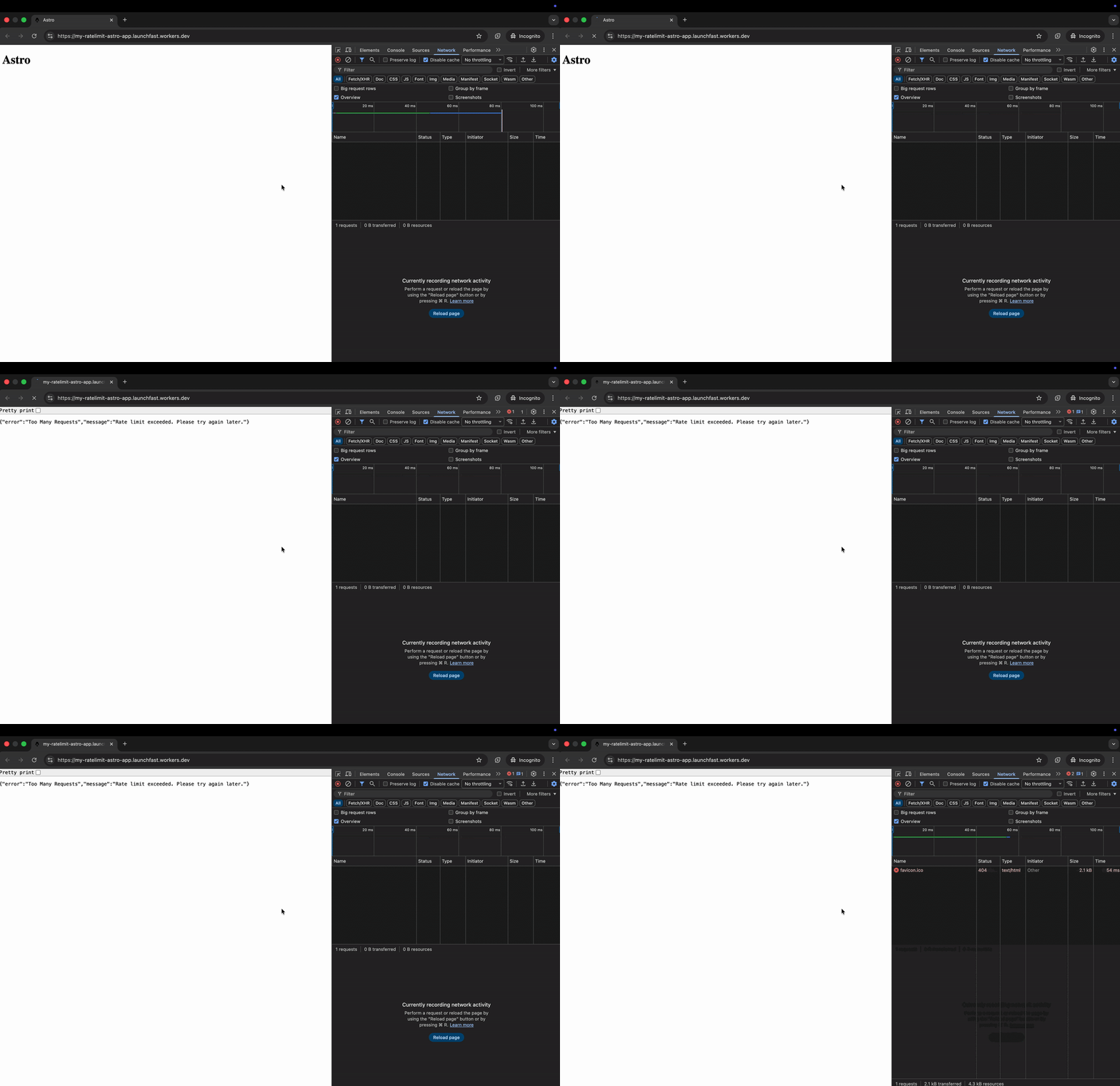 This middleware:
1. Checks if the current route should be rate limited
2. Uses the client's IP address as the rate limit key
3. Returns a `429 Too Many Requests` response when the limit is exceeded
## Rate Limiting in an API Endpoint
For more granular control, apply rate limiting directly in your API endpoints. Create `src/pages/api/data.ts`:
```typescript
// File: src/pages/api/data.ts
import type { APIContext } from 'astro'
export async function GET({ request, locals }: APIContext) {
const rateLimiter = locals.runtime?.env?.MY_RATE_LIMITER
if (rateLimiter) {
const clientIP = request.headers.get('CF-Connecting-IP') || 'unknown'
const { success } = await rateLimiter.limit({ key: clientIP })
if (!success) {
return new Response(
JSON.stringify({ error: 'Rate limit exceeded' }),
{
status: 429,
headers: { 'Content-Type': 'application/json' },
}
)
}
}
// Your endpoint logic here
return new Response(
JSON.stringify({ message: 'Success', data: { timestamp: Date.now() } }),
{
status: 200,
headers: { 'Content-Type': 'application/json' },
}
)
}
```
This middleware:
1. Checks if the current route should be rate limited
2. Uses the client's IP address as the rate limit key
3. Returns a `429 Too Many Requests` response when the limit is exceeded
## Rate Limiting in an API Endpoint
For more granular control, apply rate limiting directly in your API endpoints. Create `src/pages/api/data.ts`:
```typescript
// File: src/pages/api/data.ts
import type { APIContext } from 'astro'
export async function GET({ request, locals }: APIContext) {
const rateLimiter = locals.runtime?.env?.MY_RATE_LIMITER
if (rateLimiter) {
const clientIP = request.headers.get('CF-Connecting-IP') || 'unknown'
const { success } = await rateLimiter.limit({ key: clientIP })
if (!success) {
return new Response(
JSON.stringify({ error: 'Rate limit exceeded' }),
{
status: 429,
headers: { 'Content-Type': 'application/json' },
}
)
}
}
// Your endpoint logic here
return new Response(
JSON.stringify({ message: 'Success', data: { timestamp: Date.now() } }),
{
status: 200,
headers: { 'Content-Type': 'application/json' },
}
)
}
```
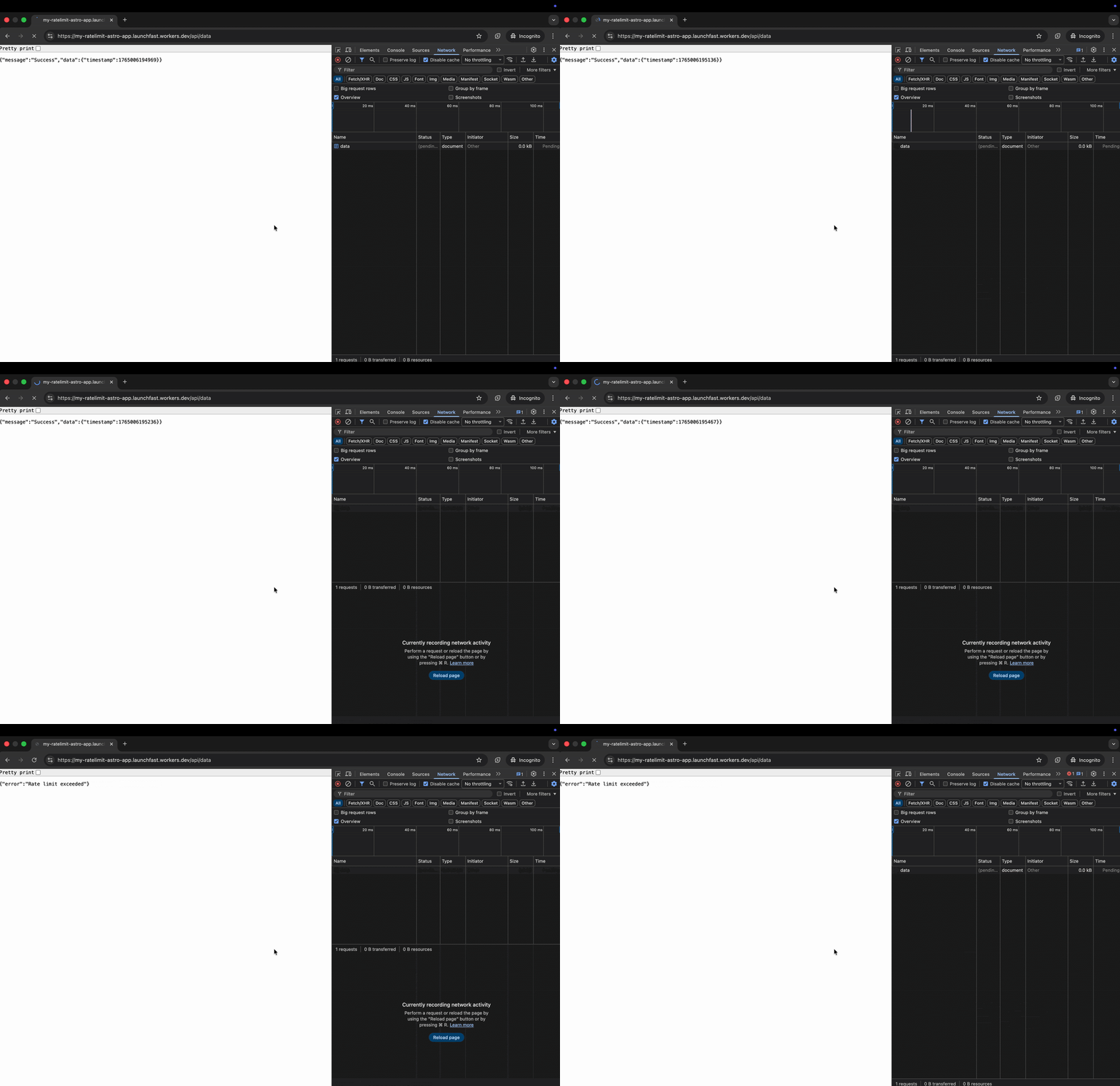 This endpoint:
1. Uses the client's IP address as the rate limit key
2. Returns a `429 Rate Limit Exceeded` response when the limit is exceeded
### Custom Rate Limit Keys
You can use different keys for different rate limiting strategies:
```typescript
// Rate limit by user ID (for authenticated routes)
const userId = locals.user?.id
const { success } = await rateLimiter.limit({ key: `user:${userId}` })
// Rate limit by IP + endpoint combination
const key = `${clientIP}:${url.pathname}`
const { success } = await rateLimiter.limit({ key })
// Rate limit by API key
const apiKey = request.headers.get('X-API-Key') || 'anonymous'
const { success } = await rateLimiter.limit({ key: `api:${apiKey}` })
```
## Deploy to Cloudflare Workers
Deploy your rate-limiting enabled Astro application to production:
```bash
# Build the project
npm run build
# Deploy to Cloudflare Workers
npx wrangler deploy
```
## Conclusion
By implementing rate limiting with Cloudflare Workers in your Astro app, you effectively block abusive requests - such as brute force attacks, API overuse, and DDoS attempts at the edge. This improves both your application's security and performance by stopping threats before they hit your application logic.
This endpoint:
1. Uses the client's IP address as the rate limit key
2. Returns a `429 Rate Limit Exceeded` response when the limit is exceeded
### Custom Rate Limit Keys
You can use different keys for different rate limiting strategies:
```typescript
// Rate limit by user ID (for authenticated routes)
const userId = locals.user?.id
const { success } = await rateLimiter.limit({ key: `user:${userId}` })
// Rate limit by IP + endpoint combination
const key = `${clientIP}:${url.pathname}`
const { success } = await rateLimiter.limit({ key })
// Rate limit by API key
const apiKey = request.headers.get('X-API-Key') || 'anonymous'
const { success } = await rateLimiter.limit({ key: `api:${apiKey}` })
```
## Deploy to Cloudflare Workers
Deploy your rate-limiting enabled Astro application to production:
```bash
# Build the project
npm run build
# Deploy to Cloudflare Workers
npx wrangler deploy
```
## Conclusion
By implementing rate limiting with Cloudflare Workers in your Astro app, you effectively block abusive requests - such as brute force attacks, API overuse, and DDoS attempts at the edge. This improves both your application's security and performance by stopping threats before they hit your application logic.