---
title: "Building Real-Time Chat in Astro with Cloudflare Durable Objects and WebSocket Hibernation"
description: "Learn how to build a real-time chat application using Astro and Cloudflare Durable Objects with WebSocket Hibernation. Implement cost-efficient WebSocket connections, message persistence, and user presence indicators at the edge."
source: "https://www.launchfa.st/blog/real-time-chat-astro-cloudflare-durable-objects"
author: "Rishi Raj Jain"
created_at: 2025-12-04T12:00:00.000Z
keywords: "astro, cloudflare, durable objects, websockets, websocket hibernation, real-time, chat, edge computing"
---
> **Site index for agents**
> Fetch https://www.launchfa.st/llms.txt to discover every page on this site.
> Every page is also available as Markdown by appending `.md` to its URL.
 Building real-time features like chat, notifications, or collaborative editing traditionally requires complex infrastructure with WebSocket servers, Redis for pub/sub, and distributed state management. [Cloudflare Durable Objects](https://developers.cloudflare.com/durable-objects/) changes this by providing stateful, strongly consistent objects at the edge that can handle WebSocket connections natively.
In this comprehensive guide, you'll learn how to build a real-time chat application using Astro and Cloudflare Durable Objects with the [WebSocket Hibernation API](https://developers.cloudflare.com/durable-objects/examples/websocket-hibernation-server/). We'll cover WebSocket connections, message persistence, user presence indicators, and room-based chat - all running at the edge with zero server management and **significantly reduced costs** thanks to hibernation.
- [View Example GitHub Project](https://github.com/rishi-raj-jain/my-realtime-chat-app)
## Demo
Building real-time features like chat, notifications, or collaborative editing traditionally requires complex infrastructure with WebSocket servers, Redis for pub/sub, and distributed state management. [Cloudflare Durable Objects](https://developers.cloudflare.com/durable-objects/) changes this by providing stateful, strongly consistent objects at the edge that can handle WebSocket connections natively.
In this comprehensive guide, you'll learn how to build a real-time chat application using Astro and Cloudflare Durable Objects with the [WebSocket Hibernation API](https://developers.cloudflare.com/durable-objects/examples/websocket-hibernation-server/). We'll cover WebSocket connections, message persistence, user presence indicators, and room-based chat - all running at the edge with zero server management and **significantly reduced costs** thanks to hibernation.
- [View Example GitHub Project](https://github.com/rishi-raj-jain/my-realtime-chat-app)
## Demo
 ## Prerequisites
You'll need the following:
- [Node.js 20](https://nodejs.org/en/blog/announcements/v20-release-announce) or later
- A [Cloudflare account](https://dash.cloudflare.com/sign-up)
## Understanding Durable Objects and WebSockets
**Durable Objects** are Cloudflare's solution for managing stateful applications at the edge. Unlike traditional serverless functions that are stateless, Durable Objects maintain state in memory and can handle WebSocket connections.
Key characteristics:
- **Single-threaded execution**: Each Durable Object instance runs in a single location, eliminating race conditions
- **Strong consistency**: State changes are immediately visible to all connections to that object
- **Built-in storage**: Persistent key-value storage that survives restarts
- **WebSocket support**: Native support for maintaining long-lived WebSocket connections
- **WebSocket Hibernation**: Durable Objects can hibernate while keeping WebSocket connections alive, significantly reducing costs
## Why WebSocket Hibernation?
Cloudflare's [WebSocket Hibernation API](https://developers.cloudflare.com/durable-objects/best-practices/websockets/) is the recommended approach for WebSocket applications on Durable Objects. Here's why:
**Without Hibernation:**
- Durable Object stays in memory as long as WebSocket connections are open
- You're billed for the entire duration, even during idle periods
- Higher memory usage across your application
**With Hibernation:**
- Durable Object can be evicted from memory during inactivity
- WebSocket connections remain open even when the DO is hibernated
- When a message arrives, the DO is recreated and the message is delivered
- **Significantly lower duration charges** - you only pay when the DO is actively processing
The Hibernation API uses special methods (`webSocketMessage`, `webSocketClose`, `webSocketError`) instead of event listeners, and uses `serializeAttachment`/`deserializeAttachment` to persist session state across hibernation cycles.
## How Durable Objects differ from traditional WebSocket servers
Traditional WebSocket architecture:
```
Client → Load Balancer → WebSocket Server (Node.js) → Redis (Pub/Sub) → Database
↓
Multiple server instances need coordination
```
Durable Objects architecture:
```
Client → Cloudflare Edge → Durable Object (single instance per chat room)
↓
Built-in state + storage
```
Benefits:
- **No Redis needed**: State is in-memory in the Durable Object
- **No coordination complexity**: One instance = no race conditions
- **Global deployment**: Runs at Cloudflare's edge, close to users
- **Automatic scaling**: Cloudflare creates instances on-demand
- **Zero server management**: No servers to configure or maintain
## Architecture overview
Our chat application will have this structure:
```
1. Astro Page (src/pages/chat/[roomId].astro)
→ Renders the chat UI
→ Includes client-side JavaScript for WebSocket
2. WebSocket API Endpoint (src/pages/api/chat/[roomId].ts)
→ Handles WebSocket upgrade requests
→ Connects clients to the appropriate Durable Object
3. Worker with ChatRoom Durable Object (src/worker.ts)
→ Exports the ChatRoom Durable Object class
→ Uses WebSocket Hibernation API for cost efficiency
→ Manages WebSocket connections for a room
→ Broadcasts messages to all connected clients
→ Persists message history and session data
→ Tracks user presence across hibernation cycles
```
Each chat room gets its own Durable Object instance, identified by the room ID. All clients in that room connect to the same instance, ensuring strong consistency.
## Create a new Astro application
Let's get started by creating a new Astro project. Execute the following command:
```bash
npm create astro@latest realtime-chat
```
When prompted, choose:
- `Use minimal (empty) template` when prompted on how to start the new project.
- `Yes` when prompted to install dependencies.
- `Yes` when prompted to initialize a git repository.
Once that's done, you can move into the project directory and start the app:
```bash
cd realtime-chat
npm install wrangler
npm run dev
```
The app should be running on [localhost:4321](http://localhost:4321/).
## Integrate Cloudflare adapter in your Astro project
To deploy your Astro project to Cloudflare Workers and use Cloudflare KV, you need to install the Cloudflare adapter. Execute the command below:
```bash
npx astro add cloudflare
```
When prompted, choose Yes for every prompt.
This installs `@astrojs/cloudflare` and configures your project for server-side rendering on Cloudflare Workers.
Now update your `astro.config.mjs` to specify the worker entry point:
```javascript
// File: astro.config.mjs
import { defineConfig } from 'astro/config';
import cloudflare from '@astrojs/cloudflare';
export default defineConfig({
output: 'server',
adapter: cloudflare({
workerEntryPoint: {
path: './src/worker.ts',
namedExports: ['ChatRoom']
}
})
});
```
The `workerEntryPoint` configuration tells Astro where to find your Durable Object class. The `namedExports` array specifies which classes to export from the worker.
### Configure wrangler.jsonc
Create a `wrangler.jsonc` file in the root of your project:
```jsonc
{
"$schema": "./node_modules/wrangler/config-schema.json",
"main": "dist/_worker.js/index.js",
"name": "realtime-chat",
"compatibility_date": "2025-12-04",
"compatibility_flags": [
"nodejs_compat",
"global_fetch_strictly_public"
],
"assets": {
"binding": "ASSETS",
"directory": "./dist"
},
"observability": {
"enabled": true
},
"durable_objects": {
"bindings": [
{
"name": "ChatRoom",
"class_name": "ChatRoom"
}
]
},
"migrations": [
{
"tag": "v1",
"new_sqlite_classes": [
"ChatRoom"
]
}
]
}
```
The `durable_objects.bindings` section creates a binding named `ChatRoom` that your code can use to access the `ChatRoom` Durable Object class. The `new_sqlite_classes` migration enables SQLite-backed storage for better performance. The `compatibility_flags` ensure Node.js compatibility for features like `crypto.randomUUID()`.
### Configure environment types
Update `src/env.d.ts` to add TypeScript definitions for Durable Objects:
```typescript
///
///
type DurableObjectNamespace = import('@cloudflare/workers-types').DurableObjectNamespace
type ENV = {
ChatRoom: DurableObjectNamespace
}
type Runtime = import('@astrojs/cloudflare').Runtime
declare namespace App {
interface Locals extends Runtime {
// Add custom locals here
}
}
```
This provides type safety when working with Durable Objects in your Astro application.
## Create the Chat Room Durable Object with Hibernation
Durable Objects are defined in the worker file along with the handler exports. We'll use the [WebSocket Hibernation API](https://developers.cloudflare.com/durable-objects/examples/websocket-hibernation-server/) for better cost efficiency. Create `src/worker.ts`:
```typescript
// File: src/worker.ts
import { handle } from '@astrojs/cloudflare/handler';
import type { SSRManifest } from 'astro';
import { App } from 'astro/app';
import { DurableObject } from 'cloudflare:workers';
interface SessionAttachment {
id: string
userId: string
username: string
}
interface ChatMessage {
id: string
type: 'message' | 'join' | 'leave' | 'presence'
userId: string
username: string
content?: string
timestamp: number
}
class ChatRoom extends DurableObject {
// Map of WebSocket -> session data
// When the DO hibernates, this gets reconstructed in the constructor
private sessions: Map
private messageHistory: ChatMessage[]
constructor(ctx: DurableObjectState, env: ENV) {
super(ctx, env)
this.sessions = new Map()
this.messageHistory = []
// Restore hibernating WebSocket connections
// When the DO wakes up, we need to restore session data from attachments
this.ctx.getWebSockets().forEach((ws) => {
const attachment = ws.deserializeAttachment() as SessionAttachment | null
if (attachment) {
this.sessions.set(ws, attachment)
}
})
// Set up automatic ping/pong responses
// This keeps connections alive without waking the DO
this.ctx.setWebSocketAutoResponse(
new WebSocketRequestResponsePair('ping', 'pong')
)
// Load message history from storage on initialization
this.ctx.blockConcurrencyWhile(async () => {
const stored = await this.ctx.storage.get('messages')
if (stored) this.messageHistory = stored
})
}
/**
* Handle HTTP requests to this Durable Object
* This is called when a client wants to establish a WebSocket connection
*/
async fetch(request: Request): Promise {
// Parse the URL to get query parameters (userId and username)
const url = new URL(request.url)
const userId = url.searchParams.get('userId')
const username = url.searchParams.get('username')
if (!userId || !username)
return new Response('Missing userId or username', { status: 400 })
// Expect a WebSocket upgrade request
const upgradeHeader = request.headers.get('Upgrade')
if (upgradeHeader !== 'websocket')
return new Response('Expected WebSocket upgrade', { status: 426 })
// Create a WebSocket pair (client and server)
const pair = new WebSocketPair()
const [client, server] = Object.values(pair)
// Accept the WebSocket connection using the Hibernation API
// Unlike server.accept(), this allows the DO to hibernate while
// keeping the WebSocket connection open
this.ctx.acceptWebSocket(server)
// Generate a unique session ID
const id = crypto.randomUUID()
// Create session attachment data
const attachment: SessionAttachment = { id, userId, username }
// Serialize the attachment to the WebSocket
// This data persists across hibernation cycles
server.serializeAttachment(attachment)
// Add to active sessions
this.sessions.set(server, attachment)
// Send message history to the newly connected client
this.sendMessageHistory(server)
// Broadcast join notification to all clients
this.broadcast({
id: crypto.randomUUID(),
type: 'join',
userId,
username,
timestamp: Date.now(),
})
// Send current presence to the new user
this.sendPresence(server)
// Return the client WebSocket in the response
return new Response(null, {
status: 101,
webSocket: client,
})
}
/**
* Handle incoming WebSocket messages (Hibernation API)
* Called when a message is received, even after hibernation
*/
async webSocketMessage(ws: WebSocket, message: ArrayBuffer | string): Promise {
// Get session data from the map (or deserialize if just woken)
let session = this.sessions.get(ws)
if (!session) {
session = ws.deserializeAttachment() as SessionAttachment
if (session) this.sessions.set(ws, session)
}
if (!session) return
try {
const parsed = JSON.parse(message as string)
if (parsed.type === 'message' && parsed.content) {
// Create a chat message
const chatMessage: ChatMessage = {
id: crypto.randomUUID(),
type: 'message',
userId: session.userId,
username: session.username,
content: parsed.content,
timestamp: Date.now(),
}
// Add to history
this.messageHistory.push(chatMessage)
// Persist to storage (limit to last 100 messages)
if (this.messageHistory.length > 100)
this.messageHistory = this.messageHistory.slice(-100)
this.ctx.storage.put('messages', this.messageHistory)
// Broadcast to all connected clients
this.broadcast(chatMessage)
}
} catch (error) {
console.error('Error handling message:', error)
}
}
/**
* Handle WebSocket close events (Hibernation API)
* Called when a client disconnects
*/
async webSocketClose(
ws: WebSocket,
code: number,
reason: string,
wasClean: boolean
): Promise {
// Get session data
const session = this.sessions.get(ws) ||
(ws.deserializeAttachment() as SessionAttachment | null)
// Remove from sessions
this.sessions.delete(ws)
// Broadcast leave notification
if (session) {
this.broadcast({
id: crypto.randomUUID(),
type: 'leave',
userId: session.userId,
username: session.username,
timestamp: Date.now(),
})
}
// Close the WebSocket
ws.close(code, 'Durable Object is closing WebSocket')
}
/**
* Handle WebSocket errors (Hibernation API)
*/
async webSocketError(ws: WebSocket, error: unknown): Promise {
console.error('WebSocket error:', error)
// Treat errors as disconnections
await this.webSocketClose(ws, 1011, 'WebSocket error', false)
}
/**
* Broadcast a message to all connected clients
*/
private broadcast(message: ChatMessage): void {
const messageStr = JSON.stringify(message)
// Send to all active sessions
this.sessions.forEach((_, ws) => {
try {
ws.send(messageStr)
} catch (error) {
// Connection might be closed, will be cleaned up by close handler
console.error('Error broadcasting to session:', error)
}
})
}
/**
* Send message history to a specific WebSocket
*/
private sendMessageHistory(ws: WebSocket): void {
const historyMessage = JSON.stringify({
type: 'history',
messages: this.messageHistory,
})
try {
ws.send(historyMessage)
} catch (error) {
console.error('Error sending history:', error)
}
}
/**
* Send current user presence to a specific WebSocket
*/
private sendPresence(ws: WebSocket): void {
const users = Array.from(this.sessions.values()).map((s) => ({
userId: s.userId,
username: s.username,
}))
const presenceMessage = JSON.stringify({
type: 'presence',
users,
})
try {
ws.send(presenceMessage)
} catch (error) {
console.error('Error sending presence:', error)
}
}
/**
* Handle Durable Object alarm for cleanup tasks
*/
async alarm(): Promise {
// Clean up old messages (older than 24 hours)
const oneDayAgo = Date.now() - 24 * 60 * 60 * 1000
this.messageHistory = this.messageHistory.filter((msg) => msg.timestamp > oneDayAgo)
await this.ctx.storage.put('messages', this.messageHistory)
// Schedule next cleanup in 1 hour
await this.ctx.storage.setAlarm(Date.now() + 60 * 60 * 1000)
}
}
export function createExports(manifest: SSRManifest) {
const app = new App(manifest);
return {
default: {
async fetch(request, env, ctx) {
// @ts-expect-error - request is not typed correctly
return handle(manifest, app, request, env, ctx);
}
} satisfies ExportedHandler,
ChatRoom,
}
}
```
This worker file implements the **WebSocket Hibernation API**, which is Cloudflare's recommended approach for WebSocket applications:
1. **Defines the ChatRoom Durable Object** with hibernation-aware chat room logic:
- **WebSocket Hibernation**: Uses `ctx.acceptWebSocket()` instead of `server.accept()`, enabling the DO to hibernate
- **Session persistence**: Uses `serializeAttachment()`/`deserializeAttachment()` to preserve session data across hibernation
- **Automatic ping/pong**: Uses `setWebSocketAutoResponse()` to keep connections alive without waking the DO
- **Hibernation-aware handlers**: Implements `webSocketMessage`, `webSocketClose`, and `webSocketError` methods
- **Session restoration**: Reconstructs the sessions Map from hibernating WebSockets in the constructor
- **Message persistence**: Stores the last 100 messages in Durable Object storage
- **User presence**: Tracks who's currently in the room
- **Automatic cleanup**: Uses alarms to clean up old messages
2. **Exports the worker and Durable Object** via the `createExports` function:
- The `default` export handles all HTTP requests via Astro's handler
- The `ChatRoom` export makes the Durable Object available to Cloudflare
- The function receives the SSR manifest from Astro's build process
### Key differences from the non-hibernating approach
| Feature | Without Hibernation | With Hibernation |
|---------|---------------------|------------------|
| Accept WebSocket | `server.accept()` | `ctx.acceptWebSocket(server)` |
| Handle messages | `addEventListener('message')` | `webSocketMessage()` method |
| Handle close | `addEventListener('close')` | `webSocketClose()` method |
| Session storage | In-memory only | `serializeAttachment()` |
| DO memory usage | Always in memory | Can be evicted |
| Billing | Entire connection duration | Only when processing |
## Implement WebSocket connection handling with Hibernation
The Durable Object's `fetch` method handles WebSocket upgrade requests. With the Hibernation API, when a client connects:
1. It validates the `userId` and `username` parameters
2. Creates a WebSocket pair (one for the client, one for the server)
3. Accepts the server-side WebSocket using `ctx.acceptWebSocket()` (enables hibernation)
4. Creates session data and serializes it to the WebSocket using `serializeAttachment()`
5. Adds the WebSocket to the sessions Map
6. Sends the message history to the new client
7. Broadcasts a join notification to all other clients
8. Returns the client-side WebSocket in the response
The key insight is that each chat room is a single Durable Object instance. All clients connecting to the same room connect to the same instance. With hibernation, the DO can be evicted from memory during idle periods while WebSocket connections remain open. When a message arrives, Cloudflare recreates the DO instance and delivers the message to the `webSocketMessage` method.
### Session restoration after hibernation
When the DO wakes up after hibernation, the constructor runs again. The session data is restored by:
```typescript
// In the constructor
this.ctx.getWebSockets().forEach((ws) => {
const attachment = ws.deserializeAttachment() as SessionAttachment | null
if (attachment) {
this.sessions.set(ws, attachment)
}
})
```
This retrieves all active WebSocket connections and deserializes their attached session data, fully restoring the state that existed before hibernation.
## Build the WebSocket API endpoint
Now create an API endpoint that routes WebSocket connections to the appropriate Durable Object. Create `src/pages/api/chat/[roomId].ts`:
```typescript
// File: src/pages/api/chat/[roomId].ts
import type { APIRoute } from 'astro'
/**
* GET /api/chat/:roomId
*
* Handles WebSocket upgrade requests and connects clients to the chat room
*/
export const GET: APIRoute = async ({ params, request, locals }) => {
const { roomId } = params
if (!roomId)
return new Response('Room ID is required', { status: 400 })
// Get the ChatRoom Durable Object namespace
const ChatRoomNamespace = locals.runtime.env.ChatRoom
if (!ChatRoomNamespace)
return new Response('Chat room binding not found', { status: 500 })
// Get a Durable Object ID for this room
// idFromName ensures the same room ID always maps to the same Durable Object
const durableObjectId = ChatRoomNamespace.idFromName(roomId)
// Get a stub (reference) to the Durable Object
const durableObjectStub = ChatRoomNamespace.get(durableObjectId)
// Forward the request to the Durable Object
// The Durable Object's fetch method will handle the WebSocket upgrade
return durableObjectStub.fetch(request)
}
```
This endpoint is simple but critical:
1. It extracts the `roomId` from the URL
2. Gets the `ChatRoom` Durable Object namespace from the environment (note: this matches the binding name in `wrangler.jsonc`)
3. Creates a Durable Object ID using `idFromName(roomId)` - this ensures the same room ID always gets the same Durable Object instance
4. Gets a stub (reference) to that Durable Object
5. Forwards the entire request to the Durable Object's `fetch` method
The `idFromName` method is important: it deterministically maps a string (the room ID) to a specific Durable Object instance. This means all clients joining "room-123" will connect to the exact same Durable Object.
## Create the chat client interface
Create a chat room page at `src/pages/chat/[roomId].astro`:
```astro
---
// File: src/pages/chat/[roomId].astro
const { roomId } = Astro.params;
if (!roomId) return Astro.redirect("/");
// Generate a random user ID and username (in production, use authentication)
const userId = crypto.randomUUID();
const defaultUsername = `User${Math.floor(Math.random() * 10000)}`;
---
Chat Room: {roomId}
## Prerequisites
You'll need the following:
- [Node.js 20](https://nodejs.org/en/blog/announcements/v20-release-announce) or later
- A [Cloudflare account](https://dash.cloudflare.com/sign-up)
## Understanding Durable Objects and WebSockets
**Durable Objects** are Cloudflare's solution for managing stateful applications at the edge. Unlike traditional serverless functions that are stateless, Durable Objects maintain state in memory and can handle WebSocket connections.
Key characteristics:
- **Single-threaded execution**: Each Durable Object instance runs in a single location, eliminating race conditions
- **Strong consistency**: State changes are immediately visible to all connections to that object
- **Built-in storage**: Persistent key-value storage that survives restarts
- **WebSocket support**: Native support for maintaining long-lived WebSocket connections
- **WebSocket Hibernation**: Durable Objects can hibernate while keeping WebSocket connections alive, significantly reducing costs
## Why WebSocket Hibernation?
Cloudflare's [WebSocket Hibernation API](https://developers.cloudflare.com/durable-objects/best-practices/websockets/) is the recommended approach for WebSocket applications on Durable Objects. Here's why:
**Without Hibernation:**
- Durable Object stays in memory as long as WebSocket connections are open
- You're billed for the entire duration, even during idle periods
- Higher memory usage across your application
**With Hibernation:**
- Durable Object can be evicted from memory during inactivity
- WebSocket connections remain open even when the DO is hibernated
- When a message arrives, the DO is recreated and the message is delivered
- **Significantly lower duration charges** - you only pay when the DO is actively processing
The Hibernation API uses special methods (`webSocketMessage`, `webSocketClose`, `webSocketError`) instead of event listeners, and uses `serializeAttachment`/`deserializeAttachment` to persist session state across hibernation cycles.
## How Durable Objects differ from traditional WebSocket servers
Traditional WebSocket architecture:
```
Client → Load Balancer → WebSocket Server (Node.js) → Redis (Pub/Sub) → Database
↓
Multiple server instances need coordination
```
Durable Objects architecture:
```
Client → Cloudflare Edge → Durable Object (single instance per chat room)
↓
Built-in state + storage
```
Benefits:
- **No Redis needed**: State is in-memory in the Durable Object
- **No coordination complexity**: One instance = no race conditions
- **Global deployment**: Runs at Cloudflare's edge, close to users
- **Automatic scaling**: Cloudflare creates instances on-demand
- **Zero server management**: No servers to configure or maintain
## Architecture overview
Our chat application will have this structure:
```
1. Astro Page (src/pages/chat/[roomId].astro)
→ Renders the chat UI
→ Includes client-side JavaScript for WebSocket
2. WebSocket API Endpoint (src/pages/api/chat/[roomId].ts)
→ Handles WebSocket upgrade requests
→ Connects clients to the appropriate Durable Object
3. Worker with ChatRoom Durable Object (src/worker.ts)
→ Exports the ChatRoom Durable Object class
→ Uses WebSocket Hibernation API for cost efficiency
→ Manages WebSocket connections for a room
→ Broadcasts messages to all connected clients
→ Persists message history and session data
→ Tracks user presence across hibernation cycles
```
Each chat room gets its own Durable Object instance, identified by the room ID. All clients in that room connect to the same instance, ensuring strong consistency.
## Create a new Astro application
Let's get started by creating a new Astro project. Execute the following command:
```bash
npm create astro@latest realtime-chat
```
When prompted, choose:
- `Use minimal (empty) template` when prompted on how to start the new project.
- `Yes` when prompted to install dependencies.
- `Yes` when prompted to initialize a git repository.
Once that's done, you can move into the project directory and start the app:
```bash
cd realtime-chat
npm install wrangler
npm run dev
```
The app should be running on [localhost:4321](http://localhost:4321/).
## Integrate Cloudflare adapter in your Astro project
To deploy your Astro project to Cloudflare Workers and use Cloudflare KV, you need to install the Cloudflare adapter. Execute the command below:
```bash
npx astro add cloudflare
```
When prompted, choose Yes for every prompt.
This installs `@astrojs/cloudflare` and configures your project for server-side rendering on Cloudflare Workers.
Now update your `astro.config.mjs` to specify the worker entry point:
```javascript
// File: astro.config.mjs
import { defineConfig } from 'astro/config';
import cloudflare from '@astrojs/cloudflare';
export default defineConfig({
output: 'server',
adapter: cloudflare({
workerEntryPoint: {
path: './src/worker.ts',
namedExports: ['ChatRoom']
}
})
});
```
The `workerEntryPoint` configuration tells Astro where to find your Durable Object class. The `namedExports` array specifies which classes to export from the worker.
### Configure wrangler.jsonc
Create a `wrangler.jsonc` file in the root of your project:
```jsonc
{
"$schema": "./node_modules/wrangler/config-schema.json",
"main": "dist/_worker.js/index.js",
"name": "realtime-chat",
"compatibility_date": "2025-12-04",
"compatibility_flags": [
"nodejs_compat",
"global_fetch_strictly_public"
],
"assets": {
"binding": "ASSETS",
"directory": "./dist"
},
"observability": {
"enabled": true
},
"durable_objects": {
"bindings": [
{
"name": "ChatRoom",
"class_name": "ChatRoom"
}
]
},
"migrations": [
{
"tag": "v1",
"new_sqlite_classes": [
"ChatRoom"
]
}
]
}
```
The `durable_objects.bindings` section creates a binding named `ChatRoom` that your code can use to access the `ChatRoom` Durable Object class. The `new_sqlite_classes` migration enables SQLite-backed storage for better performance. The `compatibility_flags` ensure Node.js compatibility for features like `crypto.randomUUID()`.
### Configure environment types
Update `src/env.d.ts` to add TypeScript definitions for Durable Objects:
```typescript
///
///
type DurableObjectNamespace = import('@cloudflare/workers-types').DurableObjectNamespace
type ENV = {
ChatRoom: DurableObjectNamespace
}
type Runtime = import('@astrojs/cloudflare').Runtime
declare namespace App {
interface Locals extends Runtime {
// Add custom locals here
}
}
```
This provides type safety when working with Durable Objects in your Astro application.
## Create the Chat Room Durable Object with Hibernation
Durable Objects are defined in the worker file along with the handler exports. We'll use the [WebSocket Hibernation API](https://developers.cloudflare.com/durable-objects/examples/websocket-hibernation-server/) for better cost efficiency. Create `src/worker.ts`:
```typescript
// File: src/worker.ts
import { handle } from '@astrojs/cloudflare/handler';
import type { SSRManifest } from 'astro';
import { App } from 'astro/app';
import { DurableObject } from 'cloudflare:workers';
interface SessionAttachment {
id: string
userId: string
username: string
}
interface ChatMessage {
id: string
type: 'message' | 'join' | 'leave' | 'presence'
userId: string
username: string
content?: string
timestamp: number
}
class ChatRoom extends DurableObject {
// Map of WebSocket -> session data
// When the DO hibernates, this gets reconstructed in the constructor
private sessions: Map
private messageHistory: ChatMessage[]
constructor(ctx: DurableObjectState, env: ENV) {
super(ctx, env)
this.sessions = new Map()
this.messageHistory = []
// Restore hibernating WebSocket connections
// When the DO wakes up, we need to restore session data from attachments
this.ctx.getWebSockets().forEach((ws) => {
const attachment = ws.deserializeAttachment() as SessionAttachment | null
if (attachment) {
this.sessions.set(ws, attachment)
}
})
// Set up automatic ping/pong responses
// This keeps connections alive without waking the DO
this.ctx.setWebSocketAutoResponse(
new WebSocketRequestResponsePair('ping', 'pong')
)
// Load message history from storage on initialization
this.ctx.blockConcurrencyWhile(async () => {
const stored = await this.ctx.storage.get('messages')
if (stored) this.messageHistory = stored
})
}
/**
* Handle HTTP requests to this Durable Object
* This is called when a client wants to establish a WebSocket connection
*/
async fetch(request: Request): Promise {
// Parse the URL to get query parameters (userId and username)
const url = new URL(request.url)
const userId = url.searchParams.get('userId')
const username = url.searchParams.get('username')
if (!userId || !username)
return new Response('Missing userId or username', { status: 400 })
// Expect a WebSocket upgrade request
const upgradeHeader = request.headers.get('Upgrade')
if (upgradeHeader !== 'websocket')
return new Response('Expected WebSocket upgrade', { status: 426 })
// Create a WebSocket pair (client and server)
const pair = new WebSocketPair()
const [client, server] = Object.values(pair)
// Accept the WebSocket connection using the Hibernation API
// Unlike server.accept(), this allows the DO to hibernate while
// keeping the WebSocket connection open
this.ctx.acceptWebSocket(server)
// Generate a unique session ID
const id = crypto.randomUUID()
// Create session attachment data
const attachment: SessionAttachment = { id, userId, username }
// Serialize the attachment to the WebSocket
// This data persists across hibernation cycles
server.serializeAttachment(attachment)
// Add to active sessions
this.sessions.set(server, attachment)
// Send message history to the newly connected client
this.sendMessageHistory(server)
// Broadcast join notification to all clients
this.broadcast({
id: crypto.randomUUID(),
type: 'join',
userId,
username,
timestamp: Date.now(),
})
// Send current presence to the new user
this.sendPresence(server)
// Return the client WebSocket in the response
return new Response(null, {
status: 101,
webSocket: client,
})
}
/**
* Handle incoming WebSocket messages (Hibernation API)
* Called when a message is received, even after hibernation
*/
async webSocketMessage(ws: WebSocket, message: ArrayBuffer | string): Promise {
// Get session data from the map (or deserialize if just woken)
let session = this.sessions.get(ws)
if (!session) {
session = ws.deserializeAttachment() as SessionAttachment
if (session) this.sessions.set(ws, session)
}
if (!session) return
try {
const parsed = JSON.parse(message as string)
if (parsed.type === 'message' && parsed.content) {
// Create a chat message
const chatMessage: ChatMessage = {
id: crypto.randomUUID(),
type: 'message',
userId: session.userId,
username: session.username,
content: parsed.content,
timestamp: Date.now(),
}
// Add to history
this.messageHistory.push(chatMessage)
// Persist to storage (limit to last 100 messages)
if (this.messageHistory.length > 100)
this.messageHistory = this.messageHistory.slice(-100)
this.ctx.storage.put('messages', this.messageHistory)
// Broadcast to all connected clients
this.broadcast(chatMessage)
}
} catch (error) {
console.error('Error handling message:', error)
}
}
/**
* Handle WebSocket close events (Hibernation API)
* Called when a client disconnects
*/
async webSocketClose(
ws: WebSocket,
code: number,
reason: string,
wasClean: boolean
): Promise {
// Get session data
const session = this.sessions.get(ws) ||
(ws.deserializeAttachment() as SessionAttachment | null)
// Remove from sessions
this.sessions.delete(ws)
// Broadcast leave notification
if (session) {
this.broadcast({
id: crypto.randomUUID(),
type: 'leave',
userId: session.userId,
username: session.username,
timestamp: Date.now(),
})
}
// Close the WebSocket
ws.close(code, 'Durable Object is closing WebSocket')
}
/**
* Handle WebSocket errors (Hibernation API)
*/
async webSocketError(ws: WebSocket, error: unknown): Promise {
console.error('WebSocket error:', error)
// Treat errors as disconnections
await this.webSocketClose(ws, 1011, 'WebSocket error', false)
}
/**
* Broadcast a message to all connected clients
*/
private broadcast(message: ChatMessage): void {
const messageStr = JSON.stringify(message)
// Send to all active sessions
this.sessions.forEach((_, ws) => {
try {
ws.send(messageStr)
} catch (error) {
// Connection might be closed, will be cleaned up by close handler
console.error('Error broadcasting to session:', error)
}
})
}
/**
* Send message history to a specific WebSocket
*/
private sendMessageHistory(ws: WebSocket): void {
const historyMessage = JSON.stringify({
type: 'history',
messages: this.messageHistory,
})
try {
ws.send(historyMessage)
} catch (error) {
console.error('Error sending history:', error)
}
}
/**
* Send current user presence to a specific WebSocket
*/
private sendPresence(ws: WebSocket): void {
const users = Array.from(this.sessions.values()).map((s) => ({
userId: s.userId,
username: s.username,
}))
const presenceMessage = JSON.stringify({
type: 'presence',
users,
})
try {
ws.send(presenceMessage)
} catch (error) {
console.error('Error sending presence:', error)
}
}
/**
* Handle Durable Object alarm for cleanup tasks
*/
async alarm(): Promise {
// Clean up old messages (older than 24 hours)
const oneDayAgo = Date.now() - 24 * 60 * 60 * 1000
this.messageHistory = this.messageHistory.filter((msg) => msg.timestamp > oneDayAgo)
await this.ctx.storage.put('messages', this.messageHistory)
// Schedule next cleanup in 1 hour
await this.ctx.storage.setAlarm(Date.now() + 60 * 60 * 1000)
}
}
export function createExports(manifest: SSRManifest) {
const app = new App(manifest);
return {
default: {
async fetch(request, env, ctx) {
// @ts-expect-error - request is not typed correctly
return handle(manifest, app, request, env, ctx);
}
} satisfies ExportedHandler,
ChatRoom,
}
}
```
This worker file implements the **WebSocket Hibernation API**, which is Cloudflare's recommended approach for WebSocket applications:
1. **Defines the ChatRoom Durable Object** with hibernation-aware chat room logic:
- **WebSocket Hibernation**: Uses `ctx.acceptWebSocket()` instead of `server.accept()`, enabling the DO to hibernate
- **Session persistence**: Uses `serializeAttachment()`/`deserializeAttachment()` to preserve session data across hibernation
- **Automatic ping/pong**: Uses `setWebSocketAutoResponse()` to keep connections alive without waking the DO
- **Hibernation-aware handlers**: Implements `webSocketMessage`, `webSocketClose`, and `webSocketError` methods
- **Session restoration**: Reconstructs the sessions Map from hibernating WebSockets in the constructor
- **Message persistence**: Stores the last 100 messages in Durable Object storage
- **User presence**: Tracks who's currently in the room
- **Automatic cleanup**: Uses alarms to clean up old messages
2. **Exports the worker and Durable Object** via the `createExports` function:
- The `default` export handles all HTTP requests via Astro's handler
- The `ChatRoom` export makes the Durable Object available to Cloudflare
- The function receives the SSR manifest from Astro's build process
### Key differences from the non-hibernating approach
| Feature | Without Hibernation | With Hibernation |
|---------|---------------------|------------------|
| Accept WebSocket | `server.accept()` | `ctx.acceptWebSocket(server)` |
| Handle messages | `addEventListener('message')` | `webSocketMessage()` method |
| Handle close | `addEventListener('close')` | `webSocketClose()` method |
| Session storage | In-memory only | `serializeAttachment()` |
| DO memory usage | Always in memory | Can be evicted |
| Billing | Entire connection duration | Only when processing |
## Implement WebSocket connection handling with Hibernation
The Durable Object's `fetch` method handles WebSocket upgrade requests. With the Hibernation API, when a client connects:
1. It validates the `userId` and `username` parameters
2. Creates a WebSocket pair (one for the client, one for the server)
3. Accepts the server-side WebSocket using `ctx.acceptWebSocket()` (enables hibernation)
4. Creates session data and serializes it to the WebSocket using `serializeAttachment()`
5. Adds the WebSocket to the sessions Map
6. Sends the message history to the new client
7. Broadcasts a join notification to all other clients
8. Returns the client-side WebSocket in the response
The key insight is that each chat room is a single Durable Object instance. All clients connecting to the same room connect to the same instance. With hibernation, the DO can be evicted from memory during idle periods while WebSocket connections remain open. When a message arrives, Cloudflare recreates the DO instance and delivers the message to the `webSocketMessage` method.
### Session restoration after hibernation
When the DO wakes up after hibernation, the constructor runs again. The session data is restored by:
```typescript
// In the constructor
this.ctx.getWebSockets().forEach((ws) => {
const attachment = ws.deserializeAttachment() as SessionAttachment | null
if (attachment) {
this.sessions.set(ws, attachment)
}
})
```
This retrieves all active WebSocket connections and deserializes their attached session data, fully restoring the state that existed before hibernation.
## Build the WebSocket API endpoint
Now create an API endpoint that routes WebSocket connections to the appropriate Durable Object. Create `src/pages/api/chat/[roomId].ts`:
```typescript
// File: src/pages/api/chat/[roomId].ts
import type { APIRoute } from 'astro'
/**
* GET /api/chat/:roomId
*
* Handles WebSocket upgrade requests and connects clients to the chat room
*/
export const GET: APIRoute = async ({ params, request, locals }) => {
const { roomId } = params
if (!roomId)
return new Response('Room ID is required', { status: 400 })
// Get the ChatRoom Durable Object namespace
const ChatRoomNamespace = locals.runtime.env.ChatRoom
if (!ChatRoomNamespace)
return new Response('Chat room binding not found', { status: 500 })
// Get a Durable Object ID for this room
// idFromName ensures the same room ID always maps to the same Durable Object
const durableObjectId = ChatRoomNamespace.idFromName(roomId)
// Get a stub (reference) to the Durable Object
const durableObjectStub = ChatRoomNamespace.get(durableObjectId)
// Forward the request to the Durable Object
// The Durable Object's fetch method will handle the WebSocket upgrade
return durableObjectStub.fetch(request)
}
```
This endpoint is simple but critical:
1. It extracts the `roomId` from the URL
2. Gets the `ChatRoom` Durable Object namespace from the environment (note: this matches the binding name in `wrangler.jsonc`)
3. Creates a Durable Object ID using `idFromName(roomId)` - this ensures the same room ID always gets the same Durable Object instance
4. Gets a stub (reference) to that Durable Object
5. Forwards the entire request to the Durable Object's `fetch` method
The `idFromName` method is important: it deterministically maps a string (the room ID) to a specific Durable Object instance. This means all clients joining "room-123" will connect to the exact same Durable Object.
## Create the chat client interface
Create a chat room page at `src/pages/chat/[roomId].astro`:
```astro
---
// File: src/pages/chat/[roomId].astro
const { roomId } = Astro.params;
if (!roomId) return Astro.redirect("/");
// Generate a random user ID and username (in production, use authentication)
const userId = crypto.randomUUID();
const defaultUsername = `User${Math.floor(Math.random() * 10000)}`;
---
Chat Room: {roomId}
Chat Room: {roomId}
●
Connecting...
```
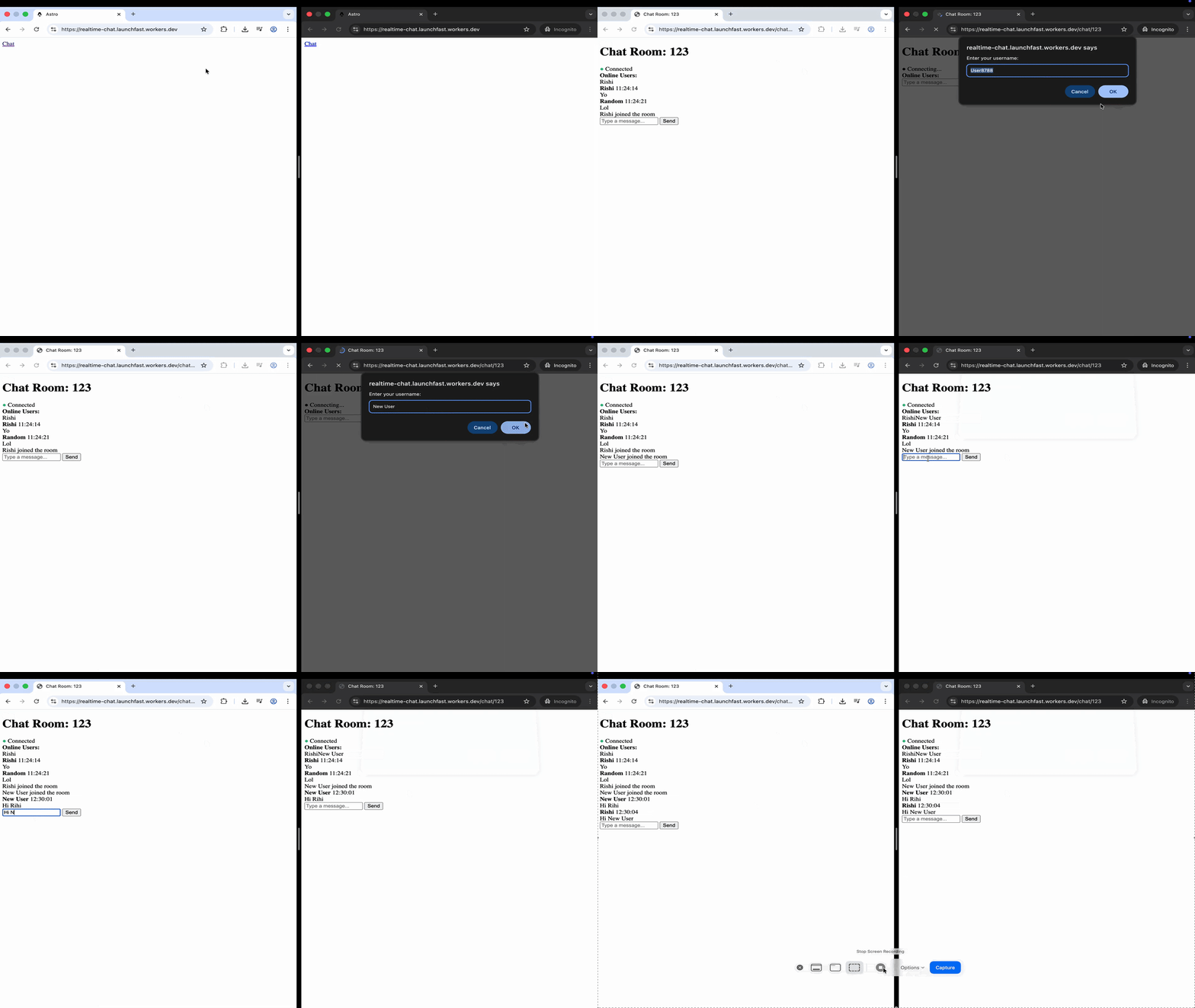
This page provides a fully functional chat interface. It manages the WebSocket connection to the backend, handles sending and receiving messages in real time, and displays notifications for when users join or leave the chat. The interface also shows the list of users currently online, keeps track of the connection status with a visual indicator, and automatically attempts to reconnect if the connection drops, using a progressive delay strategy. To keep usernames consistent across sessions, it stores them in the browser’s localStorage. All user-generated content is carefully escaped before being displayed, which helps protect the application from cross-site scripting (XSS) attacks.
The key parts:
- **WebSocket URL construction**: Uses the current hostname and the `/api/chat/[roomId]` endpoint
- **Message protocol**: Sends/receives JSON messages with a `type` field
- **Reconnection strategy**: Exponential backoff (1s, 2s, 4s, 8s and 10s (max))
- **Username persistence**: Stores username in localStorage
## Add message persistence with Durable Object storage
The message persistence is already implemented in the `ChatRoom` Durable Object. Here's how it works:
```typescript
// File: src/worker.ts
// In the constructor, load message history from storage
this.ctx.blockConcurrencyWhile(async () => {
const stored = await this.ctx.storage.get('messages')
if (stored) {
this.messageHistory = stored
}
})
// In webSocketMessage(), when a new message arrives, persist it
this.messageHistory.push(chatMessage)
// Limit to last 100 messages
if (this.messageHistory.length > 100) {
this.messageHistory = this.messageHistory.slice(-100)
}
// Save to storage
this.ctx.storage.put('messages', this.messageHistory)
```
The `blockConcurrencyWhile` method ensures storage is loaded before accepting any requests. This prevents race conditions during initialization. With hibernation, the message history is reloaded from storage each time the DO wakes up, ensuring data consistency.
## Implement user presence tracking
User presence is tracked using a Map of WebSocket connections to session data:
```typescript
// File: src/worker.ts
// When a user connects (in fetch method)
this.sessions.set(server, attachment)
// Send current presence to the new user
const users = Array.from(this.sessions.values()).map((s) => ({
userId: s.userId,
username: s.username,
}))
// When a user disconnects (in webSocketClose method)
this.sessions.delete(ws)
// Broadcast leave notification
this.broadcast({
type: 'leave',
userId: session.userId,
username: session.username,
timestamp: Date.now(),
})
```
This gives real-time presence updates:
- New users see the current user list immediately
- All users are notified when someone joins or leaves
- Session data is preserved across hibernation via `serializeAttachment()`
- If a connection drops, the user is automatically removed via `webSocketClose()`
- When the DO wakes from hibernation, `ctx.getWebSockets()` restores all active connections
## Handle reconnection and error recovery
The client implements robust reconnection logic:
```typescript
// File: src/pages/chat/[roomId].astro
function attemptReconnect() {
if (reconnectAttempts >= maxReconnectAttempts) {
displaySystemMessage('Failed to reconnect. Please refresh the page.')
return
}
reconnectAttempts++
// Exponential backoff: 1s, 2s, 4s, 8s, 10s (max)
const delay = Math.min(1000 * Math.pow(2, reconnectAttempts), 10000)
setTimeout(() => {
connect()
}, delay)
}
```
Exponential backoff helps avoid flooding the server with repeated reconnection attempts. It gives the server time to recover and helps maintain network stability. The client will automatically try to reconnect if the WebSocket closes, encounters an error, or the server restarts.
## Automatic ping/pong with WebSocket Hibernation
One powerful feature of the Hibernation API is automatic ping/pong responses that don't wake the Durable Object:
```typescript
// In the constructor
this.ctx.setWebSocketAutoResponse(
new WebSocketRequestResponsePair('ping', 'pong')
)
```
This tells Cloudflare to automatically respond to `"ping"` messages with `"pong"` at the runtime level, without invoking your Durable Object. This:
- **Keeps connections alive** without incurring billing charges
- **Reduces latency** for heartbeat messages
- **Lowers costs** since the DO doesn't wake up for pings
You can verify auto-responses were handled by checking `ws.getLastAutoResponseTimestamp()` if you need to track connection health.
## Deploy to Cloudflare Workers
Deploy your real-time chat application to production:
```bash
# Build the project
npm run build
# Deploy to Cloudflare Workers
npx wrangler deploy
```
## Conclusion
With Astro and Cloudflare Durable Objects’ WebSocket Hibernation API, you now have a scalable, low-latency real-time chat app. Messages are broadcast instantly to all clients, user presence and rooms are handled efficiently, and message storage is built in. Hibernation keeps server costs low, and automatic ping/pong maintains connections without extra overhead. For production use, remember to implement authentication, abuse protection, monitoring, and robust reconnection and security measures.
If you have any questions or comments, feel free to reach out to me on [Twitter](https://twitter.com/direct_messages/create/rishi_raj_jain_).