---
title: "Using OpenAI Swarm in Python"
description: "Learn how to set up and use OpenAI Swarm in a Python project."
source: "https://www.launchfa.st/blog/using-openai-swarm"
author: "Rishi Raj Jain"
created_at: 2024-10-18T00:00:00.000Z
---
> **Site index for agents**
> Fetch https://www.launchfa.st/llms.txt to discover every page on this site.
> Every page is also available as Markdown by appending `.md` to its URL.
 In this tutorial, you will learn how to set up and use OpenAI Swarm in Python to create a multi-agent system. The tutorial will cover environment setup, and basic usage of the OpenAI Swarm framework.
## But what can I do with OpenAI Swarm?
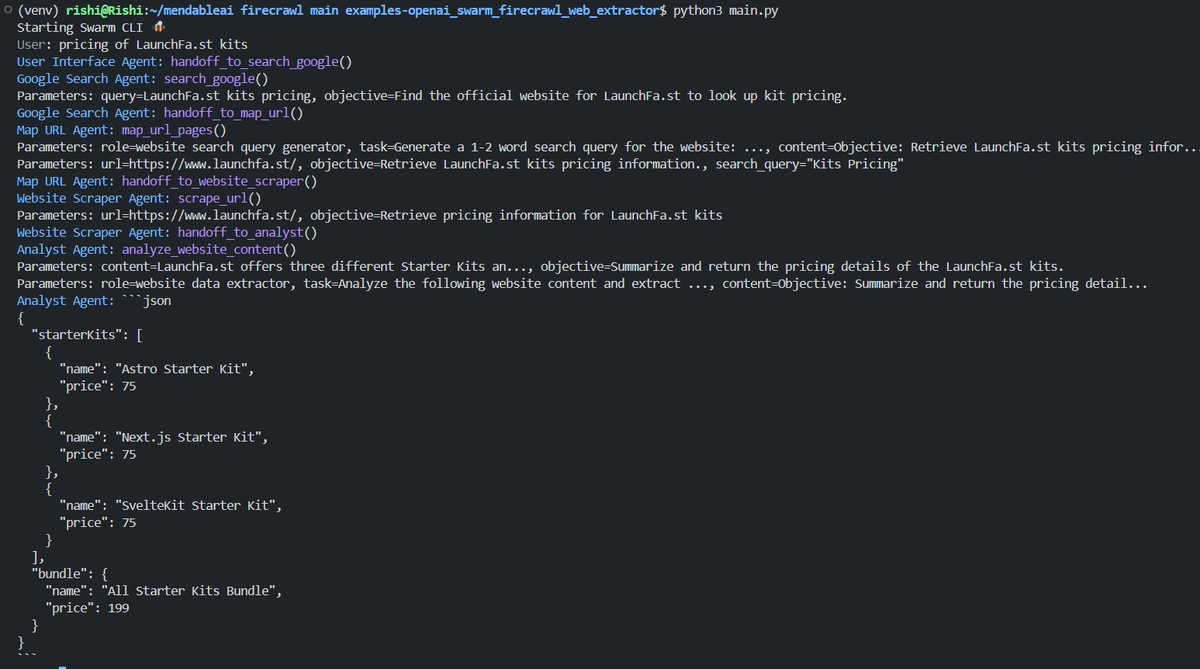
With [Firecrawl](https://www.firecrawl.dev) and [OpenAI Swarm](https://github.com/openai/swarm), a multi-agent system could crawl the internet and return the pricing of LaunchFa.st starter kits in JSON format 💥
In this tutorial, you will learn how to set up and use OpenAI Swarm in Python to create a multi-agent system. The tutorial will cover environment setup, and basic usage of the OpenAI Swarm framework.
## But what can I do with OpenAI Swarm?
With [Firecrawl](https://www.firecrawl.dev) and [OpenAI Swarm](https://github.com/openai/swarm), a multi-agent system could crawl the internet and return the pricing of LaunchFa.st starter kits in JSON format 💥
 ## Prerequisites
You'll need the following:
- [Python 3.10](https://www.python.org/downloads/) or higher
- [pip](https://pip.pypa.io/en/stable/installation/) package installer
- [OpenAI](https://platform.openai.com/api-keys) Account
## Table Of Contents
- [Set up a new virtual environment](#set-up-a-new-virtual-environment)
- [Define dependencies](#define-dependencies)
- [Install the dependencies](#install-the-dependencies)
- [Define environment variables](#define-environment-variables)
- [Create a Python script to use OpenAI Swarm](#create-a-python-script-to-use-openai-swarm)
- [Run the Script](#run-the-script)
## Set up a new virtual environment
```bash
# Create a new directory for your project
mkdir openai-swarm-tutorial
# Navigate to the project directory
cd openai-swarm-tutorial
# Create a new virtual environment
python -m venv venv
# Activate the virtual environment
## On Windows:
venv\Scripts\activate
## On macOS and Linux:
source venv/bin/activate
```
## Define dependencies
Create a `requirements.txt` file in the project directory with the following dependencies:
```bash
git+https://github.com/openai/swarm.git
python-dotenv
```
## Install the dependencies
Install the dependencies using pip:
```bash
pip install -r requirements.txt
```
## Define environment variables
Create a `.env` file in the project directory with the following:
```bash
OPENAI_API_KEY="your_api_key_here"
```
Replace `your_api_key_here` with your actual OpenAI API key.
## Create a Python script to use OpenAI Swarm
Create the main script `app.py` with the following code:
```python title="app.py"
from dotenv import load_dotenv
from swarm import Agent, Swarm
# Load environment variables
load_dotenv()
# Initialize the Swarm client
client = Swarm()
def transfer_to_agent_b():
return agent_b
# Define Agent A
agent_a = Agent(
name="Agent A",
instructions="You are a helpful agent.",
functions=[transfer_to_agent_b],
)
# Define Agent B
agent_b = Agent(
name="Agent B",
instructions="Only speak in Haikus.",
)
# Run the Swarm with Agent A
response = client.run(
agent=agent_a,
messages=[{"role": "user", "content": "I want to talk to agent B."}],
)
# Print the last message from the response
print(response.messages[-1]["content"])
```
This script does the following:
- Imports necessary modules and loads the `OPENAI_API_KEY` environment variable.
- Initializes the OpenAI Swarm client.
- Defines a `transfer_to_agent_b` function to switch to Agent B.
- Creates two agents: Agent A and Agent B with specific instructions.
- Runs the Swarm with Agent A and a user message.
- Prints the last message from the response.
## Run the Script
Execute the script:
```bash
python app.py
```
This will process the initial message with Agent A, potentially transfer to Agent B, and display the result.
## Conclusion
You have now learned how to set up and use OpenAI Swarm to create a basic multi-agent system. This example demonstrates agent definition, inter-agent communication, and basic Swarm execution. To expand on this, consider adding more agents, implementing complex transfer logic, or exploring advanced Swarm features like memory or tool use.
If you have any questions or comments, feel free to reach out to me on [Twitter](https://twitter.com/direct_messages/create/rishi_raj_jain_).
## Prerequisites
You'll need the following:
- [Python 3.10](https://www.python.org/downloads/) or higher
- [pip](https://pip.pypa.io/en/stable/installation/) package installer
- [OpenAI](https://platform.openai.com/api-keys) Account
## Table Of Contents
- [Set up a new virtual environment](#set-up-a-new-virtual-environment)
- [Define dependencies](#define-dependencies)
- [Install the dependencies](#install-the-dependencies)
- [Define environment variables](#define-environment-variables)
- [Create a Python script to use OpenAI Swarm](#create-a-python-script-to-use-openai-swarm)
- [Run the Script](#run-the-script)
## Set up a new virtual environment
```bash
# Create a new directory for your project
mkdir openai-swarm-tutorial
# Navigate to the project directory
cd openai-swarm-tutorial
# Create a new virtual environment
python -m venv venv
# Activate the virtual environment
## On Windows:
venv\Scripts\activate
## On macOS and Linux:
source venv/bin/activate
```
## Define dependencies
Create a `requirements.txt` file in the project directory with the following dependencies:
```bash
git+https://github.com/openai/swarm.git
python-dotenv
```
## Install the dependencies
Install the dependencies using pip:
```bash
pip install -r requirements.txt
```
## Define environment variables
Create a `.env` file in the project directory with the following:
```bash
OPENAI_API_KEY="your_api_key_here"
```
Replace `your_api_key_here` with your actual OpenAI API key.
## Create a Python script to use OpenAI Swarm
Create the main script `app.py` with the following code:
```python title="app.py"
from dotenv import load_dotenv
from swarm import Agent, Swarm
# Load environment variables
load_dotenv()
# Initialize the Swarm client
client = Swarm()
def transfer_to_agent_b():
return agent_b
# Define Agent A
agent_a = Agent(
name="Agent A",
instructions="You are a helpful agent.",
functions=[transfer_to_agent_b],
)
# Define Agent B
agent_b = Agent(
name="Agent B",
instructions="Only speak in Haikus.",
)
# Run the Swarm with Agent A
response = client.run(
agent=agent_a,
messages=[{"role": "user", "content": "I want to talk to agent B."}],
)
# Print the last message from the response
print(response.messages[-1]["content"])
```
This script does the following:
- Imports necessary modules and loads the `OPENAI_API_KEY` environment variable.
- Initializes the OpenAI Swarm client.
- Defines a `transfer_to_agent_b` function to switch to Agent B.
- Creates two agents: Agent A and Agent B with specific instructions.
- Runs the Swarm with Agent A and a user message.
- Prints the last message from the response.
## Run the Script
Execute the script:
```bash
python app.py
```
This will process the initial message with Agent A, potentially transfer to Agent B, and display the result.
## Conclusion
You have now learned how to set up and use OpenAI Swarm to create a basic multi-agent system. This example demonstrates agent definition, inter-agent communication, and basic Swarm execution. To expand on this, consider adding more agents, implementing complex transfer logic, or exploring advanced Swarm features like memory or tool use.
If you have any questions or comments, feel free to reach out to me on [Twitter](https://twitter.com/direct_messages/create/rishi_raj_jain_).