---
title: "Rate Limiting in Astro mit Cloudflare Workers implementieren"
description: "Lerne, wie du Rate Limiting in Astro mit der Cloudflare Workers Rate Limiting API implementierst. Schütze deine API-Endpunkte und Seiten vor Missbrauch mit Middleware und Endpoint-Level Rate Limiting."
source: "https://www.launchfa.st/de/blog/rate-limiting-astro-cloudflare-workers"
author: "Rishi Raj Jain"
created_at: 2025-12-06T12:00:00.000Z
keywords: "astro, rate limiting, cloudflare workers, api schutz, middleware, sicherheit, cloudflare"
---
> **Site index for agents**
> Fetch https://www.launchfa.st/llms.txt to discover every page on this site.
> Every page is also available as Markdown by appending `.md` to its URL.
 Rate Limiting ist essentiell, um deine APIs und Seiten vor Missbrauch, Brute-Force-Angriffen und übermäßiger Nutzung zu schützen. Cloudflare Workers bietet ein integriertes Rate Limiting Binding, das es einfach macht, Rate Limiting am Edge zu implementieren.
In diesem Leitfaden lernst du, wie du Rate Limiting in Astro mit Cloudflares Rate Limiting API implementierst, sowohl global über Middleware als auch auf Endpoint-Ebene.
- [Beispiel GitHub Projekt ansehen](https://github.com/rishi-raj-jain/my-ratelimit-astro-app)
## Voraussetzungen
- [Node.js 20](https://nodejs.org/en) oder neuer
- Ein [Cloudflare](https://cloudflare.com) Konto
## Eine neue Astro-Anwendung erstellen
Lass uns mit der Erstellung eines neuen Astro-Projekts beginnen. Führe den folgenden Befehl aus:
```bash
npm create astro@latest my-ratelimit-astro-app
```
Wenn du gefragt wirst, wähle:
- `Use minimal (empty) template` wenn du gefragt wirst, wie du das neue Projekt starten möchtest.
- `Yes` wenn du gefragt wirst, ob du Abhängigkeiten installieren möchtest.
- `Yes` wenn du gefragt wirst, ob du ein Git-Repository initialisieren möchtest.
Sobald das erledigt ist, wechsle in das Projektverzeichnis:
```bash
cd my-ratelimit-astro-app
npm install wrangler
npm run dev
```
Die App sollte auf [localhost:4321](http://localhost:4321/) laufen.
## Cloudflare Adapter in dein Astro-Projekt integrieren
Um dein Astro-Projekt auf Cloudflare Workers zu deployen und Cloudflare KV zu nutzen, musst du den Cloudflare Adapter installieren. Führe den folgenden Befehl aus:
```bash
npx astro add cloudflare
```
Wenn du gefragt wirst, wähle **Yes** für jeden Prompt.
## Das Rate Limiting Binding konfigurieren
Füge das Rate Limiting Binding zu deiner `wrangler.jsonc` hinzu:
```jsonc {5-14}
// File: wrangler.jsonc
{
// ...
"ratelimits": [
{
"namespace_id": "1001",
"name": "MY_RATE_LIMITER",
"simple": {
"limit": 100,
"period": 60
}
}
]
}
```
Diese Konfiguration:
- Erstellt einen Rate Limiter namens `MY_RATE_LIMITER`
- Erlaubt **100 Anfragen** pro **60 Sekunden** pro eindeutigem Schlüssel
- Verwendet `namespace_id` um Rate Limit Zähler zu isolieren
Aktualisiere deine `src/env.d.ts` um TypeScript-Definitionen hinzuzufügen:
```typescript
///
type RateLimiter = {
limit: (options: { key: string }) => Promise<{ success: boolean }>
}
type ENV = {
MY_RATE_LIMITER: RateLimiter
}
type Runtime = import('@astrojs/cloudflare').Runtime
declare namespace App {
interface Locals extends Runtime {}
}
```
## Rate Limiting in Astro Middleware
Um Rate Limiting global (oder für bestimmte Routen) anzuwenden, erstelle eine Middleware-Datei unter `src/middleware.ts`:
```typescript
// File: src/middleware.ts
import { defineMiddleware } from 'astro:middleware'
// Routen mit Rate Limiting
const RATE_LIMITED_ROUTES = ['/']
export const onRequest = defineMiddleware(async (context, next) => {
const { url, request, locals } = context
const pathname = url.pathname
// Prüfe, ob Route Rate Limiting haben soll
const shouldRateLimit = RATE_LIMITED_ROUTES.some((route) =>
pathname === (route)
)
if (!shouldRateLimit) {
return next()
}
// Überspringe, wenn Rate Limiter nicht verfügbar ist (lokale Entwicklung)
const rateLimiter = locals.runtime?.env?.MY_RATE_LIMITER
if (!rateLimiter) {
console.log('[Rate Limit] Binding nicht verfügbar, überspringe')
return next()
}
// Verwende Client-IP als Rate Limit Schlüssel
const clientIP = request.headers.get('CF-Connecting-IP') || 'unknown'
try {
const { success } = await rateLimiter.limit({ key: clientIP })
if (!success) {
return new Response(
JSON.stringify({
error: 'Zu viele Anfragen',
message: 'Rate Limit überschritten. Bitte versuche es später erneut.',
}),
{
status: 429,
headers: {
'Content-Type': 'application/json',
'Retry-After': '60',
},
}
)
}
} catch (error) {
console.error('[Rate Limit] Fehler:', error)
// Bei Fehler, erlaube die Anfrage (fail open)
}
return next()
})
```
Rate Limiting ist essentiell, um deine APIs und Seiten vor Missbrauch, Brute-Force-Angriffen und übermäßiger Nutzung zu schützen. Cloudflare Workers bietet ein integriertes Rate Limiting Binding, das es einfach macht, Rate Limiting am Edge zu implementieren.
In diesem Leitfaden lernst du, wie du Rate Limiting in Astro mit Cloudflares Rate Limiting API implementierst, sowohl global über Middleware als auch auf Endpoint-Ebene.
- [Beispiel GitHub Projekt ansehen](https://github.com/rishi-raj-jain/my-ratelimit-astro-app)
## Voraussetzungen
- [Node.js 20](https://nodejs.org/en) oder neuer
- Ein [Cloudflare](https://cloudflare.com) Konto
## Eine neue Astro-Anwendung erstellen
Lass uns mit der Erstellung eines neuen Astro-Projekts beginnen. Führe den folgenden Befehl aus:
```bash
npm create astro@latest my-ratelimit-astro-app
```
Wenn du gefragt wirst, wähle:
- `Use minimal (empty) template` wenn du gefragt wirst, wie du das neue Projekt starten möchtest.
- `Yes` wenn du gefragt wirst, ob du Abhängigkeiten installieren möchtest.
- `Yes` wenn du gefragt wirst, ob du ein Git-Repository initialisieren möchtest.
Sobald das erledigt ist, wechsle in das Projektverzeichnis:
```bash
cd my-ratelimit-astro-app
npm install wrangler
npm run dev
```
Die App sollte auf [localhost:4321](http://localhost:4321/) laufen.
## Cloudflare Adapter in dein Astro-Projekt integrieren
Um dein Astro-Projekt auf Cloudflare Workers zu deployen und Cloudflare KV zu nutzen, musst du den Cloudflare Adapter installieren. Führe den folgenden Befehl aus:
```bash
npx astro add cloudflare
```
Wenn du gefragt wirst, wähle **Yes** für jeden Prompt.
## Das Rate Limiting Binding konfigurieren
Füge das Rate Limiting Binding zu deiner `wrangler.jsonc` hinzu:
```jsonc {5-14}
// File: wrangler.jsonc
{
// ...
"ratelimits": [
{
"namespace_id": "1001",
"name": "MY_RATE_LIMITER",
"simple": {
"limit": 100,
"period": 60
}
}
]
}
```
Diese Konfiguration:
- Erstellt einen Rate Limiter namens `MY_RATE_LIMITER`
- Erlaubt **100 Anfragen** pro **60 Sekunden** pro eindeutigem Schlüssel
- Verwendet `namespace_id` um Rate Limit Zähler zu isolieren
Aktualisiere deine `src/env.d.ts` um TypeScript-Definitionen hinzuzufügen:
```typescript
///
type RateLimiter = {
limit: (options: { key: string }) => Promise<{ success: boolean }>
}
type ENV = {
MY_RATE_LIMITER: RateLimiter
}
type Runtime = import('@astrojs/cloudflare').Runtime
declare namespace App {
interface Locals extends Runtime {}
}
```
## Rate Limiting in Astro Middleware
Um Rate Limiting global (oder für bestimmte Routen) anzuwenden, erstelle eine Middleware-Datei unter `src/middleware.ts`:
```typescript
// File: src/middleware.ts
import { defineMiddleware } from 'astro:middleware'
// Routen mit Rate Limiting
const RATE_LIMITED_ROUTES = ['/']
export const onRequest = defineMiddleware(async (context, next) => {
const { url, request, locals } = context
const pathname = url.pathname
// Prüfe, ob Route Rate Limiting haben soll
const shouldRateLimit = RATE_LIMITED_ROUTES.some((route) =>
pathname === (route)
)
if (!shouldRateLimit) {
return next()
}
// Überspringe, wenn Rate Limiter nicht verfügbar ist (lokale Entwicklung)
const rateLimiter = locals.runtime?.env?.MY_RATE_LIMITER
if (!rateLimiter) {
console.log('[Rate Limit] Binding nicht verfügbar, überspringe')
return next()
}
// Verwende Client-IP als Rate Limit Schlüssel
const clientIP = request.headers.get('CF-Connecting-IP') || 'unknown'
try {
const { success } = await rateLimiter.limit({ key: clientIP })
if (!success) {
return new Response(
JSON.stringify({
error: 'Zu viele Anfragen',
message: 'Rate Limit überschritten. Bitte versuche es später erneut.',
}),
{
status: 429,
headers: {
'Content-Type': 'application/json',
'Retry-After': '60',
},
}
)
}
} catch (error) {
console.error('[Rate Limit] Fehler:', error)
// Bei Fehler, erlaube die Anfrage (fail open)
}
return next()
})
```
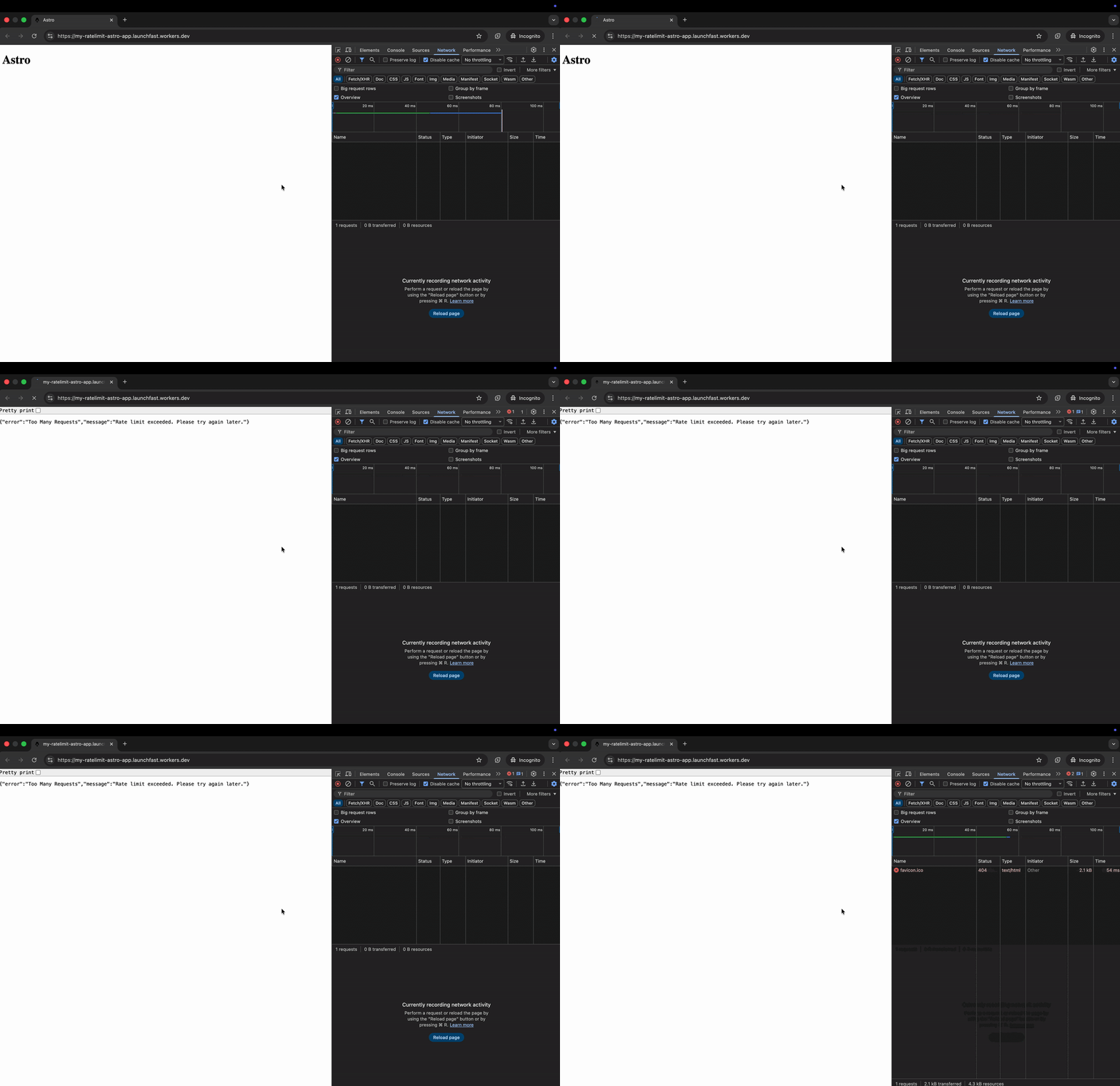 Diese Middleware:
1. Prüft, ob die aktuelle Route Rate Limiting haben soll
2. Verwendet die IP-Adresse des Clients als Rate Limit Schlüssel
3. Gibt eine `429 Too Many Requests` Antwort zurück, wenn das Limit überschritten wird
## Rate Limiting in einem API Endpoint
Für granularere Kontrolle, wende Rate Limiting direkt in deinen API-Endpunkten an. Erstelle `src/pages/api/data.ts`:
```typescript
// File: src/pages/api/data.ts
import type { APIContext } from 'astro'
export async function GET({ request, locals }: APIContext) {
const rateLimiter = locals.runtime?.env?.MY_RATE_LIMITER
if (rateLimiter) {
const clientIP = request.headers.get('CF-Connecting-IP') || 'unknown'
const { success } = await rateLimiter.limit({ key: clientIP })
if (!success) {
return new Response(
JSON.stringify({ error: 'Rate Limit überschritten' }),
{
status: 429,
headers: { 'Content-Type': 'application/json' },
}
)
}
}
// Deine Endpoint-Logik hier
return new Response(
JSON.stringify({ message: 'Erfolg', data: { timestamp: Date.now() } }),
{
status: 200,
headers: { 'Content-Type': 'application/json' },
}
)
}
```
Diese Middleware:
1. Prüft, ob die aktuelle Route Rate Limiting haben soll
2. Verwendet die IP-Adresse des Clients als Rate Limit Schlüssel
3. Gibt eine `429 Too Many Requests` Antwort zurück, wenn das Limit überschritten wird
## Rate Limiting in einem API Endpoint
Für granularere Kontrolle, wende Rate Limiting direkt in deinen API-Endpunkten an. Erstelle `src/pages/api/data.ts`:
```typescript
// File: src/pages/api/data.ts
import type { APIContext } from 'astro'
export async function GET({ request, locals }: APIContext) {
const rateLimiter = locals.runtime?.env?.MY_RATE_LIMITER
if (rateLimiter) {
const clientIP = request.headers.get('CF-Connecting-IP') || 'unknown'
const { success } = await rateLimiter.limit({ key: clientIP })
if (!success) {
return new Response(
JSON.stringify({ error: 'Rate Limit überschritten' }),
{
status: 429,
headers: { 'Content-Type': 'application/json' },
}
)
}
}
// Deine Endpoint-Logik hier
return new Response(
JSON.stringify({ message: 'Erfolg', data: { timestamp: Date.now() } }),
{
status: 200,
headers: { 'Content-Type': 'application/json' },
}
)
}
```
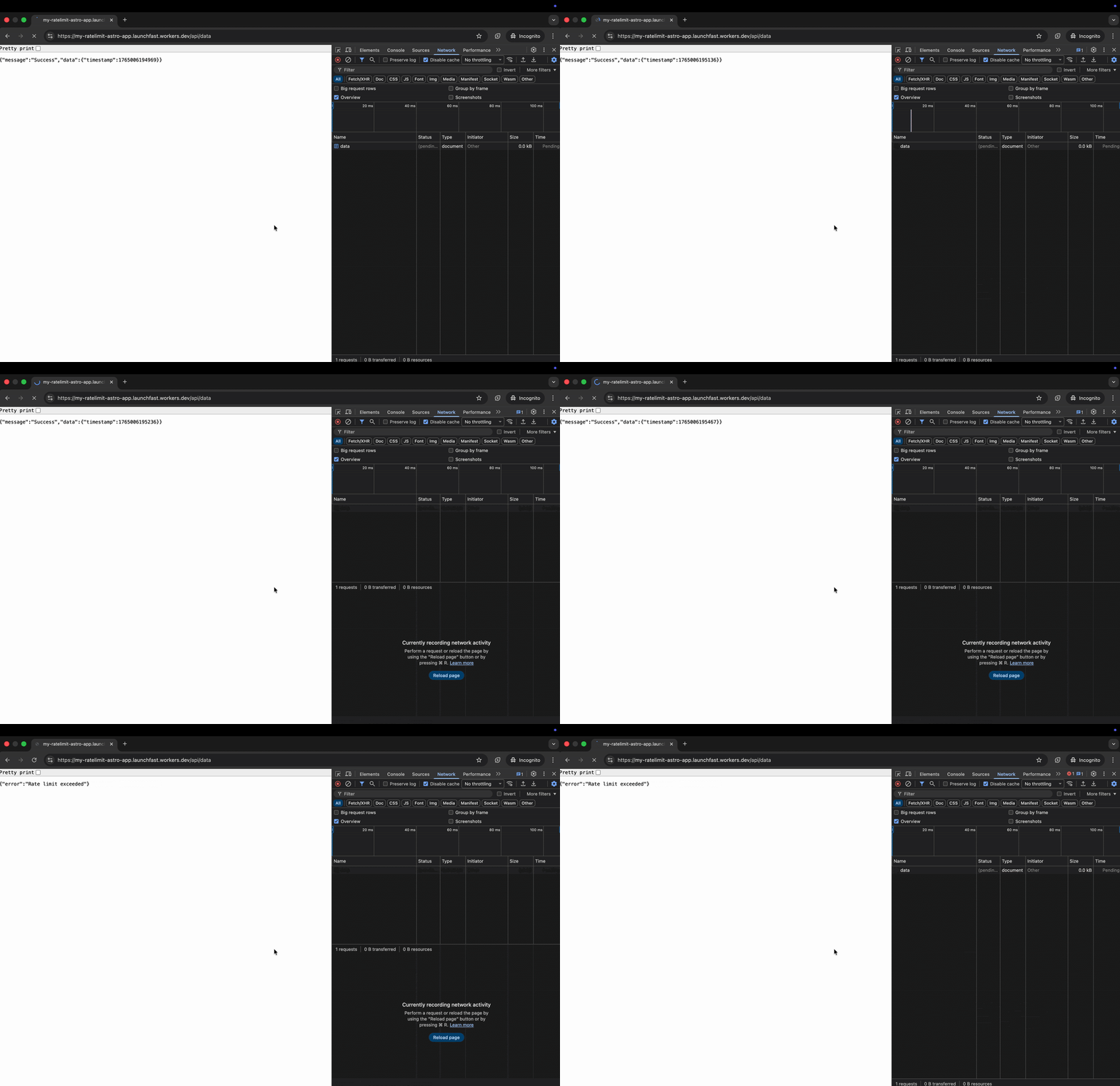 Dieser Endpoint:
1. Verwendet die IP-Adresse des Clients als Rate Limit Schlüssel
2. Gibt eine `429 Rate Limit Exceeded` Antwort zurück, wenn das Limit überschritten wird
### Benutzerdefinierte Rate Limit Schlüssel
Du kannst verschiedene Schlüssel für unterschiedliche Rate Limiting Strategien verwenden:
```typescript
// Rate Limit nach Benutzer-ID (für authentifizierte Routen)
const userId = locals.user?.id
const { success } = await rateLimiter.limit({ key: `user:${userId}` })
// Rate Limit nach IP + Endpoint Kombination
const key = `${clientIP}:${url.pathname}`
const { success } = await rateLimiter.limit({ key })
// Rate Limit nach API-Schlüssel
const apiKey = request.headers.get('X-API-Key') || 'anonymous'
const { success } = await rateLimiter.limit({ key: `api:${apiKey}` })
```
## Auf Cloudflare Workers deployen
Deploye deine Rate-Limiting-aktivierte Astro-Anwendung in die Produktion:
```bash
# Projekt bauen
npm run build
# Auf Cloudflare Workers deployen
npx wrangler deploy
```
## Fazit
Durch die Implementierung von Rate Limiting mit Cloudflare Workers in deiner Astro-App blockierst du effektiv missbräuchliche Anfragen - wie Brute-Force-Angriffe, API-Übernutzung und DDoS-Versuche am Edge. Dies verbessert sowohl die Sicherheit als auch die Performance deiner Anwendung, indem Bedrohungen gestoppt werden, bevor sie deine Anwendungslogik erreichen.
Dieser Endpoint:
1. Verwendet die IP-Adresse des Clients als Rate Limit Schlüssel
2. Gibt eine `429 Rate Limit Exceeded` Antwort zurück, wenn das Limit überschritten wird
### Benutzerdefinierte Rate Limit Schlüssel
Du kannst verschiedene Schlüssel für unterschiedliche Rate Limiting Strategien verwenden:
```typescript
// Rate Limit nach Benutzer-ID (für authentifizierte Routen)
const userId = locals.user?.id
const { success } = await rateLimiter.limit({ key: `user:${userId}` })
// Rate Limit nach IP + Endpoint Kombination
const key = `${clientIP}:${url.pathname}`
const { success } = await rateLimiter.limit({ key })
// Rate Limit nach API-Schlüssel
const apiKey = request.headers.get('X-API-Key') || 'anonymous'
const { success } = await rateLimiter.limit({ key: `api:${apiKey}` })
```
## Auf Cloudflare Workers deployen
Deploye deine Rate-Limiting-aktivierte Astro-Anwendung in die Produktion:
```bash
# Projekt bauen
npm run build
# Auf Cloudflare Workers deployen
npx wrangler deploy
```
## Fazit
Durch die Implementierung von Rate Limiting mit Cloudflare Workers in deiner Astro-App blockierst du effektiv missbräuchliche Anfragen - wie Brute-Force-Angriffe, API-Übernutzung und DDoS-Versuche am Edge. Dies verbessert sowohl die Sicherheit als auch die Performance deiner Anwendung, indem Bedrohungen gestoppt werden, bevor sie deine Anwendungslogik erreichen.