---
title: "Implementar Incremental Static Regeneration (ISR) en Astro con Cloudflare KV"
description: "Aprenda cómo implementar patrones similares a ISR en Astro usando Cloudflare KV para revalidación bajo demanda. Construya una estrategia de renderizado híbrida que combine el rendimiento de SSG con la flexibilidad de SSR."
source: "https://www.launchfa.st/es/blog/astro-incremental-static-regeneration-cloudflare-kv"
author: "Rishi Raj Jain"
created_at: 2025-12-03T12:00:00.000Z
keywords: "astro, incremental static regeneration, isr, cloudflare kv, caching, performance, hybrid rendering, on-demand revalidation"
---
> **Site index for agents**
> Fetch https://www.launchfa.st/llms.txt to discover every page on this site.
> Every page is also available as Markdown by appending `.md` to its URL.
 Una de las funciones más potentes de Next.js es **Incremental Static Regeneration (ISR)**, que le permite actualizar páginas estáticas después del despliegue sin reconstruir todo el sitio. Aunque Astro no incluye soporte nativo para ISR, puede implementar un patrón similar usando renderizado del lado del servidor con Cloudflare KV como capa de caché distribuida.
En esta guía completa, aprenderá a construir un sistema similar a ISR en Astro que le ofrece lo mejor de ambos mundos: el rendimiento de la generación estática con la flexibilidad de las actualizaciones dinámicas. Cubriremos la revalidación basada en tiempo, la revalidación bajo demanda mediante webhooks y estrategias de invalidación de caché.
- [Ver proyecto de ejemplo en GitHub](https://github.com/rishi-raj-jain/my-isr-app)
## Requisitos previos
Necesitará lo siguiente:
- [Node.js 20](https://nodejs.org/en/blog/announcements/v20-release-announce) o posterior
- Una cuenta de [Cloudflare](https://dash.cloudflare.com/sign-up)
## Entender ISR y por qué importa
La generación estática tradicional (SSG) tiene una limitación importante: cada vez que actualiza contenido, debe reconstruir y volver a desplegar todo el sitio. En sitios con miles de páginas, esto puede tardar minutos o incluso horas.
Incremental Static Regeneration resuelve esto con un enfoque híbrido:
1. **Servir contenido obsoleto de inmediato**: cuando un usuario solicita una página, sirva la versión en caché al instante
2. **Revalidar en segundo plano**: si la caché está obsoleta (según un umbral de tiempo), dispare una regeneración en segundo plano
3. **Actualizar la caché**: una vez completada la regeneración, actualice la caché para futuras solicitudes
Esto le proporciona:
- **⚡ Tiempos de respuesta ultrarrápidos** (sirviendo desde caché)
- **🔄 Contenido siempre actualizado** (revalidación automática)
- **📉 Tiempos de compilación reducidos** (sin necesidad de reconstruir todo)
- **💰 Costos más bajos** (menos tiempo de cómputo en builds)
## Cómo implementaremos ISR en Astro
Nuestra implementación usará:
- **Astro con SSR**: renderizado del lado del servidor para generación dinámica de páginas
- **Cloudflare KV**: almacén clave-valor distribuido para cachear HTML renderizado
- **Middleware**: lógica personalizada para comprobar la validez de la caché y gestionar la revalidación
- **Webhooks**: endpoints de API para invalidación de caché bajo demanda
El flujo será el siguiente:
```
User Request → Middleware → Check KV Cache
↓
Cache exists & fresh?
↓
Yes ─────────────→ Return cached HTML
↓ No
Generate page → Store in KV → Return HTML
```
## Crear una nueva aplicación Astro
Comencemos creando un nuevo proyecto Astro. Ejecute el siguiente comando:
```bash
npm create astro@latest my-isr-app
```
Cuando se le solicite, elija:
- `Use minimal (empty) template` cuando se le pregunte cómo iniciar el nuevo proyecto.
- `Yes` cuando se le pregunte si desea instalar dependencias.
- `Yes` cuando se le pregunte si desea inicializar un repositorio git.
Una vez hecho esto, puede moverse al directorio del proyecto e iniciar la aplicación:
```bash
cd my-isr-app
npm install wrangler
npm run dev
```
La aplicación debería estar ejecutándose en [localhost:4321](http://localhost:4321/).
## Integrar el adaptador de Cloudflare en su proyecto Astro
Para desplegar su proyecto Astro en Cloudflare Workers y usar Cloudflare KV, necesita instalar el adaptador de Cloudflare. Ejecute el comando siguiente:
```bash
npx astro add cloudflare --yes
```
Actualice `astro.config.mjs` para que **output** sea **server**:
```javascript
// File: astro.config.mjs
import { defineConfig } from 'astro/config';
import cloudflare from '@astrojs/cloudflare';
export default defineConfig({
output: 'server',
adapter: cloudflare()
});
```
## Configurar Cloudflare KV para caché
Cloudflare KV (Key-Value) es un almacén clave-valor distribuido globalmente, ideal para cachear páginas renderizadas en el edge.
### Crear un namespace de KV
Primero, cree un namespace de KV para su caché:
```bash
# Create a production KV namespace
npx wrangler kv namespace create ISR_CACHE
```
Cuando se le solicite, elija lo siguiente:
- Would you like Wrangler to add it on your behalf? … **yes**
- What binding name would you like to use? … **ISR_CREATE**
- For local dev, do you want to connect to the remote resource instead of a local resource? … **yes**
Creará automáticamente un archivo **wrangler.jsonc**.
### Configurar tipos de entorno
Cree un archivo nuevo `src/env.d.ts` (o actualice el existente) para añadir definiciones de TypeScript para el binding de KV:
```typescript
///
type KVNamespace = import('@cloudflare/workers-types').KVNamespace
type ENV = {
ISR_CACHE: KVNamespace
}
type Runtime = import('@astrojs/cloudflare').Runtime
declare namespace App {
interface Locals extends Runtime {
// Add custom locals here
}
}
```
Esto garantiza que TypeScript conozca su namespace de KV y proporcione autocompletado adecuado.
## Crear la utilidad de caché ISR
Ahora creemos una utilidad reutilizable para gestionar la caché ISR. Cree un archivo nuevo `src/lib/isr-cache.ts`:
```typescript
export interface ISRCacheOptions {
/**
* Time in seconds before cache is considered stale
* @default 60
*/
revalidate?: number
/**
* Custom cache key prefix
* @default 'isr'
*/
prefix?: string
/**
* Whether to enable cache
* @default true
*/
enabled?: boolean
}
export interface CachedData {
/** The cached HTML content */
html: string
/** Timestamp when the cache was created */
timestamp: number
/** Revalidation time in seconds */
revalidate: number
/** URL that was cached */
url: string
}
export class ISRCache {
private kv: KVNamespace
private options: Required
constructor(kv: KVNamespace, options: ISRCacheOptions = {}) {
this.kv = kv
this.options = {
revalidate: options.revalidate ?? 60,
prefix: options.prefix ?? 'isr',
enabled: options.enabled ?? true,
}
}
/**
* Generate a cache key for a given URL
*/
private getCacheKey(url: string): string {
// Remove query params and hash for consistent caching
const cleanUrl = url.split('?')[0].split('#')[0]
return `${this.options.prefix}:${cleanUrl}`
}
/**
* Get cached data if it exists
*/
async get(url: string): Promise {
if (!this.options.enabled) return null
try {
const key = this.getCacheKey(url)
const cached = await this.kv.get(key, 'json') as CachedData | null
return cached
} catch (error) {
console.error('[ISR Cache] Error getting cache:', error)
return null
}
}
/**
* Check if cached data is still fresh
*/
isFresh(cachedData: CachedData): boolean {
const now = Date.now()
const age = (now - cachedData.timestamp) / 1000 // Convert to seconds
return age < cachedData.revalidate
}
/**
* Store HTML in cache
*/
async set(url: string, html: string, revalidate?: number): Promise {
if (!this.options.enabled) return
try {
const key = this.getCacheKey(url)
const data: CachedData = {
html,
timestamp: Date.now(),
revalidate: revalidate ?? this.options.revalidate,
url,
}
// Store in KV with metadata
await this.kv.put(key, JSON.stringify(data), {
// Optional: Set expiration time to automatically clean up old cache
// expirationTtl: (revalidate ?? this.options.revalidate) * 2,
metadata: {
url,
cachedAt: new Date().toISOString(),
},
})
console.log(`[ISR Cache] Cached: ${url} (revalidate: ${data.revalidate}s)`)
} catch (error) {
console.error('[ISR Cache] Error setting cache:', error)
}
}
/**
* Invalidate (delete) cache for a specific URL
*/
async invalidate(url: string): Promise {
try {
const key = this.getCacheKey(url)
await this.kv.delete(key)
console.log(`[ISR Cache] Invalidated: ${url}`)
return true
} catch (error) {
console.error('[ISR Cache] Error invalidating cache:', error)
return false
}
}
/**
* Invalidate multiple URLs at once
*/
async invalidateMany(urls: string[]): Promise {
let invalidated = 0
await Promise.all(
urls.map(async (url) => {
const success = await this.invalidate(url)
if (success) invalidated++
})
)
return invalidated
}
/**
* List all cached URLs with a given prefix
*/
async list(prefix?: string): Promise {
try {
const listPrefix = prefix ? `${this.options.prefix}:${prefix}` : `${this.options.prefix}:`
const list = await this.kv.list({ prefix: listPrefix })
return list.keys.map((key) => key.name.replace(`${this.options.prefix}:`, ''))
} catch (error) {
console.error('[ISR Cache] Error listing cache:', error)
return []
}
}
/**
* Get cache statistics
*/
async getStats(): Promise<{
totalKeys: number
keys: string[]
}> {
const keys = await this.list()
return {
totalKeys: keys.length,
keys,
}
}
}
/**
* Helper function to create an ISR cache instance
*/
export function createISRCache(locals: App.Locals, options?: ISRCacheOptions): ISRCache {
const kv = locals.runtime.env.ISR_CREATE
if (!kv) {
throw new Error('ISR_CREATE KV namespace not found. Make sure it is configured in wrangler.toml')
}
return new ISRCache(kv, options)
}
```
Esta utilidad proporciona una API clara para:
- **Obtener páginas en caché**: `cache.get(url)`
- **Comprobar frescura**: `cache.isFresh(data)`
- **Guardar en caché**: `cache.set(url, html, revalidate)`
- **Invalidar caché**: `cache.invalidate(url)` o `cache.invalidateMany(urls)`
- **Listar páginas en caché**: `cache.list()`
## Implementar revalidación basada en tiempo
Ahora creemos middleware que implemente el patrón ISR. Cree un archivo nuevo `src/middleware.ts`:
```typescript
import { defineMiddleware } from 'astro:middleware'
import { createISRCache } from './lib/isr-cache'
const revalidate = 2
export const onRequest = defineMiddleware(async (context, next) => {
const { request, locals, url } = context
// Only apply ISR to GET requests for HTML pages
if (request.method !== 'GET') {
return next()
}
// Skip ISR for API routes and static assets
if (url.pathname.startsWith('/api/') || url.pathname.match(/\.(js|css|png|jpg|svg|ico|woff|woff2)$/)) {
return next()
}
// Skip ISR if KV is not available (local development)
if (!locals.runtime?.env?.ISR_CREATE) {
console.log('[ISR] KV not available, skipping cache')
return next()
}
try {
// Create ISR cache instance with 60 second default revalidation
const cache = createISRCache(locals, {
revalidate,
enabled: true,
})
// Try to get cached version
const cached = await cache.get(url.pathname)
if (cached) {
// Check if cache is still fresh
if (cache.isFresh(cached)) {
console.log(`[ISR] Cache HIT (fresh): ${url.pathname}`)
// Return cached HTML with cache headers
return new Response(cached.html, {
status: 200,
headers: {
'Content-Type': 'text/html; charset=utf-8',
'Cache-Control': 'public, s-maxage=31536000, stale-while-revalidate',
'X-Cache-Status': 'HIT',
'X-Cache-Age': String(Math.floor((Date.now() - cached.timestamp) / 1000)),
},
})
} else {
console.log(`[ISR] Cache HIT (stale): ${url.pathname}`)
// Cache is stale, but serve it anyway while we regenerate
// This is the "stale-while-revalidate" pattern
// Return stale content immediately
const response = new Response(cached.html, {
status: 200,
headers: {
'Content-Type': 'text/html; charset=utf-8',
'Cache-Control': 'public, s-maxage=31536000, stale-while-revalidate',
'X-Cache-Status': 'STALE',
'X-Cache-Age': String(Math.floor((Date.now() - cached.timestamp) / 1000)),
},
})
// Trigger background regeneration (non-blocking)
context.locals.runtime.ctx.waitUntil(
(async () => {
try {
console.log(`[ISR] Regenerating in background: ${url.pathname}`)
// Generate fresh page
const freshResponse = await next()
const freshHtml = await freshResponse.text()
// Update cache
await cache.set(url.pathname, freshHtml, 60)
console.log(`[ISR] Background regeneration complete: ${url.pathname}`)
} catch (error) {
console.error(`[ISR] Background regeneration failed: ${url.pathname}`, error)
}
})()
)
return response
}
} else {
console.log(`[ISR] Cache MISS: ${url.pathname}`)
// No cache exists, generate page
const response = await next()
// Only cache successful HTML responses
if (response.status === 200 && response.headers.get('content-type')?.includes('text/html')) {
const html = await response.text()
// Store in cache (non-blocking)
context.locals.runtime.ctx.waitUntil(cache.set(url.pathname, html, 60))
// Return response with cache miss header
return new Response(html, {
status: response.status,
headers: {
...Object.fromEntries(response.headers),
'X-Cache-Status': 'MISS',
},
})
}
return response
}
} catch (error) {
console.error('[ISR] Error in middleware:', error)
// On error, fall back to normal SSR
return next()
}
})
```
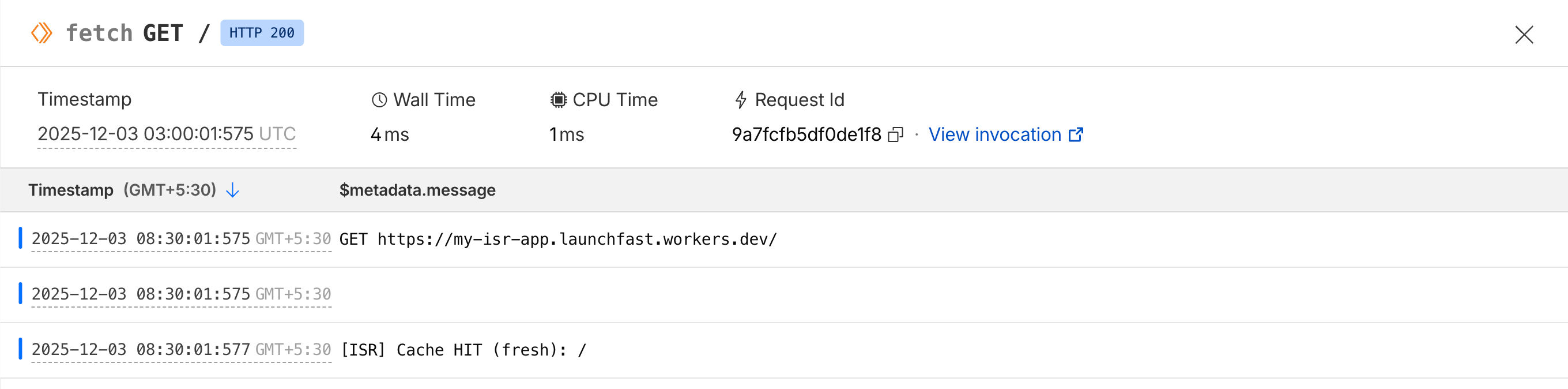
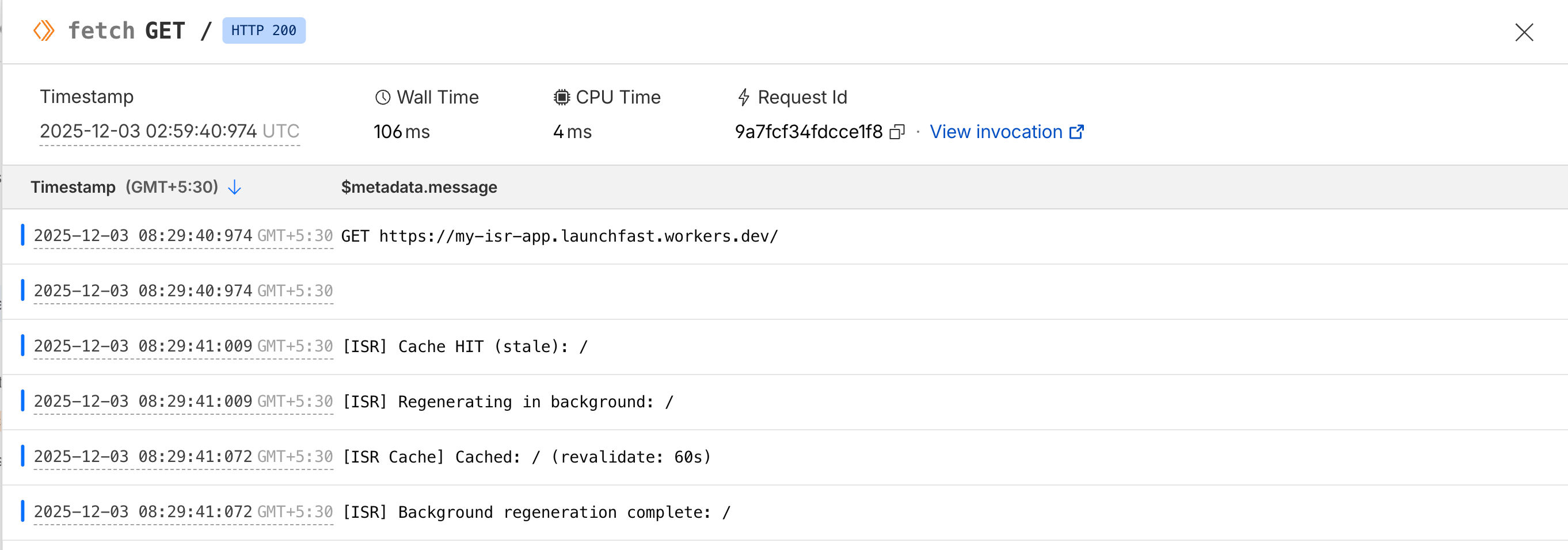
Este middleware implementa el patrón ISR completo:
1. **Cache HIT (fresh)**: devuelve el HTML en caché de inmediato
2. **Cache HIT (stale)**: devuelve el HTML obsoleto de inmediato y regenera en segundo plano
3. **Cache MISS**: genera la página, la guarda en caché y devuelve el HTML
La clave está en el patrón `stale-while-revalidate`: los usuarios siempre reciben respuestas instantáneas, incluso mientras se actualiza la caché.
#### Sirviendo aciertos de caché
Una de las funciones más potentes de Next.js es **Incremental Static Regeneration (ISR)**, que le permite actualizar páginas estáticas después del despliegue sin reconstruir todo el sitio. Aunque Astro no incluye soporte nativo para ISR, puede implementar un patrón similar usando renderizado del lado del servidor con Cloudflare KV como capa de caché distribuida.
En esta guía completa, aprenderá a construir un sistema similar a ISR en Astro que le ofrece lo mejor de ambos mundos: el rendimiento de la generación estática con la flexibilidad de las actualizaciones dinámicas. Cubriremos la revalidación basada en tiempo, la revalidación bajo demanda mediante webhooks y estrategias de invalidación de caché.
- [Ver proyecto de ejemplo en GitHub](https://github.com/rishi-raj-jain/my-isr-app)
## Requisitos previos
Necesitará lo siguiente:
- [Node.js 20](https://nodejs.org/en/blog/announcements/v20-release-announce) o posterior
- Una cuenta de [Cloudflare](https://dash.cloudflare.com/sign-up)
## Entender ISR y por qué importa
La generación estática tradicional (SSG) tiene una limitación importante: cada vez que actualiza contenido, debe reconstruir y volver a desplegar todo el sitio. En sitios con miles de páginas, esto puede tardar minutos o incluso horas.
Incremental Static Regeneration resuelve esto con un enfoque híbrido:
1. **Servir contenido obsoleto de inmediato**: cuando un usuario solicita una página, sirva la versión en caché al instante
2. **Revalidar en segundo plano**: si la caché está obsoleta (según un umbral de tiempo), dispare una regeneración en segundo plano
3. **Actualizar la caché**: una vez completada la regeneración, actualice la caché para futuras solicitudes
Esto le proporciona:
- **⚡ Tiempos de respuesta ultrarrápidos** (sirviendo desde caché)
- **🔄 Contenido siempre actualizado** (revalidación automática)
- **📉 Tiempos de compilación reducidos** (sin necesidad de reconstruir todo)
- **💰 Costos más bajos** (menos tiempo de cómputo en builds)
## Cómo implementaremos ISR en Astro
Nuestra implementación usará:
- **Astro con SSR**: renderizado del lado del servidor para generación dinámica de páginas
- **Cloudflare KV**: almacén clave-valor distribuido para cachear HTML renderizado
- **Middleware**: lógica personalizada para comprobar la validez de la caché y gestionar la revalidación
- **Webhooks**: endpoints de API para invalidación de caché bajo demanda
El flujo será el siguiente:
```
User Request → Middleware → Check KV Cache
↓
Cache exists & fresh?
↓
Yes ─────────────→ Return cached HTML
↓ No
Generate page → Store in KV → Return HTML
```
## Crear una nueva aplicación Astro
Comencemos creando un nuevo proyecto Astro. Ejecute el siguiente comando:
```bash
npm create astro@latest my-isr-app
```
Cuando se le solicite, elija:
- `Use minimal (empty) template` cuando se le pregunte cómo iniciar el nuevo proyecto.
- `Yes` cuando se le pregunte si desea instalar dependencias.
- `Yes` cuando se le pregunte si desea inicializar un repositorio git.
Una vez hecho esto, puede moverse al directorio del proyecto e iniciar la aplicación:
```bash
cd my-isr-app
npm install wrangler
npm run dev
```
La aplicación debería estar ejecutándose en [localhost:4321](http://localhost:4321/).
## Integrar el adaptador de Cloudflare en su proyecto Astro
Para desplegar su proyecto Astro en Cloudflare Workers y usar Cloudflare KV, necesita instalar el adaptador de Cloudflare. Ejecute el comando siguiente:
```bash
npx astro add cloudflare --yes
```
Actualice `astro.config.mjs` para que **output** sea **server**:
```javascript
// File: astro.config.mjs
import { defineConfig } from 'astro/config';
import cloudflare from '@astrojs/cloudflare';
export default defineConfig({
output: 'server',
adapter: cloudflare()
});
```
## Configurar Cloudflare KV para caché
Cloudflare KV (Key-Value) es un almacén clave-valor distribuido globalmente, ideal para cachear páginas renderizadas en el edge.
### Crear un namespace de KV
Primero, cree un namespace de KV para su caché:
```bash
# Create a production KV namespace
npx wrangler kv namespace create ISR_CACHE
```
Cuando se le solicite, elija lo siguiente:
- Would you like Wrangler to add it on your behalf? … **yes**
- What binding name would you like to use? … **ISR_CREATE**
- For local dev, do you want to connect to the remote resource instead of a local resource? … **yes**
Creará automáticamente un archivo **wrangler.jsonc**.
### Configurar tipos de entorno
Cree un archivo nuevo `src/env.d.ts` (o actualice el existente) para añadir definiciones de TypeScript para el binding de KV:
```typescript
///
type KVNamespace = import('@cloudflare/workers-types').KVNamespace
type ENV = {
ISR_CACHE: KVNamespace
}
type Runtime = import('@astrojs/cloudflare').Runtime
declare namespace App {
interface Locals extends Runtime {
// Add custom locals here
}
}
```
Esto garantiza que TypeScript conozca su namespace de KV y proporcione autocompletado adecuado.
## Crear la utilidad de caché ISR
Ahora creemos una utilidad reutilizable para gestionar la caché ISR. Cree un archivo nuevo `src/lib/isr-cache.ts`:
```typescript
export interface ISRCacheOptions {
/**
* Time in seconds before cache is considered stale
* @default 60
*/
revalidate?: number
/**
* Custom cache key prefix
* @default 'isr'
*/
prefix?: string
/**
* Whether to enable cache
* @default true
*/
enabled?: boolean
}
export interface CachedData {
/** The cached HTML content */
html: string
/** Timestamp when the cache was created */
timestamp: number
/** Revalidation time in seconds */
revalidate: number
/** URL that was cached */
url: string
}
export class ISRCache {
private kv: KVNamespace
private options: Required
constructor(kv: KVNamespace, options: ISRCacheOptions = {}) {
this.kv = kv
this.options = {
revalidate: options.revalidate ?? 60,
prefix: options.prefix ?? 'isr',
enabled: options.enabled ?? true,
}
}
/**
* Generate a cache key for a given URL
*/
private getCacheKey(url: string): string {
// Remove query params and hash for consistent caching
const cleanUrl = url.split('?')[0].split('#')[0]
return `${this.options.prefix}:${cleanUrl}`
}
/**
* Get cached data if it exists
*/
async get(url: string): Promise {
if (!this.options.enabled) return null
try {
const key = this.getCacheKey(url)
const cached = await this.kv.get(key, 'json') as CachedData | null
return cached
} catch (error) {
console.error('[ISR Cache] Error getting cache:', error)
return null
}
}
/**
* Check if cached data is still fresh
*/
isFresh(cachedData: CachedData): boolean {
const now = Date.now()
const age = (now - cachedData.timestamp) / 1000 // Convert to seconds
return age < cachedData.revalidate
}
/**
* Store HTML in cache
*/
async set(url: string, html: string, revalidate?: number): Promise {
if (!this.options.enabled) return
try {
const key = this.getCacheKey(url)
const data: CachedData = {
html,
timestamp: Date.now(),
revalidate: revalidate ?? this.options.revalidate,
url,
}
// Store in KV with metadata
await this.kv.put(key, JSON.stringify(data), {
// Optional: Set expiration time to automatically clean up old cache
// expirationTtl: (revalidate ?? this.options.revalidate) * 2,
metadata: {
url,
cachedAt: new Date().toISOString(),
},
})
console.log(`[ISR Cache] Cached: ${url} (revalidate: ${data.revalidate}s)`)
} catch (error) {
console.error('[ISR Cache] Error setting cache:', error)
}
}
/**
* Invalidate (delete) cache for a specific URL
*/
async invalidate(url: string): Promise {
try {
const key = this.getCacheKey(url)
await this.kv.delete(key)
console.log(`[ISR Cache] Invalidated: ${url}`)
return true
} catch (error) {
console.error('[ISR Cache] Error invalidating cache:', error)
return false
}
}
/**
* Invalidate multiple URLs at once
*/
async invalidateMany(urls: string[]): Promise {
let invalidated = 0
await Promise.all(
urls.map(async (url) => {
const success = await this.invalidate(url)
if (success) invalidated++
})
)
return invalidated
}
/**
* List all cached URLs with a given prefix
*/
async list(prefix?: string): Promise {
try {
const listPrefix = prefix ? `${this.options.prefix}:${prefix}` : `${this.options.prefix}:`
const list = await this.kv.list({ prefix: listPrefix })
return list.keys.map((key) => key.name.replace(`${this.options.prefix}:`, ''))
} catch (error) {
console.error('[ISR Cache] Error listing cache:', error)
return []
}
}
/**
* Get cache statistics
*/
async getStats(): Promise<{
totalKeys: number
keys: string[]
}> {
const keys = await this.list()
return {
totalKeys: keys.length,
keys,
}
}
}
/**
* Helper function to create an ISR cache instance
*/
export function createISRCache(locals: App.Locals, options?: ISRCacheOptions): ISRCache {
const kv = locals.runtime.env.ISR_CREATE
if (!kv) {
throw new Error('ISR_CREATE KV namespace not found. Make sure it is configured in wrangler.toml')
}
return new ISRCache(kv, options)
}
```
Esta utilidad proporciona una API clara para:
- **Obtener páginas en caché**: `cache.get(url)`
- **Comprobar frescura**: `cache.isFresh(data)`
- **Guardar en caché**: `cache.set(url, html, revalidate)`
- **Invalidar caché**: `cache.invalidate(url)` o `cache.invalidateMany(urls)`
- **Listar páginas en caché**: `cache.list()`
## Implementar revalidación basada en tiempo
Ahora creemos middleware que implemente el patrón ISR. Cree un archivo nuevo `src/middleware.ts`:
```typescript
import { defineMiddleware } from 'astro:middleware'
import { createISRCache } from './lib/isr-cache'
const revalidate = 2
export const onRequest = defineMiddleware(async (context, next) => {
const { request, locals, url } = context
// Only apply ISR to GET requests for HTML pages
if (request.method !== 'GET') {
return next()
}
// Skip ISR for API routes and static assets
if (url.pathname.startsWith('/api/') || url.pathname.match(/\.(js|css|png|jpg|svg|ico|woff|woff2)$/)) {
return next()
}
// Skip ISR if KV is not available (local development)
if (!locals.runtime?.env?.ISR_CREATE) {
console.log('[ISR] KV not available, skipping cache')
return next()
}
try {
// Create ISR cache instance with 60 second default revalidation
const cache = createISRCache(locals, {
revalidate,
enabled: true,
})
// Try to get cached version
const cached = await cache.get(url.pathname)
if (cached) {
// Check if cache is still fresh
if (cache.isFresh(cached)) {
console.log(`[ISR] Cache HIT (fresh): ${url.pathname}`)
// Return cached HTML with cache headers
return new Response(cached.html, {
status: 200,
headers: {
'Content-Type': 'text/html; charset=utf-8',
'Cache-Control': 'public, s-maxage=31536000, stale-while-revalidate',
'X-Cache-Status': 'HIT',
'X-Cache-Age': String(Math.floor((Date.now() - cached.timestamp) / 1000)),
},
})
} else {
console.log(`[ISR] Cache HIT (stale): ${url.pathname}`)
// Cache is stale, but serve it anyway while we regenerate
// This is the "stale-while-revalidate" pattern
// Return stale content immediately
const response = new Response(cached.html, {
status: 200,
headers: {
'Content-Type': 'text/html; charset=utf-8',
'Cache-Control': 'public, s-maxage=31536000, stale-while-revalidate',
'X-Cache-Status': 'STALE',
'X-Cache-Age': String(Math.floor((Date.now() - cached.timestamp) / 1000)),
},
})
// Trigger background regeneration (non-blocking)
context.locals.runtime.ctx.waitUntil(
(async () => {
try {
console.log(`[ISR] Regenerating in background: ${url.pathname}`)
// Generate fresh page
const freshResponse = await next()
const freshHtml = await freshResponse.text()
// Update cache
await cache.set(url.pathname, freshHtml, 60)
console.log(`[ISR] Background regeneration complete: ${url.pathname}`)
} catch (error) {
console.error(`[ISR] Background regeneration failed: ${url.pathname}`, error)
}
})()
)
return response
}
} else {
console.log(`[ISR] Cache MISS: ${url.pathname}`)
// No cache exists, generate page
const response = await next()
// Only cache successful HTML responses
if (response.status === 200 && response.headers.get('content-type')?.includes('text/html')) {
const html = await response.text()
// Store in cache (non-blocking)
context.locals.runtime.ctx.waitUntil(cache.set(url.pathname, html, 60))
// Return response with cache miss header
return new Response(html, {
status: response.status,
headers: {
...Object.fromEntries(response.headers),
'X-Cache-Status': 'MISS',
},
})
}
return response
}
} catch (error) {
console.error('[ISR] Error in middleware:', error)
// On error, fall back to normal SSR
return next()
}
})
```
Este middleware implementa el patrón ISR completo:
1. **Cache HIT (fresh)**: devuelve el HTML en caché de inmediato
2. **Cache HIT (stale)**: devuelve el HTML obsoleto de inmediato y regenera en segundo plano
3. **Cache MISS**: genera la página, la guarda en caché y devuelve el HTML
La clave está en el patrón `stale-while-revalidate`: los usuarios siempre reciben respuestas instantáneas, incluso mientras se actualiza la caché.
#### Sirviendo aciertos de caché
 #### Regenerando la caché automáticamente en segundo plano
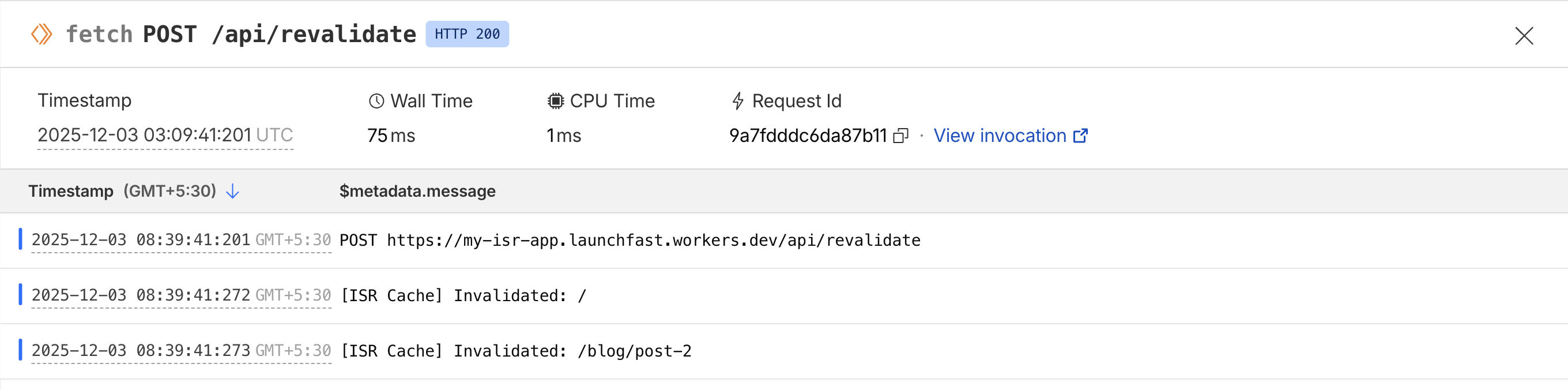
 ## Construir un endpoint de API de revalidación
Ahora creemos endpoints de API para revalidación bajo demanda. Esto es útil cuando desea invalidar la caché de inmediato (por ejemplo, cuando se actualiza contenido en su CMS).
Cree un archivo nuevo `src/pages/api/revalidate.ts`:
```typescript
import type { APIRoute } from 'astro'
import { createISRCache } from '../../lib/isr-cache'
/**
* POST /api/revalidate
*
* Invalidate cache for specific paths on-demand
*
* Body:
* {
* "secret": "your-secret-key",
* "paths": ["/", "/blog/post-2"]
* }
*/
export const POST: APIRoute = async ({ request, locals }) => {
try {
// Parse request body
const body = await request.json()
const { secret, paths } = body
// Validate secret (you should set this as an environment variable)
const REVALIDATION_SECRET = locals.runtime.env.REVALIDATION_SECRET || 'your-secret-key'
if (secret !== REVALIDATION_SECRET) {
return new Response(
JSON.stringify({
success: false,
error: 'Invalid secret',
}),
{
status: 401,
headers: { 'Content-Type': 'application/json' },
}
)
}
// Validate paths
if (!Array.isArray(paths) || paths.length === 0) {
return new Response(
JSON.stringify({
success: false,
error: 'Invalid paths array',
}),
{
status: 400,
headers: { 'Content-Type': 'application/json' },
}
)
}
// Create cache instance
const cache = createISRCache(locals)
// Invalidate all specified paths
const invalidated = await cache.invalidateMany(paths)
return new Response(
JSON.stringify({
success: true,
invalidated,
paths,
message: `Successfully invalidated ${invalidated} path(s)`,
}),
{
status: 200,
headers: { 'Content-Type': 'application/json' },
}
)
} catch (error) {
console.error('[Revalidate API] Error:', error)
return new Response(
JSON.stringify({
success: false,
error: error instanceof Error ? error.message : 'Unknown error',
}),
{
status: 500,
headers: { 'Content-Type': 'application/json' },
}
)
}
}
```
Ahora puede **invalidar la caché bajo demanda** con `POST /api/revalidate` pasando las rutas a invalidar.
Un ejemplo de cURL:
```
curl -X POST https://my-isr-app.launchfast.workers.dev/api/revalidate \
-H "Content-Type: application/json" \
-d '{"secret":"your-secret-key","paths":["/"]}'
```
## Construir un endpoint de API de revalidación
Ahora creemos endpoints de API para revalidación bajo demanda. Esto es útil cuando desea invalidar la caché de inmediato (por ejemplo, cuando se actualiza contenido en su CMS).
Cree un archivo nuevo `src/pages/api/revalidate.ts`:
```typescript
import type { APIRoute } from 'astro'
import { createISRCache } from '../../lib/isr-cache'
/**
* POST /api/revalidate
*
* Invalidate cache for specific paths on-demand
*
* Body:
* {
* "secret": "your-secret-key",
* "paths": ["/", "/blog/post-2"]
* }
*/
export const POST: APIRoute = async ({ request, locals }) => {
try {
// Parse request body
const body = await request.json()
const { secret, paths } = body
// Validate secret (you should set this as an environment variable)
const REVALIDATION_SECRET = locals.runtime.env.REVALIDATION_SECRET || 'your-secret-key'
if (secret !== REVALIDATION_SECRET) {
return new Response(
JSON.stringify({
success: false,
error: 'Invalid secret',
}),
{
status: 401,
headers: { 'Content-Type': 'application/json' },
}
)
}
// Validate paths
if (!Array.isArray(paths) || paths.length === 0) {
return new Response(
JSON.stringify({
success: false,
error: 'Invalid paths array',
}),
{
status: 400,
headers: { 'Content-Type': 'application/json' },
}
)
}
// Create cache instance
const cache = createISRCache(locals)
// Invalidate all specified paths
const invalidated = await cache.invalidateMany(paths)
return new Response(
JSON.stringify({
success: true,
invalidated,
paths,
message: `Successfully invalidated ${invalidated} path(s)`,
}),
{
status: 200,
headers: { 'Content-Type': 'application/json' },
}
)
} catch (error) {
console.error('[Revalidate API] Error:', error)
return new Response(
JSON.stringify({
success: false,
error: error instanceof Error ? error.message : 'Unknown error',
}),
{
status: 500,
headers: { 'Content-Type': 'application/json' },
}
)
}
}
```
Ahora puede **invalidar la caché bajo demanda** con `POST /api/revalidate` pasando las rutas a invalidar.
Un ejemplo de cURL:
```
curl -X POST https://my-isr-app.launchfast.workers.dev/api/revalidate \
-H "Content-Type: application/json" \
-d '{"secret":"your-secret-key","paths":["/"]}'
```
 ## Desplegar en Cloudflare Workers
Despliegue su aplicación en Cloudflare Workers:
```bash
# Build the project
npm run build
# Deploy to Cloudflare Workers
npx wrangler deploy
```
Después del despliegue:
1. Vaya a su panel de Cloudflare
2. Navegue a Workers
3. Añada la variable de entorno:
- Name: `REVALIDATION_SECRET`
- Value: Una cadena aleatoria segura
¡Su sistema ISR ya está en producción!
## Comparación con ISR de Next.js
Así se compara nuestra implementación de ISR en Astro con ISR de Next.js:
| Feature | Next.js ISR | Astro + Cloudflare KV ISR |
|---------|-------------|---------------------------|
| **Revalidación basada en tiempo** | ✅ Integrada | ✅ Implementación personalizada |
| **Revalidación bajo demanda** | ✅ `revalidatePath()` | ✅ Endpoint de API personalizado |
| **Stale-while-revalidate** | ✅ Automático | ✅ Implementado en middleware |
| **Caché en el edge** | ⚠️ Depende del hosting | ✅ Global vía Cloudflare |
| **Persistencia de caché** | ⚠️ Depende del hosting | ✅ Persistente en KV |
| **Complejidad de configuración** | ✅ Sin configuración | ⚠️ Configuración manual requerida |
| **Flexibilidad** | ⚠️ Limitada | ✅ Control total |
## Conclusión
¡Ha implementado con éxito Incremental Static Regeneration en Astro usando Cloudflare KV!
Aunque Astro no incluye ISR integrado como Next.js, esta implementación personalizada le ofrece aún más flexibilidad y control. Puede adaptar la lógica de caché a sus necesidades específicas, usar distintos backends de almacenamiento y optimizar para su caso de uso.
Si tiene preguntas o comentarios, no dude en contactarme en [Twitter](https://twitter.com/direct_messages/create/rishi_raj_jain_).
## Desplegar en Cloudflare Workers
Despliegue su aplicación en Cloudflare Workers:
```bash
# Build the project
npm run build
# Deploy to Cloudflare Workers
npx wrangler deploy
```
Después del despliegue:
1. Vaya a su panel de Cloudflare
2. Navegue a Workers
3. Añada la variable de entorno:
- Name: `REVALIDATION_SECRET`
- Value: Una cadena aleatoria segura
¡Su sistema ISR ya está en producción!
## Comparación con ISR de Next.js
Así se compara nuestra implementación de ISR en Astro con ISR de Next.js:
| Feature | Next.js ISR | Astro + Cloudflare KV ISR |
|---------|-------------|---------------------------|
| **Revalidación basada en tiempo** | ✅ Integrada | ✅ Implementación personalizada |
| **Revalidación bajo demanda** | ✅ `revalidatePath()` | ✅ Endpoint de API personalizado |
| **Stale-while-revalidate** | ✅ Automático | ✅ Implementado en middleware |
| **Caché en el edge** | ⚠️ Depende del hosting | ✅ Global vía Cloudflare |
| **Persistencia de caché** | ⚠️ Depende del hosting | ✅ Persistente en KV |
| **Complejidad de configuración** | ✅ Sin configuración | ⚠️ Configuración manual requerida |
| **Flexibilidad** | ⚠️ Limitada | ✅ Control total |
## Conclusión
¡Ha implementado con éxito Incremental Static Regeneration en Astro usando Cloudflare KV!
Aunque Astro no incluye ISR integrado como Next.js, esta implementación personalizada le ofrece aún más flexibilidad y control. Puede adaptar la lógica de caché a sus necesidades específicas, usar distintos backends de almacenamiento y optimizar para su caso de uso.
Si tiene preguntas o comentarios, no dude en contactarme en [Twitter](https://twitter.com/direct_messages/create/rishi_raj_jain_).