


One of the most powerful features in Next.js is Incremental Static Regeneration (ISR), which allows you to update static pages after deployment without rebuilding the entire site. While Astro doesn’t have built-in ISR support, you can implement a similar pattern using server-side rendering with Cloudflare KV as a distributed cache layer.
In this comprehensive guide, you’ll learn how to build an ISR-like system in Astro that gives you the best of both worlds: the performance of static generation with the flexibility of dynamic updates. We’ll cover time-based revalidation, on-demand revalidation via webhooks, and strategies for cache invalidation.
Prerequisites
You’ll need the following:
- Node.js 20 or later
- A Cloudflare account
Understanding ISR and Why It Matters
Traditional Static Site Generation (SSG) has a significant limitation: every time you update content, you need to rebuild and redeploy your entire site. For sites with thousands of pages, this can take minutes or even hours.
Incremental Static Regeneration solves this by introducing a hybrid approach:
- Serve Stale Content Immediately: When a user requests a page, serve the cached version instantly
- Revalidate in Background: If the cache is stale (based on a time threshold), trigger a regeneration in the background
- Update Cache: Once regeneration completes, update the cache for future requests
This gives you:
- ⚡ Lightning-fast response times (serving from cache)
- 🔄 Always up-to-date content (automatic revalidation)
- 📉 Reduced build times (no need to rebuild everything)
- 💰 Lower costs (less compute time for builds)
How We’ll Implement ISR in Astro
Our implementation will use:
- Astro with SSR: Server-side rendering for dynamic page generation
- Cloudflare KV: Distributed key-value store for caching rendered HTML
- Middleware: Custom logic to check cache validity and handle revalidation
- Webhooks: API endpoints for on-demand cache invalidation
The flow will look like this:
User Request → Middleware → Check KV Cache ↓ Cache exists & fresh? ↓ Yes ─────────────→ Return cached HTML ↓ No Generate page → Store in KV → Return HTMLCreate a new Astro application
Let’s get started by creating a new Astro project. Execute the following command:
npm create astro@latest my-isr-appWhen prompted, choose:
Use minimal (empty) templatewhen prompted on how to start the new project.Yeswhen prompted to install dependencies.Yeswhen prompted to initialize a git repository.
Once that’s done, you can move into the project directory and start the app:
cd my-isr-appnpm install wranglernpm run devThe app should be running on localhost:4321.
Integrate Cloudflare adapter in your Astro project
To deploy your Astro project to Cloudflare Workers and use Cloudflare KV, you need to install the Cloudflare adapter. Execute the command below:
npx astro add cloudflare --yesUpdate astro.config.mjs to have output as server:
import { defineConfig } from 'astro/config';import cloudflare from '@astrojs/cloudflare';
export default defineConfig({  output: 'server',  adapter: cloudflare()});
Set up Cloudflare KV for caching
Cloudflare KV (Key-Value) is a globally distributed key-value store that’s perfect for caching rendered pages at the edge.
Create a KV namespace
First, create a KV namespace for your cache:
# Create a production KV namespacenpx wrangler kv namespace create ISR_CACHEWhen prompted, choose the following:
- Would you like Wrangler to add it on your behalf? … yes
- What binding name would you like to use? … ISR_CREATE
- For local dev, do you want to connect to the remote resource instead of a local resource? … yes
It will automatically create a wrangler.jsonc file.
Configure environment types
Create a new file src/env.d.ts (or update the existing one) to add TypeScript definitions for the KV binding:
/// <reference types="astro/client" />
type KVNamespace = import('@cloudflare/workers-types').KVNamespacetype ENV = {  ISR_CACHE: KVNamespace}
type Runtime = import('@astrojs/cloudflare').Runtime<ENV>
declare namespace App {  interface Locals extends Runtime {    // Add custom locals here  }}
This ensures TypeScript knows about your KV namespace and provides proper autocomplete.
Create the ISR cache utility
Now let’s create a reusable utility for managing ISR cache. Create a new file src/lib/isr-cache.ts:
export interface ISRCacheOptions {  /**   * Time in seconds before cache is considered stale   * @default 60   */  revalidate?: number
  /**   * Custom cache key prefix   * @default 'isr'   */  prefix?: string
  /**   * Whether to enable cache   * @default true   */  enabled?: boolean}
export interface CachedData {  /** The cached HTML content */  html: string
  /** Timestamp when the cache was created */  timestamp: number
  /** Revalidation time in seconds */  revalidate: number
  /** URL that was cached */  url: string}
export class ISRCache {  private kv: KVNamespace  private options: Required<ISRCacheOptions>
  constructor(kv: KVNamespace, options: ISRCacheOptions = {}) {    this.kv = kv    this.options = {      revalidate: options.revalidate ?? 60,      prefix: options.prefix ?? 'isr',      enabled: options.enabled ?? true,    }  }
  /**   * Generate a cache key for a given URL   */  private getCacheKey(url: string): string {    // Remove query params and hash for consistent caching    const cleanUrl = url.split('?')[0].split('#')[0]    return `${this.options.prefix}:${cleanUrl}`  }
  /**   * Get cached data if it exists   */  async get(url: string): Promise<CachedData | null> {    if (!this.options.enabled) return null
    try {      const key = this.getCacheKey(url)      const cached = await this.kv.get(key, 'json') as CachedData | null
      return cached    } catch (error) {      console.error('[ISR Cache] Error getting cache:', error)      return null    }  }
  /**   * Check if cached data is still fresh   */  isFresh(cachedData: CachedData): boolean {    const now = Date.now()    const age = (now - cachedData.timestamp) / 1000 // Convert to seconds    return age < cachedData.revalidate  }
  /**   * Store HTML in cache   */  async set(url: string, html: string, revalidate?: number): Promise<void> {    if (!this.options.enabled) return
    try {      const key = this.getCacheKey(url)      const data: CachedData = {        html,        timestamp: Date.now(),        revalidate: revalidate ?? this.options.revalidate,        url,      }
      // Store in KV with metadata      await this.kv.put(key, JSON.stringify(data), {        // Optional: Set expiration time to automatically clean up old cache        // expirationTtl: (revalidate ?? this.options.revalidate) * 2,        metadata: {          url,          cachedAt: new Date().toISOString(),        },      })
      console.log(`[ISR Cache] Cached: ${url} (revalidate: ${data.revalidate}s)`)    } catch (error) {      console.error('[ISR Cache] Error setting cache:', error)    }  }
  /**   * Invalidate (delete) cache for a specific URL   */  async invalidate(url: string): Promise<boolean> {    try {      const key = this.getCacheKey(url)      await this.kv.delete(key)      console.log(`[ISR Cache] Invalidated: ${url}`)      return true    } catch (error) {      console.error('[ISR Cache] Error invalidating cache:', error)      return false    }  }
  /**   * Invalidate multiple URLs at once   */  async invalidateMany(urls: string[]): Promise<number> {    let invalidated = 0
    await Promise.all(      urls.map(async (url) => {        const success = await this.invalidate(url)        if (success) invalidated++      })    )
    return invalidated  }
  /**   * List all cached URLs with a given prefix   */  async list(prefix?: string): Promise<string[]> {    try {      const listPrefix = prefix ? `${this.options.prefix}:${prefix}` : `${this.options.prefix}:`      const list = await this.kv.list({ prefix: listPrefix })
      return list.keys.map((key) => key.name.replace(`${this.options.prefix}:`, ''))    } catch (error) {      console.error('[ISR Cache] Error listing cache:', error)      return []    }  }
  /**   * Get cache statistics   */  async getStats(): Promise<{    totalKeys: number    keys: string[]  }> {    const keys = await this.list()    return {      totalKeys: keys.length,      keys,    }  }}
/** * Helper function to create an ISR cache instance */export function createISRCache(locals: App.Locals, options?: ISRCacheOptions): ISRCache {  const kv = locals.runtime.env.ISR_CREATE  if (!kv) {    throw new Error('ISR_CREATE KV namespace not found. Make sure it is configured in wrangler.toml')  }  return new ISRCache(kv, options)}
This utility provides a clean API for:
- Getting cached pages:
cache.get(url) - Checking freshness:
cache.isFresh(data) - Setting cache:
cache.set(url, html, revalidate) - Invalidating cache:
cache.invalidate(url)orcache.invalidateMany(urls) - Listing cached pages:
cache.list()
Implement time-based revalidation
Now let’s create middleware that implements the ISR pattern. Create a new file src/middleware.ts:
import { defineMiddleware } from 'astro:middleware'import { createISRCache } from './lib/isr-cache'
const revalidate = 2
export const onRequest = defineMiddleware(async (context, next) => {    const { request, locals, url } = context
    // Only apply ISR to GET requests for HTML pages    if (request.method !== 'GET') {        return next()    }
    // Skip ISR for API routes and static assets    if (url.pathname.startsWith('/api/') || url.pathname.match(/\.(js|css|png|jpg|svg|ico|woff|woff2)$/)) {        return next()    }
    // Skip ISR if KV is not available (local development)    if (!locals.runtime?.env?.ISR_CREATE) {        console.log('[ISR] KV not available, skipping cache')        return next()    }
    try {        // Create ISR cache instance with 60 second default revalidation        const cache = createISRCache(locals, {            revalidate,            enabled: true,        })
        // Try to get cached version        const cached = await cache.get(url.pathname)
        if (cached) {            // Check if cache is still fresh            if (cache.isFresh(cached)) {                console.log(`[ISR] Cache HIT (fresh): ${url.pathname}`)
                // Return cached HTML with cache headers                return new Response(cached.html, {                    status: 200,                    headers: {                        'Content-Type': 'text/html; charset=utf-8',                        'Cache-Control': 'public, s-maxage=31536000, stale-while-revalidate',                        'X-Cache-Status': 'HIT',                        'X-Cache-Age': String(Math.floor((Date.now() - cached.timestamp) / 1000)),                    },                })            } else {                console.log(`[ISR] Cache HIT (stale): ${url.pathname}`)
                // Cache is stale, but serve it anyway while we regenerate                // This is the "stale-while-revalidate" pattern
                // Return stale content immediately                const response = new Response(cached.html, {                    status: 200,                    headers: {                        'Content-Type': 'text/html; charset=utf-8',                        'Cache-Control': 'public, s-maxage=31536000, stale-while-revalidate',                        'X-Cache-Status': 'STALE',                        'X-Cache-Age': String(Math.floor((Date.now() - cached.timestamp) / 1000)),                    },                })
                // Trigger background regeneration (non-blocking)                context.locals.runtime.ctx.waitUntil(                    (async () => {                        try {                            console.log(`[ISR] Regenerating in background: ${url.pathname}`)
                            // Generate fresh page                            const freshResponse = await next()                            const freshHtml = await freshResponse.text()
                            // Update cache                            await cache.set(url.pathname, freshHtml, 60)
                            console.log(`[ISR] Background regeneration complete: ${url.pathname}`)                        } catch (error) {                            console.error(`[ISR] Background regeneration failed: ${url.pathname}`, error)                        }                    })()                )
                return response            }        } else {            console.log(`[ISR] Cache MISS: ${url.pathname}`)
            // No cache exists, generate page            const response = await next()
            // Only cache successful HTML responses            if (response.status === 200 && response.headers.get('content-type')?.includes('text/html')) {                const html = await response.text()
                // Store in cache (non-blocking)                context.locals.runtime.ctx.waitUntil(cache.set(url.pathname, html, 60))
                // Return response with cache miss header                return new Response(html, {                    status: response.status,                    headers: {                        ...Object.fromEntries(response.headers),                        'X-Cache-Status': 'MISS',                    },                })            }
            return response        }    } catch (error) {        console.error('[ISR] Error in middleware:', error)        // On error, fall back to normal SSR        return next()    }})
This middleware implements the complete ISR pattern:
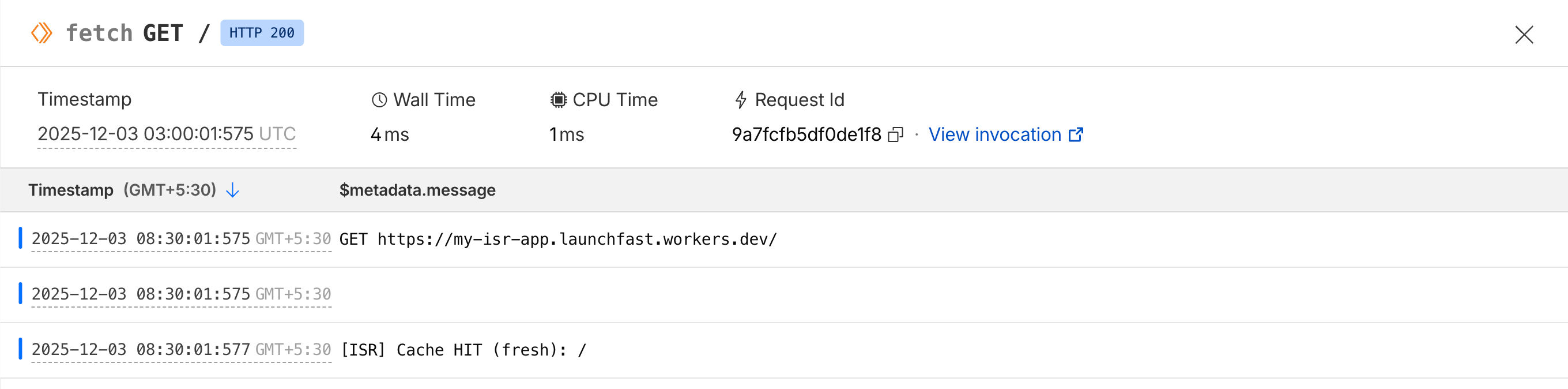
- Cache HIT (fresh): Return cached HTML immediately
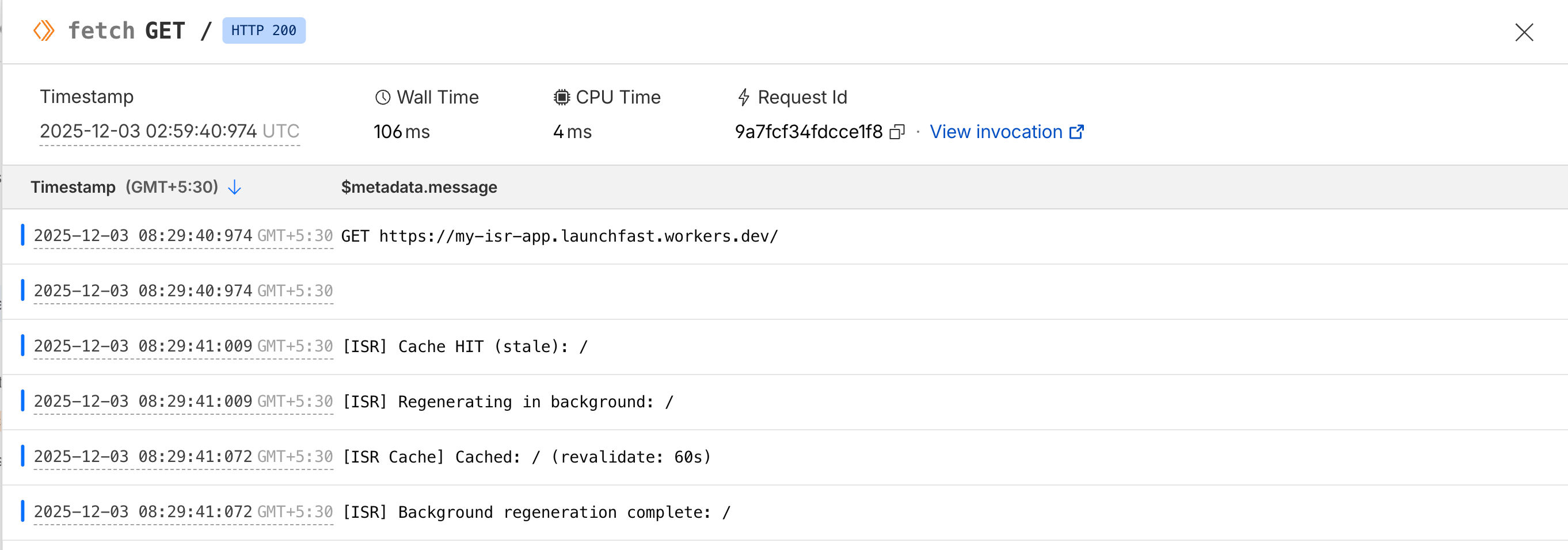
- Cache HIT (stale): Return stale HTML immediately, regenerate in background
- Cache MISS: Generate page, cache it, return HTML
The magic is in the stale-while-revalidate pattern - users always get instant responses, even when cache is being updated.
Serving cache hits
Automatically regenerating cache in the background
Build a revalidation API endpoint
Now let’s create API endpoints for on-demand revalidation. This is useful when you want to invalidate cache immediately (e.g., when content updates in your CMS).
Create a new file src/pages/api/revalidate.ts:
import type { APIRoute } from 'astro'import { createISRCache } from '../../lib/isr-cache'
/** * POST /api/revalidate * * Invalidate cache for specific paths on-demand * * Body: * { *   "secret": "your-secret-key", *   "paths": ["/", "/blog/post-2"] * } */
export const POST: APIRoute = async ({ request, locals }) => {    try {        // Parse request body        const body = await request.json()        const { secret, paths } = body
        // Validate secret (you should set this as an environment variable)        const REVALIDATION_SECRET = locals.runtime.env.REVALIDATION_SECRET || 'your-secret-key'
        if (secret !== REVALIDATION_SECRET) {            return new Response(                JSON.stringify({                    success: false,                    error: 'Invalid secret',                }),                {                    status: 401,                    headers: { 'Content-Type': 'application/json' },                }            )        }
        // Validate paths        if (!Array.isArray(paths) || paths.length === 0) {            return new Response(                JSON.stringify({                    success: false,                    error: 'Invalid paths array',                }),                {                    status: 400,                    headers: { 'Content-Type': 'application/json' },                }            )        }
        // Create cache instance        const cache = createISRCache(locals)
        // Invalidate all specified paths        const invalidated = await cache.invalidateMany(paths)
        return new Response(            JSON.stringify({                success: true,                invalidated,                paths,                message: `Successfully invalidated ${invalidated} path(s)`,            }),            {                status: 200,                headers: { 'Content-Type': 'application/json' },            }        )    } catch (error) {        console.error('[Revalidate API] Error:', error)
        return new Response(            JSON.stringify({                success: false,                error: error instanceof Error ? error.message : 'Unknown error',            }),            {                status: 500,                headers: { 'Content-Type': 'application/json' },            }        )    }}
Now you can Invalidate cache on-demand with POST /api/revalidate by passing the paths to invalidate.
A sample cURL of the following:
curl -X POST https://my-isr-app.launchfast.workers.dev/api/revalidate \-H "Content-Type: application/json" \-d '{"secret":"your-secret-key","paths":["/"]}'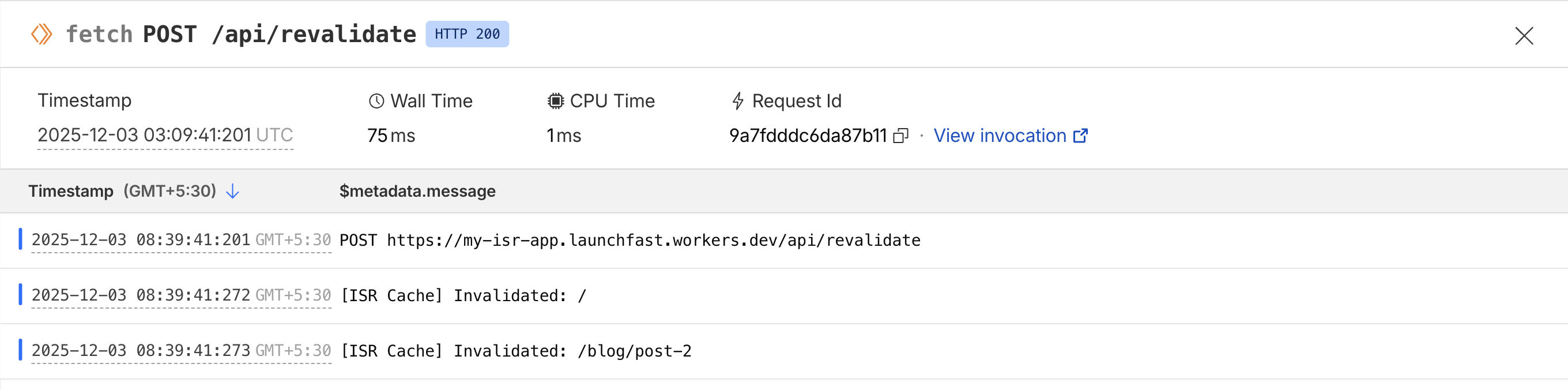
Deploy to Cloudflare Workers
Deploy your application to Cloudflare Workers:
# Build the projectnpm run build
# Deploy to Cloudflare Workersnpx wrangler deploy
After deployment:
- Go to your Cloudflare dashboard
- Navigate to Workers
- Add environment variable:
- Name:
REVALIDATION_SECRET - Value: A secure random string
- Name:
Now your ISR system is live in production!
Comparing with Next.js ISR
Here’s how our Astro ISR implementation compares to Next.js ISR:
| Feature | Next.js ISR | Astro + Cloudflare KV ISR |
|---|---|---|
| Time-based revalidation | ✅ Built-in | ✅ Custom implementation |
| On-demand revalidation | ✅ revalidatePath() |
✅ Custom API endpoint |
| Stale-while-revalidate | ✅ Automatic | ✅ Implemented in middleware |
| Edge caching | ⚠️ Depends on hosting | ✅ Global via Cloudflare |
| Cache persistence | ⚠️ Depends on hosting | ✅ Persistent in KV |
| Setup complexity | ✅ Zero config | ⚠️ Manual setup required |
| Flexibility | ⚠️ Limited | ✅ Full control |
Conclusion
You’ve successfully implemented Incremental Static Regeneration in Astro using Cloudflare KV!
While Astro doesn’t have built-in ISR like Next.js, this custom implementation gives you even more flexibility and control. You can adapt the caching logic to your specific needs, use different storage backends, and optimize for your use case.
If you have any questions or comments, feel free to reach out to me on Twitter.