

“Someone in Germany just purchased Pro 2 hours ago.” That line is everywhere on SaaS landing pages and often it is entirely fabricated. A better approach is to surface real orders from your payment provider. If you sell with Polar, you can read recent orders through the official API, expose a small JSON endpoint from your Astro application, and let the client render a tasteful toast with a Verified label so visitors know the signal comes from your checkout, not a random number generator.
In this guide, you will wire Polar SDK into an Astro server route, deploy it on Vercel, and add a floating notification component that cycles through recent sales. The pattern matches what we use on this site: server-only secrets, edge-friendly caching headers, and a minimal client script.
Table Of Contents
- How the pieces fit together
- Create a Polar access token
- Scaffold Astro with the Vercel adapter
- Implement the API route
- Environment variables locally and on Vercel
- Add the floating recent-sale notification
Prerequisites
You will need:
- Node.js 20 or later
- A Polar account with at least one product and (for meaningful demos) a few test or real orders
- A Vercel account if you want to deploy there
How the pieces fit together
1. Browser   → GET /api/sale (your Astro route)   → Receives JSON: product name, ISO timestamp, optional billing country label
2. Astro API route (Node / Vercel Function)   → Uses POLAR_ACCESS_TOKEN with Polar SDK   → Lists orders (newest first), maps to a small public shape   → Sets Cache-Control for CDN caching
3. Polar API   → Authoritative list of orders and line items
The Verified badge in the UI communicates that the payload was fetched from Polar on the server at request time (or from a cached response that was produced that way). Keep the access token out of client bundles and environment prefixes.
Create a Polar access token
- Open the Polar dashboard and sign in.
- Go to your organization Settings and find Developers (wording may vary slightly).
- Create a token with permission to orders:read.
- Copy the token once and store it securely - you will add it to Vercel and local
.envasPOLAR_ACCESS_TOKEN. (Never commit this value to git!)
Scaffold Astro with the Vercel adapter
Create a new project (or use an existing one with output: 'server'):
npm create astro@latest polar-sale-badgecd polar-sale-badgeAdd the Vercel adapter so API routes run as serverless functions on deploy:
npx astro add vercel --yesEnsure astro.config.mjs uses server output. A minimal config looks like:
import { defineConfig } from 'astro/config'import vercel from '@astrojs/vercel'
export default defineConfig({  output: 'server',  adapter: vercel(),})
Install the Polar SDK:
npm install @polar-sh/sdkImplement the API route
Add src/pages/api/sale.ts. The important details:
export const prerender = falseso Astro does not try to statically bake this URL at build time.- Instantiate
Polarwithimport.meta.env.POLAR_ACCESS_TOKEN. - Call
polar.orders.listwith sorting newest first and a small limit, then map each item to only what the UI needs (product name, createdAt, optional billing country). - Return
Cache-Controlso Vercel’s CDN can cache the JSON for a day while allowing revalidation (max-age=0, s-maxage=86400is a reasonable starting point).
export const prerender = false
import { Polar } from '@polar-sh/sdk'
const countryCodeToName: { [key: string]: string } = {  AF: 'Afghanistan',242 collapsed lines  AL: 'Albania',  DZ: 'Algeria',  AS: 'American Samoa',  AD: 'Andorra',  AO: 'Angola',  AI: 'Anguilla',  AQ: 'Antarctica',  AG: 'Antigua and Barbuda',  AR: 'Argentina',  AM: 'Armenia',  AW: 'Aruba',  AU: 'Australia',  AT: 'Austria',  AZ: 'Azerbaijan',  BS: 'Bahamas',  BH: 'Bahrain',  BD: 'Bangladesh',  BB: 'Barbados',  BY: 'Belarus',  BE: 'Belgium',  BZ: 'Belize',  BJ: 'Benin',  BM: 'Bermuda',  BT: 'Bhutan',  BO: 'Bolivia',  BA: 'Bosnia and Herzegovina',  BW: 'Botswana',  BV: 'Bouvet Island',  BR: 'Brazil',  IO: 'British Indian Ocean Territory',  BN: 'Brunei Darussalam',  BG: 'Bulgaria',  BF: 'Burkina Faso',  BI: 'Burundi',  KH: 'Cambodia',  CM: 'Cameroon',  CA: 'Canada',  CV: 'Cape Verde',  KY: 'Cayman Islands',  CF: 'Central African Republic',  TD: 'Chad',  CL: 'Chile',  CN: 'China',  CX: 'Christmas Island',  CC: 'Cocos (Keeling) Islands',  CO: 'Colombia',  KM: 'Comoros',  CG: 'Congo',  CD: 'Congo, Democratic Republic of the',  CK: 'Cook Islands',  CR: 'Costa Rica',  CI: "Côte d'Ivoire",  HR: 'Croatia',  CU: 'Cuba',  CY: 'Cyprus',  CZ: 'Czech Republic',  DK: 'Denmark',  DJ: 'Djibouti',  DM: 'Dominica',  DO: 'Dominican Republic',  EC: 'Ecuador',  EG: 'Egypt',  SV: 'El Salvador',  GQ: 'Equatorial Guinea',  ER: 'Eritrea',  EE: 'Estonia',  ET: 'Ethiopia',  FK: 'Falkland Islands (Malvinas)',  FO: 'Faroe Islands',  FJ: 'Fiji',  FI: 'Finland',  FR: 'France',  GF: 'French Guiana',  PF: 'French Polynesia',  TF: 'French Southern Territories',  GA: 'Gabon',  GM: 'Gambia',  GE: 'Georgia',  DE: 'Germany',  GH: 'Ghana',  GI: 'Gibraltar',  GR: 'Greece',  GL: 'Greenland',  GD: 'Grenada',  GP: 'Guadeloupe',  GU: 'Guam',  GT: 'Guatemala',  GG: 'Guernsey',  GN: 'Guinea',  GW: 'Guinea-Bissau',  GY: 'Guyana',  HT: 'Haiti',  HM: 'Heard Island and McDonald Islands',  VA: 'Holy See (Vatican City State)',  HN: 'Honduras',  HK: 'Hong Kong',  HU: 'Hungary',  IS: 'Iceland',  IN: 'India',  ID: 'Indonesia',  IR: 'Iran, Islamic Republic of',  IQ: 'Iraq',  IE: 'Ireland',  IM: 'Isle of Man',  IL: 'Israel',  IT: 'Italy',  JM: 'Jamaica',  JP: 'Japan',  JE: 'Jersey',  JO: 'Jordan',  KZ: 'Kazakhstan',  KE: 'Kenya',  KI: 'Kiribati',  KP: "Korea, Democratic People's Republic of",  KR: 'Korea, Republic of',  KW: 'Kuwait',  KG: 'Kyrgyzstan',  LA: "Lao People's Democratic Republic",  LV: 'Latvia',  LB: 'Lebanon',  LS: 'Lesotho',  LR: 'Liberia',  LY: 'Libyan Arab Jamahiriya',  LI: 'Liechtenstein',  LT: 'Lithuania',  LU: 'Luxembourg',  MO: 'Macao',  MK: 'Macedonia, The Former Yugoslav Republic of',  MG: 'Madagascar',  MW: 'Malawi',  MY: 'Malaysia',  MV: 'Maldives',  ML: 'Mali',  MT: 'Malta',  MH: 'Marshall Islands',  MQ: 'Martinique',  MR: 'Mauritania',  MU: 'Mauritius',  YT: 'Mayotte',  MX: 'Mexico',  FM: 'Micronesia, Federated States of',  MD: 'Moldova, Republic of',  MC: 'Monaco',  MN: 'Mongolia',  ME: 'Montenegro',  MS: 'Montserrat',  MA: 'Morocco',  MZ: 'Mozambique',  MM: 'Myanmar',  NA: 'Namibia',  NR: 'Nauru',  NP: 'Nepal',  NL: 'Netherlands',  NC: 'New Caledonia',  NZ: 'New Zealand',  NI: 'Nicaragua',  NE: 'Niger',  NG: 'Nigeria',  NU: 'Niue',  NF: 'Norfolk Island',  MP: 'Northern Mariana Islands',  NO: 'Norway',  OM: 'Oman',  PK: 'Pakistan',  PW: 'Palau',  PS: 'Palestinian Territory, Occupied',  PA: 'Panama',  PG: 'Papua New Guinea',  PY: 'Paraguay',  PE: 'Peru',  PH: 'Philippines',  PN: 'Pitcairn',  PL: 'Poland',  PT: 'Portugal',  PR: 'Puerto Rico',  QA: 'Qatar',  RE: 'Réunion',  RO: 'Romania',  RU: 'Russian Federation',  RW: 'Rwanda',  BL: 'Saint Barthélemy',  SH: 'Saint Helena',  KN: 'Saint Kitts and Nevis',  LC: 'Saint Lucia',  MF: 'Saint Martin (French part)',  PM: 'Saint Pierre and Miquelon',  VC: 'Saint Vincent and the Grenadines',  WS: 'Samoa',  SM: 'San Marino',  ST: 'Sao Tome and Principe',  SA: 'Saudi Arabia',  SN: 'Senegal',  RS: 'Serbia',  SC: 'Seychelles',  SL: 'Sierra Leone',  SG: 'Singapore',  SK: 'Slovakia',  SI: 'Slovenia',  SB: 'Solomon Islands',  SO: 'Somalia',  ZA: 'South Africa',  GS: 'South Georgia and the South Sandwich Islands',  ES: 'Spain',  LK: 'Sri Lanka',  SD: 'Sudan',  SR: 'Suriname',  SJ: 'Svalbard and Jan Mayen',  SZ: 'Swaziland',  SE: 'Sweden',  CH: 'Switzerland',  SY: 'Syrian Arab Republic',  TW: 'Taiwan, Province of China',  TJ: 'Tajikistan',  TZ: 'Tanzania, United Republic of',  TH: 'Thailand',  TL: 'Timor-Leste',  TG: 'Togo',  TK: 'Tokelau',  TO: 'Tonga',  TT: 'Trinidad and Tobago',  TN: 'Tunisia',  TR: 'Turkey',  TM: 'Turkmenistan',  TC: 'Turks and Caicos Islands',  TV: 'Tuvalu',  UG: 'Uganda',  UA: 'Ukraine',  AE: 'United Arab Emirates',  GB: 'United Kingdom',  US: 'United States',  UM: 'United States Minor Outlying Islands',  UY: 'Uruguay',  UZ: 'Uzbekistan',  VU: 'Vanuatu',  VE: 'Venezuela',  VN: 'Viet Nam',  VG: 'Virgin Islands, British',  VI: 'Virgin Islands, U.S.',  WF: 'Wallis and Futuna',  EH: 'Western Sahara',  YE: 'Yemen',  ZM: 'Zambia',  ZW: 'Zimbabwe',}
export async function GET() {  const polar = new Polar({    accessToken: import.meta.env.POLAR_ACCESS_TOKEN,  })  let orders: { date: string; billingCountry: string | undefined; name: string }[] = []  const result = await polar.orders.list({    sorting: ['-created_at'],    limit: 10,  })  for await (const page of result) {    orders = page.result.items      .map((item) => ({        name: item.product.name,        date: item.createdAt.toISOString(),        billingCountry: item.billingAddress?.country ? countryCodeToName[item.billingAddress.country] || item.billingAddress.country : undefined,      }))      .filter((order) => order.name.includes('LaunchFast'))      .slice(0, 5)    break  }  return new Response(JSON.stringify(orders), {    headers: {      'Content-Type': 'application/json',      'Cache-Control': 'max-age=0, s-maxage=86400',    },  })}
Filtering by product: In production you may only want certain SKUs (for example names containing your product family). After mapping, .filter((order) => order.name.includes('YourBrand')) keeps the toast relevant.
Country names: Polar returns a country code (like DE, US, etc.) in the billingAddress.country field, not the full country name. To display the proper country name, map this code to a country name using a lookup table, as shown in the example API route above.
Environment variables locally and on Vercel
Create .env (and add .env to .gitignore if it is not already):
POLAR_ACCESS_TOKEN="polar_oat_…"For Vercel:
- Project → Settings → Environment Variables
- Add
POLAR_ACCESS_TOKENfor Production (and Preview if you test PR deployments) - Redeploy so the new value is available
Run locally:
npm run devVisit http://localhost:4321/api/sale and confirm you get a JSON array.
Add the floating recent-sale notification
Create a component such as src/components/SalesPopup.astro with the following code:
---
---
<script>  let popupTimeout  let salesItems: any[] = []  let currentIndex = 0
  function showSalePopup(item) {    // Remove if already exists    const existing = document.getElementById('sale-popup')    if (existing) existing.remove()    const popup = document.createElement('a')    popup.id = 'sale-popup'    popup.href = '/#pricing'    popup.className = `fixed bottom-6 right-6 z-50 bg-white shadow-lg rounded-xl px-6 py-4 flex flex-col items-start min-w-[270px] max-w-xs border border-gray-100 transition-transform duration-500 translate-y-8 opacity-0 pointer-events-none`    popup.innerHTML = `          <div class="text-sm text-gray-700">            Someone in <span class="font-bold text-branding">${item.billingCountry ? item.billingCountry : 'Unknown'}</span> purchased <span class="font-bold text-branding">${item.name}</span>          </div>          <div class="mt-1 text-xs text-gray-500 flex items-center gap-2">            <span>${timeAgo(item.date)}</span>            <span>| <svg class="inline-block size-3 text-branding" xmlns="http://www.w3.org/2000/svg" viewBox="0 0 512 512"><path fill="currentColor" d="M269.4 2.9C265.2 1 260.7 0 256 0s-9.2 1-13.4 2.9L54.3 82.8c-22 9.3-38.4 31-38.3 57.2c.5 99.2 41.3 280.7 213.6 363.2c16.7 8 36.1 8 52.8 0C454.7 420.7 495.5 239.2 496 140c.1-26.2-16.3-47.9-38.3-57.2L269.4 2.9zM369 209L241 337c-9.4 9.4-24.6 9.4-33.9 0l-64-64c-9.4-9.4-9.4-24.6 0-33.9s24.6-9.4 33.9 0l47 47L335 175c9.4-9.4 24.6-9.4 33.9 0s9.4 24.6 0 33.9z"></path></svg> <span class="text-branding font-semibold">Verified</span></span>          </div>        `    document.body.appendChild(popup)    // Animate in    setTimeout(() => {      popup.classList.remove('translate-y-8', 'opacity-0', 'pointer-events-none')      popup.classList.add('translate-y-0', 'opacity-100', 'pointer-events-auto')    }, 10)    // Remove after 3s    clearTimeout(popupTimeout)    popupTimeout = setTimeout(() => {      popup.classList.remove('translate-y-0', 'opacity-100', 'pointer-events-auto')      popup.classList.add('translate-y-8', 'opacity-0', 'pointer-events-none')      setTimeout(() => popup.remove(), 500)    }, 3000)  }
  function timeAgo(dateStr) {    const now = new Date()    const date = new Date(dateStr)    const diff = Math.floor((now.getTime() - date.getTime()) / 1000)    if (diff < 60) return `${diff} seconds ago`    if (diff < 3600) return `${Math.floor(diff / 60)} ${Math.floor(diff / 60) === 1 ? 'minute' : 'minutes'} ago`    if (diff < 86400) return `${Math.floor(diff / 3600)} ${Math.floor(diff / 3600) === 1 ? 'hour' : 'hours'} ago`    return `${Math.floor(diff / 86400)} ${Math.floor(diff / 86400) === 1 ? 'day' : 'days'} ago`  }
  function fetchAndShow() {    if (Array.isArray(salesItems) && salesItems.length > 0) {      // Sequential, not random      const item = salesItems[currentIndex]      if (item && item.billingCountry) showSalePopup(item)      currentIndex = (currentIndex + 1) % salesItems.length    }  }
  fetch('/api/sale')    .then((res) => res.json())    .then((res) => {      salesItems = Array.isArray(res) ? res : []      currentIndex = 0      fetchAndShow()      setInterval(fetchAndShow, 10000)    })</script>
The code above does the following:
fetch('/api/sale')after page load.- Stores the array in memory and rotates entries on an interval (for example every 10 seconds).
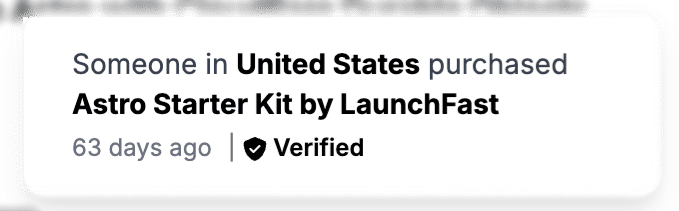
- Renders a small fixed card (bottom-right is common) with:
- Country (or “Unknown” if you prefer not to show coarse location)
- Product name
- Relative time (“3 minutes ago”) from the ISO
date - A Verified row with a shield-style icon to reinforce that data is backed by Polar
Keep the script lean: plain DOM APIs or a tiny helper for timeAgo are enough. Link the card to your pricing section so the nudge has a clear call to action.
If you want to match stricter privacy expectations, only show region or omit geography entirely and display product + time only.
Output
Conclusion
You now have a Polar-backed sales feed: the Astro API route owns the secret, Vercel serves it as a serverless function with CDN caching, and the browser only sees anonymized fields you choose to expose. Swap the styling to match your brand, tune intervals and filters, and you get credible social proof without maintaining a separate analytics pipeline for “fake” notifications.