


Una de las funciones más potentes de Next.js es Incremental Static Regeneration (ISR), que le permite actualizar páginas estáticas después del despliegue sin reconstruir todo el sitio. Aunque Astro no incluye soporte nativo para ISR, puede implementar un patrón similar usando renderizado del lado del servidor con Cloudflare KV como capa de caché distribuida.
En esta guía completa, aprenderá a construir un sistema similar a ISR en Astro que le ofrece lo mejor de ambos mundos: el rendimiento de la generación estática con la flexibilidad de las actualizaciones dinámicas. Cubriremos la revalidación basada en tiempo, la revalidación bajo demanda mediante webhooks y estrategias de invalidación de caché.
Requisitos previos
Necesitará lo siguiente:
- Node.js 20 o posterior
- Una cuenta de Cloudflare
Entender ISR y por qué importa
La generación estática tradicional (SSG) tiene una limitación importante: cada vez que actualiza contenido, debe reconstruir y volver a desplegar todo el sitio. En sitios con miles de páginas, esto puede tardar minutos o incluso horas.
Incremental Static Regeneration resuelve esto con un enfoque híbrido:
- Servir contenido obsoleto de inmediato: cuando un usuario solicita una página, sirva la versión en caché al instante
- Revalidar en segundo plano: si la caché está obsoleta (según un umbral de tiempo), dispare una regeneración en segundo plano
- Actualizar la caché: una vez completada la regeneración, actualice la caché para futuras solicitudes
Esto le proporciona:
- ⚡ Tiempos de respuesta ultrarrápidos (sirviendo desde caché)
- 🔄 Contenido siempre actualizado (revalidación automática)
- 📉 Tiempos de compilación reducidos (sin necesidad de reconstruir todo)
- 💰 Costos más bajos (menos tiempo de cómputo en builds)
Cómo implementaremos ISR en Astro
Nuestra implementación usará:
- Astro con SSR: renderizado del lado del servidor para generación dinámica de páginas
- Cloudflare KV: almacén clave-valor distribuido para cachear HTML renderizado
- Middleware: lógica personalizada para comprobar la validez de la caché y gestionar la revalidación
- Webhooks: endpoints de API para invalidación de caché bajo demanda
El flujo será el siguiente:
User Request → Middleware → Check KV Cache ↓ Cache exists & fresh? ↓ Yes ─────────────→ Return cached HTML ↓ No Generate page → Store in KV → Return HTMLCrear una nueva aplicación Astro
Comencemos creando un nuevo proyecto Astro. Ejecute el siguiente comando:
npm create astro@latest my-isr-appCuando se le solicite, elija:
Use minimal (empty) templatecuando se le pregunte cómo iniciar el nuevo proyecto.Yescuando se le pregunte si desea instalar dependencias.Yescuando se le pregunte si desea inicializar un repositorio git.
Una vez hecho esto, puede moverse al directorio del proyecto e iniciar la aplicación:
cd my-isr-appnpm install wranglernpm run devLa aplicación debería estar ejecutándose en localhost:4321.
Integrar el adaptador de Cloudflare en su proyecto Astro
Para desplegar su proyecto Astro en Cloudflare Workers y usar Cloudflare KV, necesita instalar el adaptador de Cloudflare. Ejecute el comando siguiente:
npx astro add cloudflare --yesActualice astro.config.mjs para que output sea server:
import { defineConfig } from 'astro/config';import cloudflare from '@astrojs/cloudflare';
export default defineConfig({  output: 'server',  adapter: cloudflare()});
Configurar Cloudflare KV para caché
Cloudflare KV (Key-Value) es un almacén clave-valor distribuido globalmente, ideal para cachear páginas renderizadas en el edge.
Crear un namespace de KV
Primero, cree un namespace de KV para su caché:
# Create a production KV namespacenpx wrangler kv namespace create ISR_CACHECuando se le solicite, elija lo siguiente:
- Would you like Wrangler to add it on your behalf? … yes
- What binding name would you like to use? … ISR_CREATE
- For local dev, do you want to connect to the remote resource instead of a local resource? … yes
Creará automáticamente un archivo wrangler.jsonc.
Configurar tipos de entorno
Cree un archivo nuevo src/env.d.ts (o actualice el existente) para añadir definiciones de TypeScript para el binding de KV:
/// <reference types="astro/client" />
type KVNamespace = import('@cloudflare/workers-types').KVNamespacetype ENV = {  ISR_CACHE: KVNamespace}
type Runtime = import('@astrojs/cloudflare').Runtime<ENV>
declare namespace App {  interface Locals extends Runtime {    // Add custom locals here  }}
Esto garantiza que TypeScript conozca su namespace de KV y proporcione autocompletado adecuado.
Crear la utilidad de caché ISR
Ahora creemos una utilidad reutilizable para gestionar la caché ISR. Cree un archivo nuevo src/lib/isr-cache.ts:
export interface ISRCacheOptions {  /**   * Time in seconds before cache is considered stale   * @default 60   */  revalidate?: number
  /**   * Custom cache key prefix   * @default 'isr'   */  prefix?: string
  /**   * Whether to enable cache   * @default true   */  enabled?: boolean}
export interface CachedData {  /** The cached HTML content */  html: string
  /** Timestamp when the cache was created */  timestamp: number
  /** Revalidation time in seconds */  revalidate: number
  /** URL that was cached */  url: string}
export class ISRCache {  private kv: KVNamespace  private options: Required<ISRCacheOptions>
  constructor(kv: KVNamespace, options: ISRCacheOptions = {}) {    this.kv = kv    this.options = {      revalidate: options.revalidate ?? 60,      prefix: options.prefix ?? 'isr',      enabled: options.enabled ?? true,    }  }
  /**   * Generate a cache key for a given URL   */  private getCacheKey(url: string): string {    // Remove query params and hash for consistent caching    const cleanUrl = url.split('?')[0].split('#')[0]    return `${this.options.prefix}:${cleanUrl}`  }
  /**   * Get cached data if it exists   */  async get(url: string): Promise<CachedData | null> {    if (!this.options.enabled) return null
    try {      const key = this.getCacheKey(url)      const cached = await this.kv.get(key, 'json') as CachedData | null
      return cached    } catch (error) {      console.error('[ISR Cache] Error getting cache:', error)      return null    }  }
  /**   * Check if cached data is still fresh   */  isFresh(cachedData: CachedData): boolean {    const now = Date.now()    const age = (now - cachedData.timestamp) / 1000 // Convert to seconds    return age < cachedData.revalidate  }
  /**   * Store HTML in cache   */  async set(url: string, html: string, revalidate?: number): Promise<void> {    if (!this.options.enabled) return
    try {      const key = this.getCacheKey(url)      const data: CachedData = {        html,        timestamp: Date.now(),        revalidate: revalidate ?? this.options.revalidate,        url,      }
      // Store in KV with metadata      await this.kv.put(key, JSON.stringify(data), {        // Optional: Set expiration time to automatically clean up old cache        // expirationTtl: (revalidate ?? this.options.revalidate) * 2,        metadata: {          url,          cachedAt: new Date().toISOString(),        },      })
      console.log(`[ISR Cache] Cached: ${url} (revalidate: ${data.revalidate}s)`)    } catch (error) {      console.error('[ISR Cache] Error setting cache:', error)    }  }
  /**   * Invalidate (delete) cache for a specific URL   */  async invalidate(url: string): Promise<boolean> {    try {      const key = this.getCacheKey(url)      await this.kv.delete(key)      console.log(`[ISR Cache] Invalidated: ${url}`)      return true    } catch (error) {      console.error('[ISR Cache] Error invalidating cache:', error)      return false    }  }
  /**   * Invalidate multiple URLs at once   */  async invalidateMany(urls: string[]): Promise<number> {    let invalidated = 0
    await Promise.all(      urls.map(async (url) => {        const success = await this.invalidate(url)        if (success) invalidated++      })    )
    return invalidated  }
  /**   * List all cached URLs with a given prefix   */  async list(prefix?: string): Promise<string[]> {    try {      const listPrefix = prefix ? `${this.options.prefix}:${prefix}` : `${this.options.prefix}:`      const list = await this.kv.list({ prefix: listPrefix })
      return list.keys.map((key) => key.name.replace(`${this.options.prefix}:`, ''))    } catch (error) {      console.error('[ISR Cache] Error listing cache:', error)      return []    }  }
  /**   * Get cache statistics   */  async getStats(): Promise<{    totalKeys: number    keys: string[]  }> {    const keys = await this.list()    return {      totalKeys: keys.length,      keys,    }  }}
/** * Helper function to create an ISR cache instance */export function createISRCache(locals: App.Locals, options?: ISRCacheOptions): ISRCache {  const kv = locals.runtime.env.ISR_CREATE  if (!kv) {    throw new Error('ISR_CREATE KV namespace not found. Make sure it is configured in wrangler.toml')  }  return new ISRCache(kv, options)}
Esta utilidad proporciona una API clara para:
- Obtener páginas en caché:
cache.get(url) - Comprobar frescura:
cache.isFresh(data) - Guardar en caché:
cache.set(url, html, revalidate) - Invalidar caché:
cache.invalidate(url)ocache.invalidateMany(urls) - Listar páginas en caché:
cache.list()
Implementar revalidación basada en tiempo
Ahora creemos middleware que implemente el patrón ISR. Cree un archivo nuevo src/middleware.ts:
import { defineMiddleware } from 'astro:middleware'import { createISRCache } from './lib/isr-cache'
const revalidate = 2
export const onRequest = defineMiddleware(async (context, next) => {    const { request, locals, url } = context
    // Only apply ISR to GET requests for HTML pages    if (request.method !== 'GET') {        return next()    }
    // Skip ISR for API routes and static assets    if (url.pathname.startsWith('/api/') || url.pathname.match(/\.(js|css|png|jpg|svg|ico|woff|woff2)$/)) {        return next()    }
    // Skip ISR if KV is not available (local development)    if (!locals.runtime?.env?.ISR_CREATE) {        console.log('[ISR] KV not available, skipping cache')        return next()    }
    try {        // Create ISR cache instance with 60 second default revalidation        const cache = createISRCache(locals, {            revalidate,            enabled: true,        })
        // Try to get cached version        const cached = await cache.get(url.pathname)
        if (cached) {            // Check if cache is still fresh            if (cache.isFresh(cached)) {                console.log(`[ISR] Cache HIT (fresh): ${url.pathname}`)
                // Return cached HTML with cache headers                return new Response(cached.html, {                    status: 200,                    headers: {                        'Content-Type': 'text/html; charset=utf-8',                        'Cache-Control': 'public, s-maxage=31536000, stale-while-revalidate',                        'X-Cache-Status': 'HIT',                        'X-Cache-Age': String(Math.floor((Date.now() - cached.timestamp) / 1000)),                    },                })            } else {                console.log(`[ISR] Cache HIT (stale): ${url.pathname}`)
                // Cache is stale, but serve it anyway while we regenerate                // This is the "stale-while-revalidate" pattern
                // Return stale content immediately                const response = new Response(cached.html, {                    status: 200,                    headers: {                        'Content-Type': 'text/html; charset=utf-8',                        'Cache-Control': 'public, s-maxage=31536000, stale-while-revalidate',                        'X-Cache-Status': 'STALE',                        'X-Cache-Age': String(Math.floor((Date.now() - cached.timestamp) / 1000)),                    },                })
                // Trigger background regeneration (non-blocking)                context.locals.runtime.ctx.waitUntil(                    (async () => {                        try {                            console.log(`[ISR] Regenerating in background: ${url.pathname}`)
                            // Generate fresh page                            const freshResponse = await next()                            const freshHtml = await freshResponse.text()
                            // Update cache                            await cache.set(url.pathname, freshHtml, 60)
                            console.log(`[ISR] Background regeneration complete: ${url.pathname}`)                        } catch (error) {                            console.error(`[ISR] Background regeneration failed: ${url.pathname}`, error)                        }                    })()                )
                return response            }        } else {            console.log(`[ISR] Cache MISS: ${url.pathname}`)
            // No cache exists, generate page            const response = await next()
            // Only cache successful HTML responses            if (response.status === 200 && response.headers.get('content-type')?.includes('text/html')) {                const html = await response.text()
                // Store in cache (non-blocking)                context.locals.runtime.ctx.waitUntil(cache.set(url.pathname, html, 60))
                // Return response with cache miss header                return new Response(html, {                    status: response.status,                    headers: {                        ...Object.fromEntries(response.headers),                        'X-Cache-Status': 'MISS',                    },                })            }
            return response        }    } catch (error) {        console.error('[ISR] Error in middleware:', error)        // On error, fall back to normal SSR        return next()    }})
Este middleware implementa el patrón ISR completo:
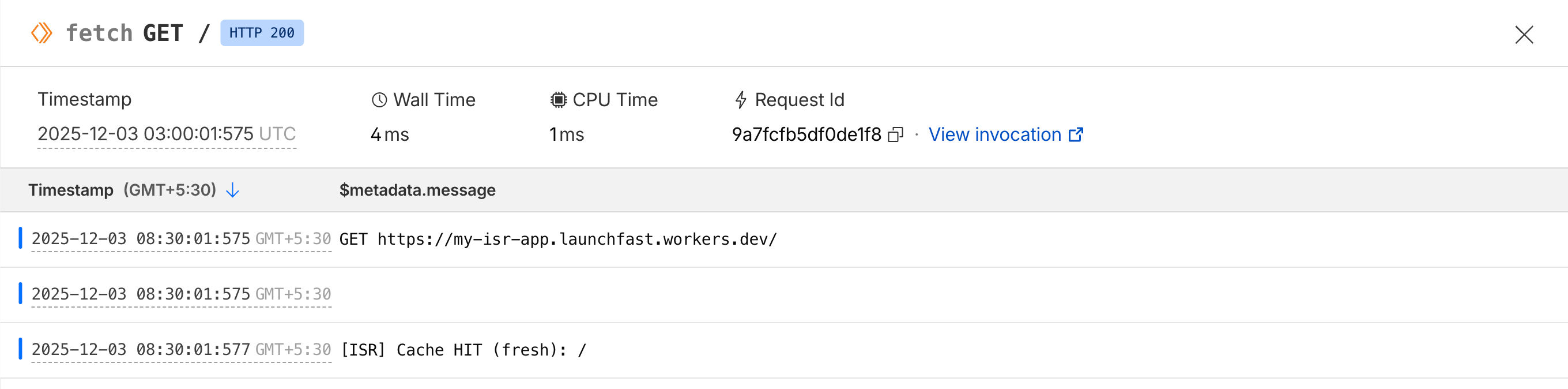
- Cache HIT (fresh): devuelve el HTML en caché de inmediato
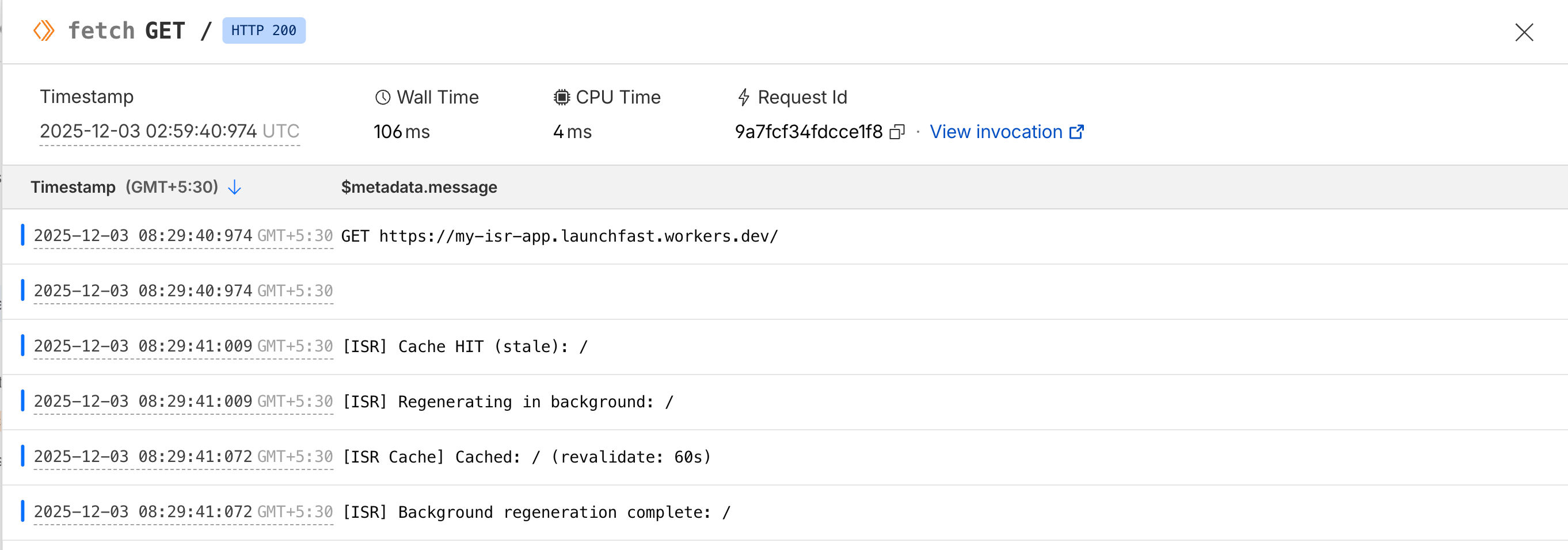
- Cache HIT (stale): devuelve el HTML obsoleto de inmediato y regenera en segundo plano
- Cache MISS: genera la página, la guarda en caché y devuelve el HTML
La clave está en el patrón stale-while-revalidate: los usuarios siempre reciben respuestas instantáneas, incluso mientras se actualiza la caché.
Sirviendo aciertos de caché
Regenerando la caché automáticamente en segundo plano
Construir un endpoint de API de revalidación
Ahora creemos endpoints de API para revalidación bajo demanda. Esto es útil cuando desea invalidar la caché de inmediato (por ejemplo, cuando se actualiza contenido en su CMS).
Cree un archivo nuevo src/pages/api/revalidate.ts:
import type { APIRoute } from 'astro'import { createISRCache } from '../../lib/isr-cache'
/** * POST /api/revalidate * * Invalidate cache for specific paths on-demand * * Body: * { *   "secret": "your-secret-key", *   "paths": ["/", "/blog/post-2"] * } */
export const POST: APIRoute = async ({ request, locals }) => {    try {        // Parse request body        const body = await request.json()        const { secret, paths } = body
        // Validate secret (you should set this as an environment variable)        const REVALIDATION_SECRET = locals.runtime.env.REVALIDATION_SECRET || 'your-secret-key'
        if (secret !== REVALIDATION_SECRET) {            return new Response(                JSON.stringify({                    success: false,                    error: 'Invalid secret',                }),                {                    status: 401,                    headers: { 'Content-Type': 'application/json' },                }            )        }
        // Validate paths        if (!Array.isArray(paths) || paths.length === 0) {            return new Response(                JSON.stringify({                    success: false,                    error: 'Invalid paths array',                }),                {                    status: 400,                    headers: { 'Content-Type': 'application/json' },                }            )        }
        // Create cache instance        const cache = createISRCache(locals)
        // Invalidate all specified paths        const invalidated = await cache.invalidateMany(paths)
        return new Response(            JSON.stringify({                success: true,                invalidated,                paths,                message: `Successfully invalidated ${invalidated} path(s)`,            }),            {                status: 200,                headers: { 'Content-Type': 'application/json' },            }        )    } catch (error) {        console.error('[Revalidate API] Error:', error)
        return new Response(            JSON.stringify({                success: false,                error: error instanceof Error ? error.message : 'Unknown error',            }),            {                status: 500,                headers: { 'Content-Type': 'application/json' },            }        )    }}
Ahora puede invalidar la caché bajo demanda con POST /api/revalidate pasando las rutas a invalidar.
Un ejemplo de cURL:
curl -X POST https://my-isr-app.launchfast.workers.dev/api/revalidate \-H "Content-Type: application/json" \-d '{"secret":"your-secret-key","paths":["/"]}'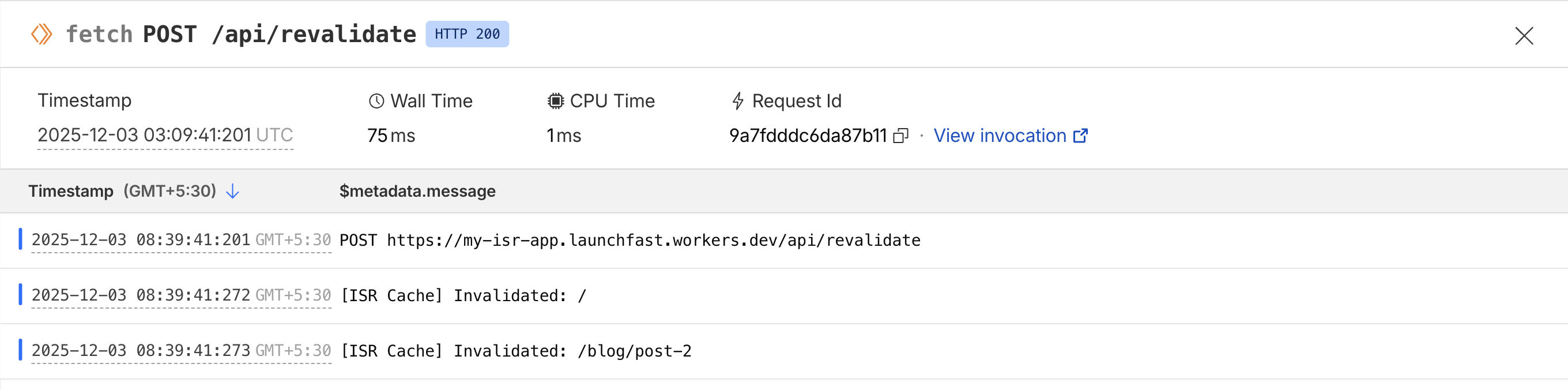
Desplegar en Cloudflare Workers
Despliegue su aplicación en Cloudflare Workers:
# Build the projectnpm run build
# Deploy to Cloudflare Workersnpx wrangler deploy
Después del despliegue:
- Vaya a su panel de Cloudflare
- Navegue a Workers
- Añada la variable de entorno:
- Name:
REVALIDATION_SECRET - Value: Una cadena aleatoria segura
- Name:
¡Su sistema ISR ya está en producción!
Comparación con ISR de Next.js
Así se compara nuestra implementación de ISR en Astro con ISR de Next.js:
| Feature | Next.js ISR | Astro + Cloudflare KV ISR |
|---|---|---|
| Revalidación basada en tiempo | ✅ Integrada | ✅ Implementación personalizada |
| Revalidación bajo demanda | ✅ revalidatePath() |
✅ Endpoint de API personalizado |
| Stale-while-revalidate | ✅ Automático | ✅ Implementado en middleware |
| Caché en el edge | ⚠️ Depende del hosting | ✅ Global vía Cloudflare |
| Persistencia de caché | ⚠️ Depende del hosting | ✅ Persistente en KV |
| Complejidad de configuración | ✅ Sin configuración | ⚠️ Configuración manual requerida |
| Flexibilidad | ⚠️ Limitada | ✅ Control total |
Conclusión
¡Ha implementado con éxito Incremental Static Regeneration en Astro usando Cloudflare KV!
Aunque Astro no incluye ISR integrado como Next.js, esta implementación personalizada le ofrece aún más flexibilidad y control. Puede adaptar la lógica de caché a sus necesidades específicas, usar distintos backends de almacenamiento y optimizar para su caso de uso.
Si tiene preguntas o comentarios, no dude en contactarme en Twitter.